Schlagwort-Archiv: Smart Home

Wellness-Oase-Garten mit HA Integration (Bestway)

Wer einen Garten hat, kennt das Gefühl: Nach einem langen Tag einfach in den Jacuzzi sinken, warmes Wasser, Ruhe – pure Erholung. Doch bis es so weit ist, wartet man entweder ewig auf die richtige Wassertemperatur, oder man verschwendet Energie, weil der Whirlpool stundenlang unnötig heizt.

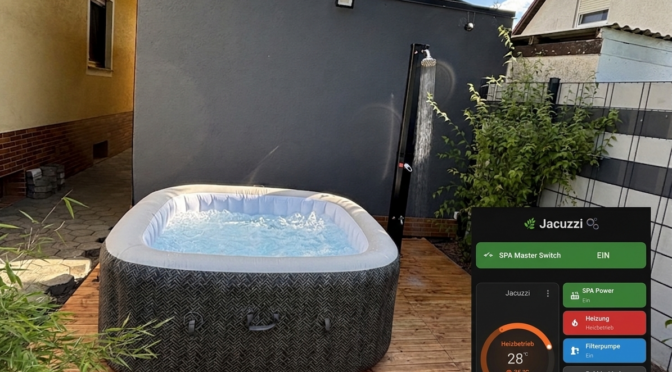
Ich habe das Problem gelöst – mit Home Assistant. In diesem Beitrag zeige ich dir, wie ich meinen Bestway Jacuzzi und meine Gartendusche vollständig automatisiert habe. Der Jacuzzi heizt nur dann, wenn genug Photovoltaik-Überschuss vorhanden ist – also praktisch kostenlos. Die Dusche schaltet sich nach einer konfigurierbaren Zeit automatisch ab. Beides lässt sich bequem per Dashboard steuern und überwachen.

Und wen es interessiert , es gibt noch einen Blogbeitrag, wie das Holzdeck und die Dusche entstanden sind ➡️ Vom alten Pool zum Wellness-Deck
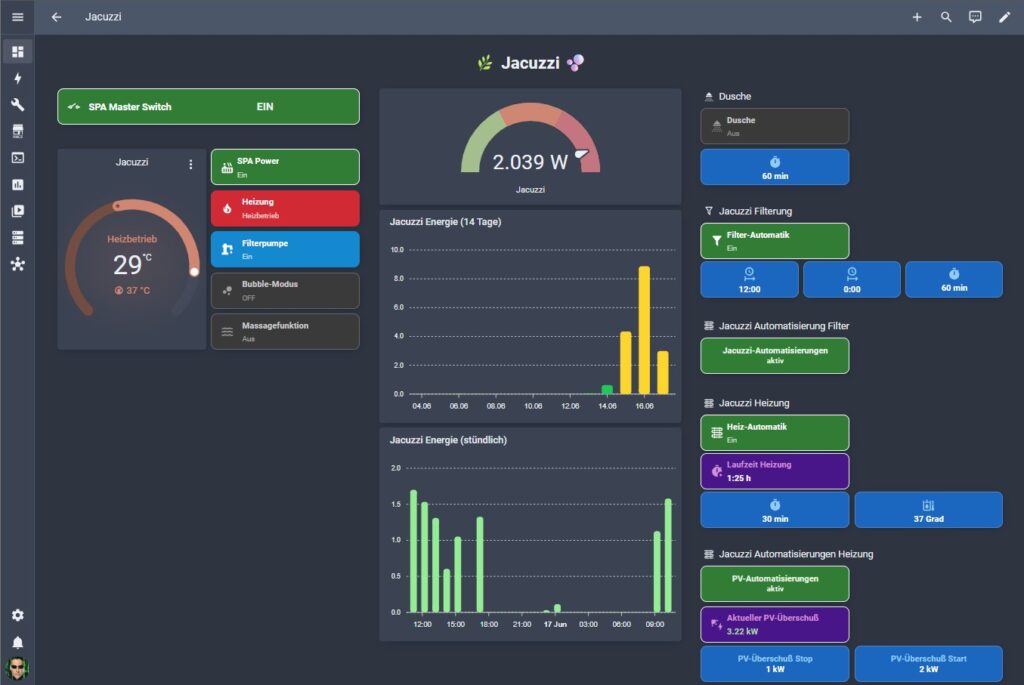

📸 Dashboard der Wellness-Oase im Garten mit Jacuzzi und Dusche

🛁 Teil 1: Der smarte Jacuzzi


🔧 Ausgangsproblem

Der Bestway Lay-Z-Spa bringt von Haus aus keine nennenswerte Automatisierung mit. Man schaltet ihn ein, stellt die Zieltemperatur ein – und wartet. Das Aufheizen dauert je nach Ausgangstemperatur mehrere Stunden und kostet entsprechend Strom.

👉 Meine Probleme waren:

  • Heizen kostet Strom – idealerweise sollte das nur bei PV-Überschuss passieren
  • Wasser muss regelmäßig gefiltert werden – auch wenn die Heizung gerade nicht läuft
  • War der Jacuzzi manuell eingeschaltet, sollte die Automatisierung das nicht ignorieren oder gar den Spa unkontrolliert ausschalten

🔗 Die Bestway-Integration für Home Assistant

Die Grundlage für die gesamte Steuerung ist die Bestway-Integration für Home Assistant, die den Jacuzzi über die Cloud-API von Bestway einbindet. Die Installation erfolgt über HACS.
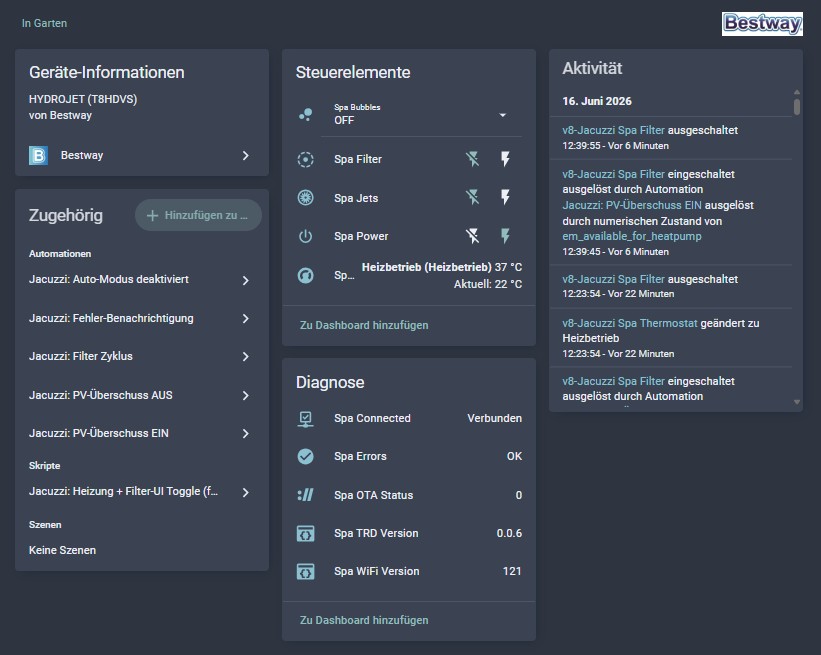
📸 Screenshot der Bestway-Integration

⚠️ Wichtiger Hinweis zum Modell: Mein konkretes Modell, der Bestway LAY-Z-SPA Energiespar-Whirlpool Cabo HydroJet, ist in der offiziellen Liste der unterstützten Geräte nicht aufgeführt. Die Integration funktioniert dennoch – jedoch nicht vollständig.

Das grundsätzliche Problem: Mehrere Entitäten liefern über die API keine zuverlässige Rückmeldung über den tatsächlichen Gerätezustand. Befehle lassen sich senden – ob sie angekommen sind und was das Gerät jetzt wirklich macht, meldet die API aber nicht immer zurück. Besonders deutlich wird das an der Filterpumpe: Hier musste ich sogar auf einen Mechanismus mit drei Ausschaltversuchen zurückgreifen, weil ein einzelner Befehl nicht garantiert zuverlässig ausgeführt wird.

Überall wo die API-Rückmeldung nicht verlässlich ist, habe ich denselben Workaround-Ansatz gewählt: interne Booleans als Zustandsspeicher, die von den Automationen selbst gesetzt werden – unabhängig davon was die API zurückmeldet. Das bekannteste Beispiel ist der Template-Switch switch.v8_jacuzzi_spa_filter_ui in Kombination mit input_boolean.v8_jacuzzi_filter_state: Der Boolean ist die verlässliche Zustandsquelle für das Dashboard, nicht die API-Entität direkt.

Wer denselben oder einen ähnlichen Bestway-Jacuzzi besitzt und mit ähnlichen API-Problemen kämpft: Dieser Ansatz – eigene Zustandsspeicher statt API-Feedback – hat sich bei mir bewährt. Schreib gerne in die Kommentare welches Modell du hast und welche Erfahrungen du gemacht hast.


🎯 Ziele meiner Automatisierung

  • ☀️ Jacuzzi heizt nur bei ausreichendem PV-Überschuss (≥ 2 kW für 2 Minuten)
  • ⏹️ Automatisches Abschalten wenn Überschuss zu gering (< 1 kW für 3 Minuten)
  • ⏱️ Mindestlaufzeit von 30 Minuten schützt vor ständigem Ein-/Ausschalten
  • 💧 Regelmäßige Filterzyklen – unabhängig davon ob die Heizung läuft
  • 🧠 War der Spa manuell eingeschaltet: Automatisierung greift nur in Heizung und Filter ein – Spa bleibt an
  • 📧 E-Mail-Benachrichtigungen bei jedem automatischen Start, Stopp und bei Fehlern
  • 📊 Übersichtliches Dashboard zur Steuerung und Statusanzeige
  • 🌡️ Zieltemperatur erreicht → alles automatisch ausschalten, Neustart erst wenn das Wasser 2 °C abgekühlt ist und PV-Überschuss wieder ausreicht
  • 💧 Regelmäßige Filterzyklen – unabhängig davon ob die Heizung läuft

  • 🔌 Voraussetzungen – benötigte Entitäten

    Diese Entitäten werden durch die Bestway-Integration in Home Assistant bereitgestellt und müssen bereits existieren:

    • switch.v8_jacuzzi_spa_power – Hauptschalter des Spas
    • switch.v8_jacuzzi_spa_filter – Filterpumpe
    • climate.v8_jacuzzi_spa_thermostat – Heizungssteuerung
    • binary_sensor.v8_jacuzzi_spa_connected – Verbindungsstatus
    • binary_sensor.v8_jacuzzi_spa_errors – Fehlererkennung
    • sensor.em_available_for_heatpump – PV-Überschuss aus dem Energy Manager (mehr dazu weiter unten)

    ⚡ Zusammenspiel mit dem Energy Manager

    Das Herzstück der PV-Steuerung ist der Sensor sensor.em_available_for_heatpump aus meinem Energy Manager Package. Dieser Sensor berechnet in Echtzeit, wie viel Solarstrom tatsächlich für weitere Verbraucher verfügbar ist:

    Verfügbar = PV-Leistung (geglättet) - Haushaltslast (geglättet) - Powerwall-Ladung

    Der entscheidende Vorteil: Läuft meine Wärmepumpe gerade, ist ihr Verbrauch bereits in der Haushaltslast enthalten. Der Sensor sinkt automatisch. Der Jacuzzi startet dann nur noch bei echtem Zusatzüberschuss – kein separater Konfliktschutz zwischen Wärmepumpe und Jacuzzi nötig.


    🧩 Helper – automatisch durch das Package erstellt

    Das Package erstellt beim Start alle benötigten Helfer automatisch. Kein manuelles Anlegen notwendig.

    🔘 Steuer-Flags

    • input_boolean.jacuzzi_pv_auto – PV-Heizautomatik ein/aus (Standard: an). Perfekt für den Urlaubsfall.
    • input_boolean.jacuzzi_filter_auto – Filter-Automatik ein/aus (Standard: an). Unabhängig von der Heizautomatik.
    • input_boolean.jacuzzi_spa_started_by_pv – Merkt sich ob der Spa durch die PV-Automatik eingeschaltet wurde. Verhindert, dass ein manuell eingeschalteter Spa automatisch wieder ausgeschaltet wird.
    • input_boolean.jacuzzi_temp_reached – Merkt sich ob der letzte Stopp durch das Erreichen der Zieltemperatur ausgelöst wurde. Verhindert, dass der Spa sofor t neu startet, bevor das Wasser 2 °C abgekühlt ist.

    ⚙️ Schwellenwerte & Konfiguration

    • input_number.jacuzzi_pv_start – PV-Überschuss zum Einschalten (Standard: 2,0 kW)
    • input_number.jacuzzi_pv_stop – PV-Überschuss zum Abschalten (Standard: 1,0 kW)
    • input_number.jacuzzi_target_temp – Zieltemperatur (Standard: 37 °C)
    • input_number.jacuzzi_min_runtime – Mindestlaufzeit vor automatischem Stopp (Standard: 30 Min)
    • input_number.jacuzzi_filter_duration – Dauer eines Filterzyklus (Standard: 60 Min)

    🕐 Filterzeiten

    • input_datetime.jacuzzi_filter_time_1 – Erste tägliche Filterzeit (z. B. 08:00 Uhr)
    • input_datetime.jacuzzi_filter_time_2 – Zweite tägliche Filterzeit (z. B. 20:00 Uhr)

    💡 Tipp: Die Heizphasen tagsüber liefern automatisch zusätzliche Filterzeit – die zwei konfigurierten Zyklen dienen als Mindestabsicherung für Tage ohne PV-Überschuss.


    🤖 Die 8 Automationen im Überblick

    1️⃣ PV-Überschuss EIN

    Sobald der verfügbare PV-Überschuss die Start-Schwelle (Standard: 2 kW) für mindestens 2 Minuten überschreitet, startet der Jacuzzi automatisch. Der Debounce von 2 Minuten verhindert, dass kurze Schwankungen im Energieangebot den Spa ständig ein- und ausschalten.

    👉 Besonderheit: War der Spa bereits manuell eingeschaltet, schaltet die Automatisierung ihn nicht nochmal ein – sie setzt nur Heiztemperatur und Filter. Der jacuzzi_spa_started_by_pv-Boolean merkt sich dabei, ob die Automatisierung den Spa selbst gestartet hat.

    2️⃣ PV-Überschuss AUS

    Fällt der Überschuss für 3 Minuten unter die Stop-Schwelle (Standard: 1 kW), schaltet die Automatisierung Heizung und Filter ab. Zusätzlich greift eine Mindestlaufzeit: Der Spa läuft immer mindestens 30 Minuten, bevor er automatisch gestoppt werden kann.

    👉 War der Spa vor dem PV-Start bereits manuell eingeschaltet, wird er nicht ausgeschaltet – nur Heizung und Filter stoppen.

    3️⃣ Filter-Zyklus

    Täglich zu den zwei konfigurierten Zeiten startet automatisch ein Filterzyklus – unabhängig davon ob die Heizung gerade läuft. Die Automation ist dabei smart:

    • Spa war aus → Spa kurz einschalten, Filter starten, nach Ablauf der Filterdauer: Filter stoppen, Spa wieder ausschalten (außer die Heizung ist inzwischen aktiv)
    • Spa war bereits an → nur Filter starten und nach Ablauf stoppen
    • Filter läuft bereits (z. B. wegen Heizung) → Zyklus wird übersprungen

    4️⃣ Auto-Modus deaktiviert

    Schaltet man jacuzzi_pv_auto manuell aus während der Spa läuft, stoppt diese Automation sauber Heizung und Filter. Den Spa selbst schaltet sie nur aus wenn er ursprünglich durch die PV-Automatik gestartet wurde – war er manuell eingeschaltet, bleibt er an.

    5️⃣ Fehler-Benachrichtigung

    Meldet der Spa einen Fehler (z. B. den gefürchteten E02 bei verstopfter Filterkartusche), kommt sofort eine E-Mail-Benachrichtigung und ein Eintrag im System-Log.

    💡 Tipp zur Filterpflege: Die Filterkartusche sollte spätestens alle 2–3 Tage gereinigt werden, sonst kommt es schnell zu Fehlern durch schlechten Durchfluss.

    6️⃣ Zieltemperatur sofort übernehmen

    Ändert man die Zieltemperatur im Dashboard während der Spa bereits läuft, soll die neue Temperatur sofort an den Thermostat weitergegeben werden – ohne auf den nächsten automatischen Start warten zu müssen.

    Diese Automation überwacht input_number.jacuzzi_target_temp auf Änderungen. Ist der Spa zu diesem Zeitpunkt eingeschaltet, wird die neue Temperatur unmittelbar per climate.set_temperature gesetzt. Ist der Spa aus, passiert nichts – beim nächsten Einschalten greift dann wie gewohnt die PV-EIN-Automation.

    7️⃣ Zieltemperatur erreicht – alles ausschalten

    Damit der Jacuzzi nicht eingeschaltet bleibt, wenn die Zieltemperatur erreicht ist und unnötiger Stromverbrauch verbraucht wird, gibt es diese zusätzliche Automatisierung.

    Diese neue Automation löst das Problem mit einer Hysterese-Regelung: Sobald climate.v8_jacuzzi_spa_thermostat in den Zustand idle wechselt (= Zieltemperatur ist erreicht), schaltet die Automation alles ab: Heizung off, Filter 3× off, Spa Power off. Gleichzeitig wird der interne Merker jacuzzi_temp _reached gesetzt.

    👉 Die Automation greift nur wenn jacuzzi_pv_auto aktiv ist – bei manuellem Betrieb bleibt das normale Thermostat-Verhalten (heat → idle → heat) erhalten.

    8️⃣ Temperatur gesunken – automatischer Neustart

    Das Gegenstück zu Automation 7: Sobald die Wassertemperatur um 2 °C unter die Zieltemperatur gefallen ist – und das für mindestens 1 Minute stabil bleibt – startet der Jacuzzi automatisch neu, sofern alle Bedingungen erfüllt sind:

    • PV-Auto ist aktiv
    • Der Merker jacuzzi_temp_reached ist gesetzt (kein versehentlicher Neustart aus anderen Szenarien)
    • Spa ist verbunden und fehlerfrei
    • PV-Überschuss ist wieder ausreichend (≥ Start-Schwelle)

    💡 Wichtig: Reicht der PV-Überschuss beim 2-°C-Abfall noch nicht aus, bleibt der Spa aus und wartet. Sobald der Überschuss wieder steigt und die Temperatur noch 2 °C unter Ziel liegt, springt entweder diese Automation an – oder die normale PV-EIN-Automation übernimmt. Ein Doppelstart wird durch den jacuzzi_temp_reached-Merker sicher verhindert.


    🖥️ Das Jacuzzi-Dashboard

    Das Jacuzzi-Dashboard ist ein extra Dashboard aufgebaut und nutzt das Theme Nordic. Es ist über eine klickbaren Heading direkt aus meinem Hauptdashboard ereichbar. Alle Buttons basieren auf custom:button-card.
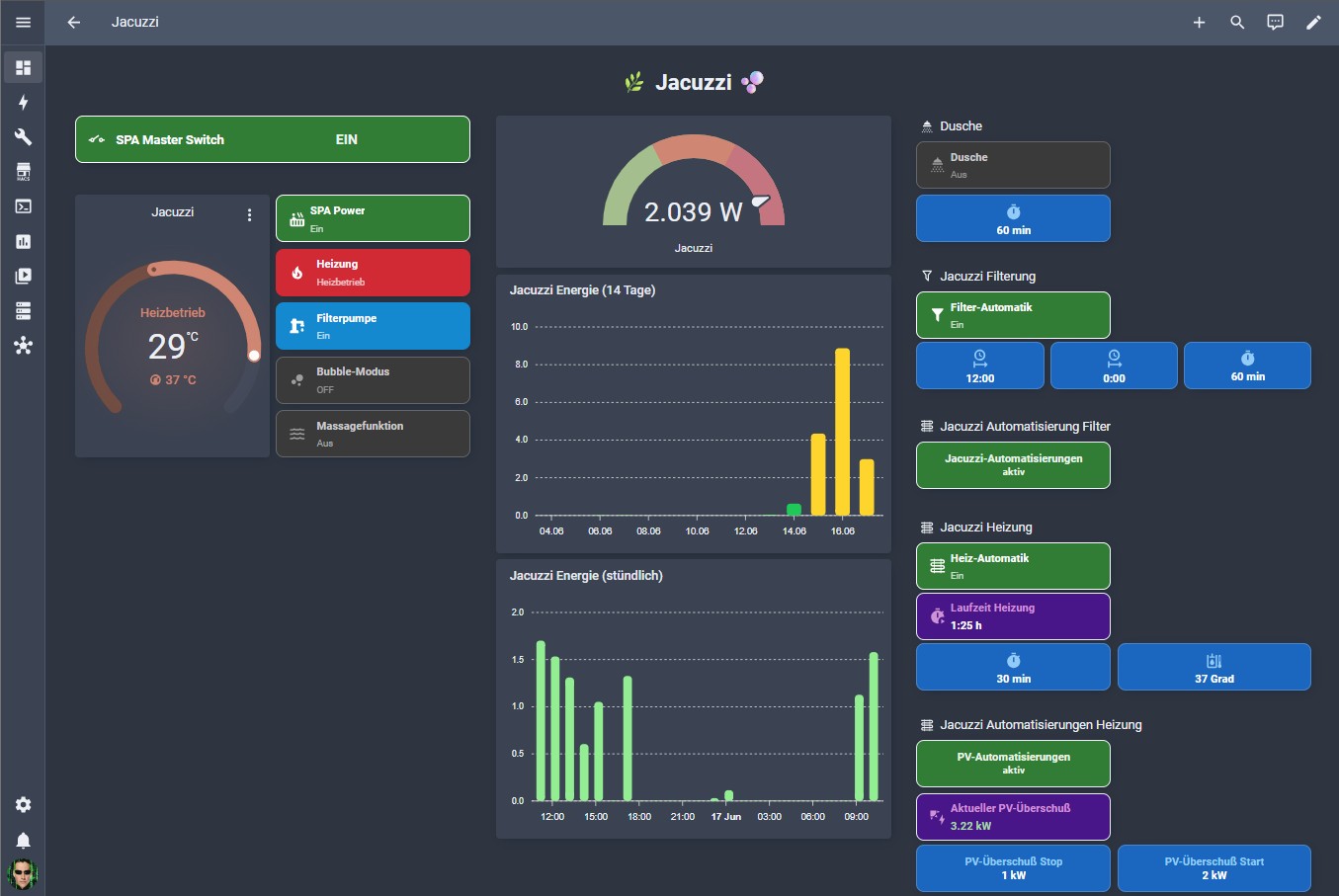
    📸 Screenshot des Jacuzzi-Dashboard

    Steuer-Buttons

    Die Steuer-Buttons sind in einem 2-Spalten-Grid angeordnet. Jeder Button zeigt Icon, Name und Zustand in einer kompakten 60px-Karte:

    • Jacuzzi Power – grün wenn an, dunkel wenn aus. Tippen schaltet den Spa direkt um.
    • Heizung – rot bei aktiver Heizung, orange im Idle-Modus (Zieltemp erreicht, Thermostat wartet), dunkel wenn aus. Tippen ruft das Script jacuzzi_heat_toggle auf, das Heizung und Filter gemeinsam schaltet.
    • Filterpumpe – blau wenn aktiv, dunkel wenn aus. Arbeitet über den Template-Switch switch.v8_jacuzzi_spa_filter_ui als verlässliche Zustandsquelle (siehe API-Hinweis oben).
    • Bubble-Modus – orange wenn MAX, dunkel wenn OFF. Tippen wechselt direkt zwischen OFF und MAX.
    • Massagefunktion – lila wenn aktiv, dunkel wenn aus.
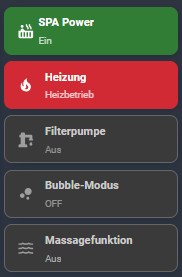
    📸 Die fünf Steuer-Buttons – verschiedene Zustände sichtbar

    📌 Übersichts-Widget auf dem Hauptdashboard

    Auf meinem zentralen Tablet-Dashboard habe ich zusätzlich ein kompaktes 4-Button-Widget eingebaut, das auf einen Blick den wichtigsten Status von Jacuzzi und Dusche zeigt – ohne in die Detailansicht wechseln zu müssen. Die vier Buttons sind in einem 2-Spalten-Grid angeordnet:

    • Jacuzzi Power – Hauptschalter, grün wenn an
    • Jacuzzi Status – Der Button zeigt z. B. „Heizung AN · Filter AN · Massage AN“ wenn mehrere Funktionen aktiv sind, oder schlicht „Alles aus“. Er reagiert nicht auf Tippen – er dient nur der Anzeige. Die Kartenfarbe wechselt zu Blau sobald mindestens eine Funktion aktiv ist.
    • Dusche – Ventilstatus, „Ein“ oder „Aus“
    • Jacuzzi Heizung – zeigt Ist- und Solltemperatur direkt im Button: „Ist: 34°C / Soll: 37°C“ – so sieht man sofort wie weit der Jacuzzi noch aufheizen muss

    Der Heizungs-Button ist dabei besonders praktisch: Dank einem state_display-Template werden Ist- und Zieltemperatur direkt in der Statuszeile angezeigt. Kein Aufklappen, kein More-Info nötig.
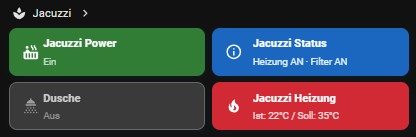
    📸 4-Button-Übersichts-Widgets auf dem Hauptdashboard

    ⚡ Stromverbrauch im Blick

    Auf der Jacuzzi-Detailseite habe ich drei Verbrauchs-Anzeigen eingebaut, damit ich jederzeit sehe was der Jacuzzi gerade und in den letzten Tagen verbraucht hat:

    • Gauge – aktueller Verbrauch: Zeigt die aktuelle Leistungsaufnahme in Watt an. Farblich abgestuft: grün (Normalbetrieb), gelb (erhöht), rot (Volllast).
    • Stündliche Übersicht (24h): Ein Balkendiagramm auf Stundenbasis zeigt den Leistungsverlauf der letzten 24 Stunden – ideal um zu sehen, wann die Heizphasen und Filterzyklen stattgefunden haben.
    • 14-Tage-Übersicht: Ein Tagesbalken-Diagramm der letzten 14 Tage zeigt den täglichen Energieverbrauch in kWh. Auf einen Blick sieht man, an welchen Tagen der Jacuzzi viel oder wenig PV-Überschuss genutzt hat.
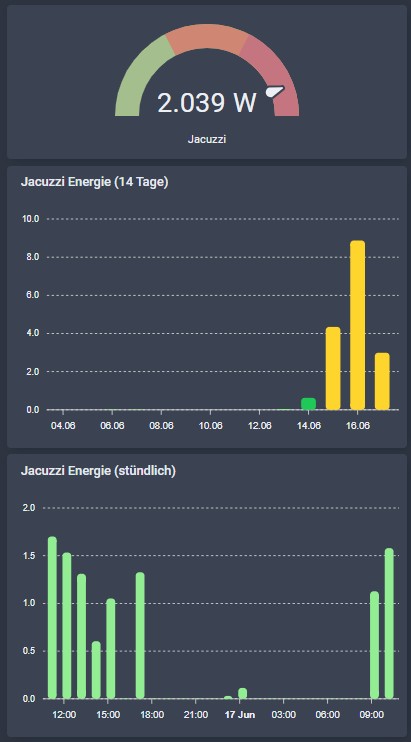
    📸 Verbrauchsüberischt

    📋 Der YAML-Code

    Helper & Automationen (config/packages/jacuzzi.yaml)

    # config/packages/jacuzzi.yaml
    
    # --- Helpers ---
    input_boolean:
      jacuzzi_pv_auto:
        name: "Jacuzzi: PV-Auto aktiv"
        initial: on
        icon: mdi:hot-tub
    
      jacuzzi_filter_auto:
        name: "Jacuzzi: Filter-Automatik aktiv"
        initial: on
        icon: mdi:water-sync
    
      v8_jacuzzi_filter_state:
        name: "Jacuzzi Filter Status"
        initial: off
        icon: mdi:water-pump
    
      jacuzzi_spa_started_by_pv:
        name: "Jacuzzi Spa durch PV gestartet"
        initial: off
        icon: mdi:solar-power
    
      jacuzzi_temp_reached:
        name: "Jacuzzi Zieltemperatur erreicht (Pause)"
        initial: off
        icon: mdi:thermometer-check
    
    input_number:
      jacuzzi_pv_start:
        name: "Jacuzzi PV Start-Schwelle (kW)"
        initial: 2.0
        min: 0.5
        max: 6.0
        step: 0.1
        unit_of_measurement: kW
    
      jacuzzi_pv_stop:
        name: "Jacuzzi PV Stop-Schwelle (kW)"
        initial: 1.0
        min: 0.0
        max: 5.0
        step: 0.1
        unit_of_measurement: kW
    
      jacuzzi_target_temp:
        name: "Jacuzzi Zieltemperatur (°C)"
        initial: 37
        min: 20
        max: 40
        step: 0.5
        unit_of_measurement: "°C"
    
      jacuzzi_min_runtime:
        name: "Jacuzzi Mindestlaufzeit (Min)"
        initial: 30
        min: 5
        max: 120
        step: 5
    
      jacuzzi_filter_duration:
        name: "Jacuzzi Filter Laufzeit (Min)"
        initial: 60
        min: 15
        max: 240
        step: 15
        unit_of_measurement: min
    
    # --- Filter-Zeitsteuerung ---
    input_datetime:
      jacuzzi_filter_time_1:
        name: "Jacuzzi Filter Zeit 1"
        has_time: true
        has_date: false
    
      jacuzzi_filter_time_2:
        name: "Jacuzzi Filter Zeit 2"
        has_time: true
        has_date: false
    
    # --- Automationen ---
    automation:
      - alias: "Jacuzzi: PV-Überschuss EIN"
        description: "Schaltet Jacuzzi-Heizung bei ausreichendem PV-Überschuss ein"
        mode: single
        trigger:
          - platform: numeric_state
            entity_id: sensor.em_available_for_heatpump
            above: input_number.jacuzzi_pv_start
            for: "00:02:00"
        condition:
          - condition: state
            entity_id: input_boolean.jacuzzi_pv_auto
            state: "on"
          - condition: state
            entity_id: binary_sensor.v8_jacuzzi_spa_connected
            state: "on"
          - condition: state
            entity_id: binary_sensor.v8_jacuzzi_spa_errors
            state: "off"
          - condition: template
            value_template: >
              {{ not is_state('input_boolean.jacuzzi_temp_reached', 'on') or
                 state_attr('climate.v8_jacuzzi_spa_thermostat', 'current_temperature') | float(100)
                 < (states('input_number.jacuzzi_target_temp') | float(37) - 2) }}
        action:
          - variables:
              spa_was_off: "{{ is_state('switch.v8_jacuzzi_spa_power', 'off') }}"
          - service: input_boolean.turn_off
            target:
              entity_id: input_boolean.jacuzzi_temp_reached
          - if:
              - condition: template
                value_template: "{{ spa_was_off }}"
            then:
              - service: switch.turn_on
                target:
                  entity_id: switch.v8_jacuzzi_spa_power
              - service: input_boolean.turn_on
                target:
                  entity_id: input_boolean.jacuzzi_spa_started_by_pv
              - delay: "00:00:05"
          - service: climate.set_temperature
            target:
              entity_id: climate.v8_jacuzzi_spa_thermostat
            data:
              temperature: "{{ states('input_number.jacuzzi_target_temp') | float(37) }}"
          - service: climate.set_hvac_mode
            target:
              entity_id: climate.v8_jacuzzi_spa_thermostat
            data:
              hvac_mode: heat
          - service: switch.turn_on
            target:
              entity_id: switch.v8_jacuzzi_spa_filter
          - service: input_boolean.turn_on
            target:
              entity_id: input_boolean.v8_jacuzzi_filter_state
          - service: system_log.write
            data:
              message: >
                Jacuzzi: EIN via PV-Überschuss
                {{ states('sensor.em_available_for_heatpump') }} kW,
                Zieltemp {{ states('input_number.jacuzzi_target_temp') }}°C
                (Spa war {{ 'aus – wurde eingeschaltet' if spa_was_off else 'bereits an' }})
              level: info
          - data:
              title: "Jacuzzi gestartet"
              message: >
                Jacuzzi automatisch gestartet
                (PV-Überschuss: {{ states('sensor.em_available_for_heatpump') }} kW,
                Zieltemp: {{ states('input_number.jacuzzi_target_temp') }}°C)
            action: notify.kottlowski_gmail_com
    
      - alias: "Jacuzzi: PV-Überschuss AUS"
        description: "Schaltet Jacuzzi-Heizung ab wenn PV-Überschuss zu gering"
        mode: single
        trigger:
          - platform: numeric_state
            entity_id: sensor.em_available_for_heatpump
            below: input_number.jacuzzi_pv_stop
            for: "00:03:00"
        condition:
          - condition: state
            entity_id: input_boolean.jacuzzi_pv_auto
            state: "on"
          - condition: state
            entity_id: switch.v8_jacuzzi_spa_power
            state: "on"
          - condition: template
            value_template: >
              {% set last_on = states.switch.v8_jacuzzi_spa_power.last_changed %}
              {% set min_run = states('input_number.jacuzzi_min_runtime') | int(30) %}
              {{ (as_timestamp(now()) - as_timestamp(last_on)) > (min_run * 60) }}
        action:
          - service: climate.set_hvac_mode
            target:
              entity_id: climate.v8_jacuzzi_spa_thermostat
            data:
              hvac_mode: "off"
          - delay: "00:00:02"
          - service: switch.turn_off
            target:
              entity_id: switch.v8_jacuzzi_spa_filter
          - delay: "00:00:02"
          - service: switch.turn_off
            target:
              entity_id: switch.v8_jacuzzi_spa_filter
          - delay: "00:00:02"
          - service: switch.turn_off
            target:
              entity_id: switch.v8_jacuzzi_spa_filter
          - delay: "00:00:01"
          - service: input_boolean.turn_off
            target:
              entity_id: input_boolean.v8_jacuzzi_filter_state
          - delay: "00:00:03"
          - if:
              - condition: state
                entity_id: input_boolean.jacuzzi_spa_started_by_pv
                state: "on"
            then:
              - service: switch.turn_off
                target:
                  entity_id: switch.v8_jacuzzi_spa_power
              - service: input_boolean.turn_off
                target:
                  entity_id: input_boolean.jacuzzi_spa_started_by_pv
          - service: system_log.write
            data:
              message: >
                Jacuzzi: AUS – PV-Überschuss unter Schwelle
                ({{ states('sensor.em_available_for_heatpump') }} kW)
              level: info
          - data:
              title: "Jacuzzi gestoppt"
              message: >
                Jacuzzi automatisch gestoppt
                (PV-Überschuss zu gering: {{ states('sensor.em_available_for_heatpump') }} kW)
            action: notify.kottlowski_gmail_com
    
      - alias: "Jacuzzi: Filter Zyklus"
        description: "Startet Filterung zu konfigurierbaren Zeiten – Spa wird bei Bedarf kurz eingeschaltet"
        mode: single
        trigger:
          - platform: time
            at: input_datetime.jacuzzi_filter_time_1
          - platform: time
            at: input_datetime.jacuzzi_filter_time_2
        condition:
          - condition: state
            entity_id: input_boolean.jacuzzi_filter_auto
            state: "on"
          - condition: state
            entity_id: binary_sensor.v8_jacuzzi_spa_connected
            state: "on"
          - condition: state
            entity_id: binary_sensor.v8_jacuzzi_spa_errors
            state: "off"
          - condition: state
            entity_id: input_boolean.v8_jacuzzi_filter_state
            state: "off"
        action:
          - variables:
              spa_was_off: "{{ is_state('switch.v8_jacuzzi_spa_power', 'off') }}"
          - if:
              - condition: template
                value_template: "{{ spa_was_off }}"
            then:
              - service: switch.turn_on
                target:
                  entity_id: switch.v8_jacuzzi_spa_power
              - delay: "00:00:05"
          - service: switch.turn_on
            target:
              entity_id: switch.v8_jacuzzi_spa_filter
          - service: input_boolean.turn_on
            target:
              entity_id: input_boolean.v8_jacuzzi_filter_state
          - service: system_log.write
            data:
              message: >
                Jacuzzi: Filter gestartet für
                {{ states('input_number.jacuzzi_filter_duration') | int }} Min
                (Spa war {{ 'aus – wurde eingeschaltet' if spa_was_off else 'bereits an' }})
              level: info
          - delay:
              minutes: "{{ states('input_number.jacuzzi_filter_duration') | int(60) }}"
          - service: switch.turn_off
            target:
              entity_id: switch.v8_jacuzzi_spa_filter
          - service: input_boolean.turn_off
            target:
              entity_id: input_boolean.v8_jacuzzi_filter_state
          - if:
              - condition: template
                value_template: >
                  {{ spa_was_off and
                     not is_state('climate.v8_jacuzzi_spa_thermostat', 'heat') }}
            then:
              - delay: "00:00:03"
              - service: switch.turn_off
                target:
                  entity_id: switch.v8_jacuzzi_spa_power
          - service: system_log.write
            data:
              message: "Jacuzzi: Filter Zyklus beendet"
              level: info
    
      - alias: "Jacuzzi: Auto-Modus deaktiviert"
        description: "Stoppt den Jacuzzi sofort wenn PV-Auto manuell deaktiviert wird"
        mode: single
        trigger:
          - platform: state
            entity_id: input_boolean.jacuzzi_pv_auto
            to: "off"
        condition:
          - condition: state
            entity_id: switch.v8_jacuzzi_spa_power
            state: "on"
        action:
          - service: climate.set_hvac_mode
            target:
              entity_id: climate.v8_jacuzzi_spa_thermostat
            data:
              hvac_mode: "off"
          - delay: "00:00:02"
          - service: switch.turn_off
            target:
              entity_id: switch.v8_jacuzzi_spa_filter
          - delay: "00:00:02"
          - service: switch.turn_off
            target:
              entity_id: switch.v8_jacuzzi_spa_filter
          - delay: "00:00:02"
          - service: switch.turn_off
            target:
              entity_id: switch.v8_jacuzzi_spa_filter
          - delay: "00:00:01"
          - service: input_boolean.turn_off
            target:
              entity_id: input_boolean.v8_jacuzzi_filter_state
          - delay: "00:00:03"
          - if:
              - condition: state
                entity_id: input_boolean.jacuzzi_spa_started_by_pv
                state: "on"
            then:
              - service: switch.turn_off
                target:
                  entity_id: switch.v8_jacuzzi_spa_power
              - service: input_boolean.turn_off
                target:
                  entity_id: input_boolean.jacuzzi_spa_started_by_pv
          - service: input_boolean.turn_off
            target:
              entity_id: input_boolean.jacuzzi_temp_reached
          - service: system_log.write
            data:
              message: "Jacuzzi: PV-Auto deaktiviert – Heizung und Filter gestoppt"
              level: info
          - data:
              title: "Jacuzzi deaktiviert"
              message: "Jacuzzi PV-Auto wurde deaktiviert. Heizung und Filter wurden gestoppt."
            action: notify.kottlowski_gmail_com
    
      - alias: "Jacuzzi: Zieltemperatur aktualisieren"
        description: "Übergibt geänderte Zieltemperatur sofort an den Thermostat wenn der Spa läuft"
        mode: single
        trigger:
          - platform: state
            entity_id: input_number.jacuzzi_target_temp
        condition:
          - condition: state
            entity_id: switch.v8_jacuzzi_spa_power
            state: "on"
        action:
          - service: climate.set_temperature
            target:
              entity_id: climate.v8_jacuzzi_spa_thermostat
            data:
              temperature: "{{ states('input_number.jacuzzi_target_temp') | float(37) }}"
          - service: system_log.write
            data:
              message: >
                Jacuzzi: Zieltemperatur aktualisiert auf
                {{ states('input_number.jacuzzi_target_temp') }}°C
              level: info
    
      - alias: "Jacuzzi: Fehler-Benachrichtigung"
        description: "Benachrichtigt bei Jacuzzi-Fehler und stoppt falls aktiv"
        mode: single
        trigger:
          - platform: state
            entity_id: binary_sensor.v8_jacuzzi_spa_errors
            to: "on"
        action:
          - data:
              title: "Jacuzzi Fehler!"
              message: "Der Jacuzzi meldet einen Fehler. Bitte überprüfen!"
            action: notify.kottlowski_gmail_com
          - service: system_log.write
            data:
              message: "Jacuzzi: Fehler erkannt – manuelle Prüfung erforderlich"
              level: error
    
      - alias: "Jacuzzi: Zieltemperatur erreicht"
        description: "Schaltet alles ab wenn Zieltemperatur erreicht ist – Neustart nach 2°C Abfall"
        mode: single
        trigger:
          - platform: template
            value_template: >
              {{ state_attr('climate.v8_jacuzzi_spa_thermostat', 'current_temperature') | float(0)
                 >= states('input_number.jacuzzi_target_temp') | float(100) }}
            for: "00:01:00"
        condition:
          - condition: state
            entity_id: input_boolean.jacuzzi_pv_auto
            state: "on"
          - condition: state
            entity_id: switch.v8_jacuzzi_spa_power
            state: "on"
        action:
          - service: climate.set_hvac_mode
            target:
              entity_id: climate.v8_jacuzzi_spa_thermostat
            data:
              hvac_mode: "off"
          - delay: "00:00:02"
          - service: switch.turn_off
            target:
              entity_id: switch.v8_jacuzzi_spa_filter
          - delay: "00:00:02"
          - service: switch.turn_off
            target:
              entity_id: switch.v8_jacuzzi_spa_filter
          - delay: "00:00:02"
          - service: switch.turn_off
            target:
              entity_id: switch.v8_jacuzzi_spa_filter
          - delay: "00:00:01"
          - service: input_boolean.turn_off
            target:
              entity_id: input_boolean.v8_jacuzzi_filter_state
          - delay: "00:00:03"
          - service: switch.turn_off
            target:
              entity_id: switch.v8_jacuzzi_spa_power
          - service: input_boolean.turn_off
            target:
              entity_id: input_boolean.jacuzzi_spa_started_by_pv
          - service: input_boolean.turn_on
            target:
              entity_id: input_boolean.jacuzzi_temp_reached
          - service: system_log.write
            data:
              message: >
                Jacuzzi: Zieltemperatur erreicht – alles ausgeschaltet
                ({{ state_attr('climate.v8_jacuzzi_spa_thermostat', 'current_temperature') }}°C /
                Ziel: {{ states('input_number.jacuzzi_target_temp') }}°C).
                Neustart wenn unter {{ (states('input_number.jacuzzi_target_temp') | float(37) - 2) | round(1) }}°C und PV ausreicht.
              level: info
          - data:
              title: "Jacuzzi: Zieltemperatur erreicht"
              message: >
                Jacuzzi ausgeschaltet – Zieltemperatur
                {{ states('input_number.jacuzzi_target_temp') }}°C erreicht.
                Neustart automatisch bei {{ (states('input_number.jacuzzi_target_temp') | float(37) - 2) | round(1) }}°C.
            action: notify.kottlowski_gmail_com
    
      - alias: "Jacuzzi: Temperatur gesunken – neu starten"
        description: "Startet Jacuzzi neu wenn Temperatur 2°C unter Zieltemperatur und PV-Überschuss ausreicht"
        mode: single
        trigger:
          - platform: template
            value_template: >
              {{ state_attr('climate.v8_jacuzzi_spa_thermostat', 'current_temperature') | float(100)
                 < (states('input_number.jacuzzi_target_temp') | float(37) - 2) }}
            for: "00:01:00"
        condition:
          - condition: state
            entity_id: input_boolean.jacuzzi_pv_auto
            state: "on"
          - condition: state
            entity_id: input_boolean.jacuzzi_temp_reached
            state: "on"
          - condition: state
            entity_id: binary_sensor.v8_jacuzzi_spa_connected
            state: "on"
          - condition: state
            entity_id: binary_sensor.v8_jacuzzi_spa_errors
            state: "off"
          - condition: numeric_state
            entity_id: sensor.em_available_for_heatpump
            above: input_number.jacuzzi_pv_start
        action:
          - service: input_boolean.turn_off
            target:
              entity_id: input_boolean.jacuzzi_temp_reached
          - service: switch.turn_on
            target:
              entity_id: switch.v8_jacuzzi_spa_power
          - service: input_boolean.turn_on
            target:
              entity_id: input_boolean.jacuzzi_spa_started_by_pv
          - delay: "00:00:05"
          - service: climate.set_temperature
            target:
              entity_id: climate.v8_jacuzzi_spa_thermostat
            data:
              temperature: "{{ states('input_number.jacuzzi_target_temp') | float(37) }}"
          - service: climate.set_hvac_mode
            target:
              entity_id: climate.v8_jacuzzi_spa_thermostat
            data:
              hvac_mode: heat
          - service: switch.turn_on
            target:
              entity_id: switch.v8_jacuzzi_spa_filter
          - service: input_boolean.turn_on
            target:
              entity_id: input_boolean.v8_jacuzzi_filter_state
          - service: system_log.write
            data:
              message: >
                Jacuzzi: Temperatur auf
                {{ state_attr('climate.v8_jacuzzi_spa_thermostat', 'current_temperature') }}°C gesunken –
                Neustart (Ziel: {{ states('input_number.jacuzzi_target_temp') }}°C,
                PV: {{ states('sensor.em_available_for_heatpump') }} kW)
              level: info
          - data:
              title: "Jacuzzi: Neustart nach Abkühlung"
              message: >
                Jacuzzi neu gestartet – Temperatur auf
                {{ state_attr('climate.v8_jacuzzi_spa_thermostat', 'current_temperature') }}°C gesunken
                (PV-Überschuss: {{ states('sensor.em_available_for_heatpump') }} kW).
            action: notify.kottlowski_gmail_com
    
    # --- Laufzeit-Protokollierung ---
    sensor:
      - platform: history_stats
        name: "Jacuzzi Heizung Laufzeit heute"
        entity_id: climate.v8_jacuzzi_spa_thermostat
        state: "heat"
        type: time
        start: "{{ now().replace(hour=0, minute=0, second=0) }}"
        end: "{{ now() }}"
    
    template:
      - sensor:
          - name: "Jacuzzi Heizung Laufzeit heute formatiert"
            icon: mdi:timer-play
            state: >
              {% set h = states('sensor.jacuzzi_heizung_laufzeit_heute') | float(0) %}
              {% set hours = h | int %}
              {% set minutes = ((h - hours) * 60) | int %}
              {{ '%d:%02d h' | format(hours, minutes) }}
    

    Status-Button (Lovelace YAML)

    type: custom:button-card
    name: Jacuzzi Status
    icon: mdi:information-outline
    show_label: true
    show_state: false
    tap_action:
      action: none
    hold_action:
      action: more-info
      entity: climate.v8_jacuzzi_spa_thermostat
    triggers_update:
      - climate.v8_jacuzzi_spa_thermostat
      - switch.v8_jacuzzi_spa_filter_ui
      - switch.v8_jacuzzi_spa_jets
      - select.v8_jacuzzi_spa_bubbles
    label: |
      [[[
        var heat    = states['climate.v8_jacuzzi_spa_thermostat'].state;
        var filter  = states['switch.v8_jacuzzi_spa_filter_ui'].state;
        var jets    = states['switch.v8_jacuzzi_spa_jets'].state;
        var bubbles = states['select.v8_jacuzzi_spa_bubbles'].state;
        var parts = [];
        if (heat === 'heat')   parts.push('Heizung AN');
        if (heat === 'idle')   parts.push('Heizung Idle');
        if (filter === 'on')   parts.push('Filter AN');
        if (jets === 'on')     parts.push('Massage AN');
        if (bubbles !== 'OFF') parts.push('Bubbles AN');
        return parts.length > 0 ? parts.join('  ·  ') : 'Alles aus';
      ]]]
    styles:
      card:
        - height: 60px
        - padding: 6px 10px
        - border-radius: 10px
        - cursor: default
        - background: |
            [[[
              var heat    = states['climate.v8_jacuzzi_spa_thermostat'].state;
              var filter  = states['switch.v8_jacuzzi_spa_filter_ui'].state;
              var jets    = states['switch.v8_jacuzzi_spa_jets'].state;
              var bubbles = states['select.v8_jacuzzi_spa_bubbles'].state;
              var anyOn = heat === 'heat' || heat === 'idle' || filter === 'on' || jets === 'on' || bubbles !== 'OFF';
              return anyOn ? '#1565c0' : '#3a3a3a';
            ]]]
        - border: |
            [[[
              var heat    = states['climate.v8_jacuzzi_spa_thermostat'].state;
              var filter  = states['switch.v8_jacuzzi_spa_filter_ui'].state;
              var jets    = states['switch.v8_jacuzzi_spa_jets'].state;
              var bubbles = states['select.v8_jacuzzi_spa_bubbles'].state;
              var anyOn = heat === 'heat' || heat === 'idle' || filter === 'on' || jets === 'on' || bubbles !== 'OFF';
              return anyOn ? '2px solid #1565c0' : '1px solid #666';
            ]]]
      grid:
        - grid-template-areas: "\"i n\" \"i l\""
        - grid-template-columns: 32px auto
        - grid-template-rows: auto auto
        - align-items: center
        - justify-items: start
        - column-gap: 8px
      icon:
        - width: 22px
        - height: 22px
        - color: |
            [[[
              var heat    = states['climate.v8_jacuzzi_spa_thermostat'].state;
              var filter  = states['switch.v8_jacuzzi_spa_filter_ui'].state;
              var jets    = states['switch.v8_jacuzzi_spa_jets'].state;
              var bubbles = states['select.v8_jacuzzi_spa_bubbles'].state;
              var anyOn = heat === 'heat' || heat === 'idle' || filter === 'on' || jets === 'on' || bubbles !== 'OFF';
              return anyOn ? '#ffffff' : '#9e9e9e';
            ]]]
      name:
        - font-size: 14px
        - font-weight: 600
        - justify-self: start
        - text-align: left
        - color: |
            [[[
              var heat    = states['climate.v8_jacuzzi_spa_thermostat'].state;
              var filter  = states['switch.v8_jacuzzi_spa_filter_ui'].state;
              var jets    = states['switch.v8_jacuzzi_spa_jets'].state;
              var bubbles = states['select.v8_jacuzzi_spa_bubbles'].state;
              var anyOn = heat === 'heat' || heat === 'idle' || filter === 'on' || jets === 'on' || bubbles !== 'OFF';
              return anyOn ? '#ffffff' : '#cccccc';
            ]]]
      label:
        - font-size: 12px
        - justify-self: start
        - text-align: left
        - color: |
            [[[
              var heat    = states['climate.v8_jacuzzi_spa_thermostat'].state;
              var filter  = states['switch.v8_jacuzzi_spa_filter_ui'].state;
              var jets    = states['switch.v8_jacuzzi_spa_jets'].state;
              var bubbles = states['select.v8_jacuzzi_spa_bubbles'].state;
              var anyOn = heat === 'heat' || heat === 'idle' || filter === 'on' || jets === 'on' || bubbles !== 'OFF';
              return anyOn ? '#e3f2fd' : '#aaaaaa';
            ]]]
    

    Steuer-Buttons (Lovelace YAML)

    type: vertical-stack
    cards:
      - type: custom:button-card
        entity: switch.v8_jacuzzi_spa_power
        name: SPA Power
        icon: mdi:hot-tub
        show_state: true
        size: 22px
        tap_action:
          action: toggle
        hold_action:
          action: more-info
        state:
          - value: "on"
            styles:
              card:
                - background: "#2e7d32"
                - border: 2px solid "#2e7d32"
              icon:
                - color: "#ffffff"
              name:
                - color: "#ffffff"
              state:
                - color: "#e8f5e9"
          - value: "off"
            styles:
              card:
                - background: "#3a3a3a"
                - border: "1px solid #666"
              icon:
                - color: "#9e9e9e"
              name:
                - color: "#cccccc"
              state:
                - color: "#aaaaaa"
        styles:
          card:
            - height: 60px
            - padding: 6px 10px
            - border-radius: 10px
            - background: var(--ha-card-background)
            - border: 1px solid var(--divider-color)
            - cursor: pointer
          grid:
            - grid-template-areas: "\"i n\" \"i s\""
            - grid-template-columns: 32px auto
            - grid-template-rows: auto auto
            - align-items: center
            - justify-items: start
          icon:
            - width: 22px
            - height: 22px
            - color: var(--secondary-text-color)
          name:
            - font-size: 14px
            - font-weight: 600
            - justify-self: start
            - text-align: left
          state:
            - font-size: 12px
            - opacity: 0.8
            - justify-self: start
            - text-align: left
      - type: custom:button-card
        entity: climate.v8_jacuzzi_spa_thermostat
        name: Heizung
        icon: mdi:fire
        show_state: true
        tap_action:
          action: call-service
          service: script.jacuzzi_heat_toggle
        hold_action:
          action: more-info
        state:
          - value: heat
            styles:
              card:
                - background: "#d32f2f"
                - border: 2px solid "#d32f2f"
              icon:
                - color: "#ffffff"
              name:
                - color: "#ffffff"
              state:
                - color: "#ffebee"
          - value: idle
            styles:
              card:
                - background: "#f57c00"
                - border: 2px solid "#f57c00"
              icon:
                - color: "#ffffff"
              name:
                - color: "#ffffff"
              state:
                - color: "#fff3e0"
          - value: "off"
            styles:
              card:
                - background: "#3a3a3a"
                - border: "1px solid #666"
              icon:
                - color: "#9e9e9e"
              name:
                - color: "#cccccc"
              state:
                - color: "#aaaaaa"
        styles:
          card:
            - height: 60px
            - padding: 6px 10px
            - border-radius: 10px
            - cursor: pointer
          grid:
            - grid-template-areas: "\"i n\" \"i s\""
            - grid-template-columns: 32px auto
            - grid-template-rows: auto auto
            - align-items: center
            - justify-items: start
            - column-gap: 8px
          icon:
            - width: 22px
            - height: 22px
          name:
            - font-size: 14px
            - font-weight: 600
            - justify-self: start
            - text-align: left
          state:
            - font-size: 12px
            - opacity: 0.8
            - justify-self: start
            - text-align: left
      - type: custom:button-card
        entity: switch.v8_jacuzzi_spa_filter_ui
        name: Filterpumpe
        icon: mdi:water-pump
        show_state: true
        size: 22px
        tap_action:
          action: call-service
          service: >
            [[[ return entity.state === 'on' ? 'switch.turn_off' : 'switch.turn_on'
            ]]]
          target:
            entity_id: switch.v8_jacuzzi_spa_filter_ui
        hold_action:
          action: more-info
        state:
          - value: "on"
            styles:
              card:
                - background: "#0288d1"
                - border: 2px solid "#0288d1"
              icon:
                - color: "#ffffff"
              name:
                - color: "#ffffff"
              state:
                - color: "#e1f5fe"
          - value: "off"
            styles:
              card:
                - background: "#3a3a3a"
                - border: "1px solid #666"
              icon:
                - color: "#9e9e9e"
              name:
                - color: "#cccccc"
              state:
                - color: "#aaaaaa"
        styles:
          card:
            - height: 60px
            - padding: 6px 10px
            - border-radius: 10px
            - border: 1px solid var(--divider-color)
            - cursor: pointer
          grid:
            - grid-template-areas: "\"i n\" \"i s\""
            - grid-template-columns: 32px auto
            - grid-template-rows: auto auto
            - align-items: center
            - justify-items: start
            - column-gap: 8px
          icon:
            - width: 22px
            - height: 22px
          name:
            - font-size: 14px
            - font-weight: 600
            - justify-self: start
            - text-align: left
          state:
            - font-size: 12px
            - opacity: 0.8
            - justify-self: start
            - text-align: left
      - type: custom:button-card
        entity: select.v8_jacuzzi_spa_bubbles
        name: Bubble-Modus
        icon: mdi:chart-bubble
        show_state: true
        tap_action:
          action: call-service
          service: select.select_option
          service_data:
            entity_id: select.v8_jacuzzi_spa_bubbles
            option: "[[[ return entity.state === 'MAX' ? 'OFF' : 'MAX'; ]]]"
        hold_action:
          action: more-info
        state:
          - value: "OFF"
            styles:
              card:
                - background: "#3a3a3a"
                - border: "1px solid #666"
              icon:
                - color: "#9e9e9e"
              name:
                - color: "#cccccc"
              state:
                - color: "#aaaaaa"
          - value: MAX
            styles:
              card:
                - background: "#ff9800"
                - border: 2px solid "#ff9800"
              icon:
                - color: "#ffffff"
              name:
                - color: "#ffffff"
              state:
                - color: "#fff8e1"
        styles:
          card:
            - height: 60px
            - padding: 6px 10px
            - border-radius: 10px
          grid:
            - grid-template-areas: "\"i n\" \"i s\""
            - grid-template-columns: 32px auto
            - grid-template-rows: auto auto
            - align-items: center
            - justify-items: start
            - column-gap: 8px
          icon:
            - width: 22px
            - height: 22px
          name:
            - font-size: 14px
            - font-weight: 600
            - justify-self: start
            - text-align: left
          state:
            - font-size: 12px
            - justify-self: start
            - text-align: left
            - opacity: 0.8
      - type: custom:button-card
        entity: switch.v8_jacuzzi_spa_jets
        name: Massagefunktion
        icon: mdi:waves
        show_state: true
        tap_action:
          action: toggle
        hold_action:
          action: more-info
        state:
          - value: "on"
            styles:
              card:
                - background: "#8e24aa"
                - border: 2px solid "#8e24aa"
              icon:
                - color: "#ffffff"
              name:
                - color: "#ffffff"
              state:
                - color: "#f3e5f5"
          - value: "off"
            styles:
              card:
                - background: "#3a3a3a"
                - border: "1px solid #666"
              icon:
                - color: "#9e9e9e"
              name:
                - color: "#cccccc"
              state:
                - color: "#aaaaaa"
        styles:
          card:
            - height: 60px
            - padding: 6px 10px
            - border-radius: 10px
          grid:
            - grid-template-areas: "\"i n\" \"i s\""
            - grid-template-columns: 32px auto
            - grid-template-rows: auto auto
            - align-items: center
            - justify-items: start
            - column-gap: 8px
          icon:
            - width: 22px
            - height: 22px
          name:
            - font-size: 14px
            - font-weight: 600
            - justify-self: start
            - text-align: left
          state:
            - font-size: 12px
            - justify-self: start
            - text-align: left
    grid_options:
      rows: auto
      columns: 6
    card_mod:
      style: |
        ha-card {
          gap: 6px;   /* 🔥 Abstand zwischen Buttons */
        }
    

    Script & Template-Switch (script.yaml / sensors/jacuzzi.yaml)

    In: „/homeassistant/scripts.yaml“

    jacuzzi_heat_toggle:
      alias: "Jacuzzi: Heizung + Filter-UI Toggle (force off with retries)"
      mode: single
      sequence:
        - choose:
            - conditions:
                - condition: state
                  entity_id: climate.v8_jacuzzi_spa_thermostat
                  state: 'off'
              sequence:
                - service: climate.set_hvac_mode
                  target:
                    entity_id: climate.v8_jacuzzi_spa_thermostat
                  data:
                    hvac_mode: 'heat'
                - delay: { seconds: 2 }
                - service: switch.turn_on
                  target:
                    entity_id: switch.v8_jacuzzi_spa_filter
                - service: input_boolean.turn_on
                  target:
                    entity_id: input_boolean.v8_jacuzzi_filter_state
          default:
            - service: climate.turn_off
              target:
                entity_id: climate.v8_jacuzzi_spa_thermostat
            - delay: { seconds: 2 }
            # drei Versuche, den Filter auszuschalten (mit kurzen Pausen)
            - service: switch.turn_off
              target:
                entity_id: switch.v8_jacuzzi_spa_filter
            - delay: { seconds: 2 }
            - service: switch.turn_off
              target:
                entity_id: switch.v8_jacuzzi_spa_filter
            - delay: { seconds: 2 }
            - service: switch.turn_off
              target:
                entity_id: switch.v8_jacuzzi_spa_filter
            - delay: { seconds: 1 }
            - service: input_boolean.turn_off
              target:
                entity_id: input_boolean.v8_jacuzzi_filter_state

    Unter: „/homeassistant/sensors/jacuzzi.yaml“

    - switch:
          - name: "v8-Jacuzzi Spa Filter (UI)"
            unique_id: v8_jacuzzi_filter_ui
            optimistic: false  # optional
            state: "{{ is_state('input_boolean.v8_jacuzzi_filter_state','on') }}"
            turn_on:
              - service: switch.turn_on
                target:
                  entity_id: switch.v8_jacuzzi_spa_filter
              - service: input_boolean.turn_on
                target:
                  entity_id: input_boolean.v8_jacuzzi_filter_state
            turn_off:
              - service: switch.turn_off
                target:
                  entity_id: switch.v8_jacuzzi_spa_filter
              - service: input_boolean.turn_off
                target:
                  entity_id: input_boolean.v8_jacuzzi_filter_state

    Vollständiges Dashboard (Lovelace Raw-Konfiguration)

    Der vollständige YAML-Code meines Jacuzzi Dashboards mit Nordic Theme:

      - type: sections
        max_columns: 3
        title: Jacuzzi
        path: jacuzzi
        icon: mdi:spa
        sections:
          - type: grid
            cards:
              - type: custom:button-card
                entity: switch.jacuzzi
                name: SPA Master Switch
                icon: mdi:electric-switch
                show_state: true
                size: 22px
                tap_action:
                  action: toggle
                hold_action:
                  action: more-info
                state:
                  - value: "on"
                    styles:
                      card:
                        - background: "#2e7d32"
                        - border: "2px solid #ffffff"
                      icon:
                        - color: "#ffffff"
                      name:
                        - color: "#ffffff"
                      state:
                        - color: "#e8f5e9"
                  - value: "off"
                    styles:
                      card:
                        - background: "#c62828"
                        - border: "2px solid #c62828"
                      icon:
                        - color: "#ffffff"
                      name:
                        - color: "#ffffff"
                      state:
                        - color: "#ffebee"
                styles:
                  card:
                    - height: 60px
                    - padding: 6px 10px
                    - border-radius: 10px
                    - cursor: pointer
                  grid:
                    - grid-template-areas: "\"i n s\""
                    - grid-template-columns: 32px auto auto
                    - grid-template-rows: 1fr
                    - align-items: center
                  icon:
                    - width: 22px
                    - height: 22px
                  name:
                    - font-size: 16px
                    - font-weight: 600
                    - justify-self: start
                    - margin-left: 8px
                  state:
                    - font-size: 18px
                    - justify-self: start
                    - font-weight: 700
                    - margin-left: 10px
                    - text-transform: uppercase
              - type: heading
                icon: ""
                heading_style: title
              - type: thermostat
                entity: climate.v8_jacuzzi_spa_thermostat
                show_current_as_primary: true
                grid_options:
                  columns: 6
                  rows: auto
                name: Jacuzzi
              - type: vertical-stack
                cards:
                  - type: custom:button-card
                    entity: switch.v8_jacuzzi_spa_power
                    name: SPA Power
                    icon: mdi:hot-tub
                    show_state: true
                    size: 22px
                    tap_action:
                      action: toggle
                    hold_action:
                      action: more-info
                    state:
                      - value: "on"
                        styles:
                          card:
                            - background: "#2e7d32"
                            - border: "2px solid #ffffff"
                          icon:
                            - color: "#ffffff"
                          name:
                            - color: "#ffffff"
                          state:
                            - color: "#e8f5e9"
                      - value: "off"
                        styles:
                          card:
                            - background: "#3a3a3a"
                            - border: "1px solid #666"
                          icon:
                            - color: "#9e9e9e"
                          name:
                            - color: "#cccccc"
                          state:
                            - color: "#aaaaaa"
                    styles:
                      card:
                        - height: 60px
                        - padding: 6px 10px
                        - border-radius: 10px
                        - background: var(--ha-card-background)
                        - border: 1px solid var(--divider-color)
                        - cursor: pointer
                      grid:
                        - grid-template-areas: "\"i n\" \"i s\""
                        - grid-template-columns: 32px auto
                        - grid-template-rows: auto auto
                        - align-items: center
                        - justify-items: start
                      icon:
                        - width: 22px
                        - height: 22px
                        - color: var(--secondary-text-color)
                      name:
                        - font-size: 14px
                        - font-weight: 600
                        - justify-self: start
                        - text-align: left
                      state:
                        - font-size: 12px
                        - opacity: 0.8
                        - justify-self: start
                        - text-align: left
                  - type: custom:button-card
                    entity: climate.v8_jacuzzi_spa_thermostat
                    name: Heizung
                    icon: mdi:fire
                    show_state: true
                    tap_action:
                      action: call-service
                      service: script.jacuzzi_heat_toggle
                    hold_action:
                      action: more-info
                    state:
                      - value: heat
                        styles:
                          card:
                            - background: "#d32f2f"
                            - border: 2px solid "#d32f2f"
                          icon:
                            - color: "#ffffff"
                          name:
                            - color: "#ffffff"
                          state:
                            - color: "#ffebee"
                      - value: idle
                        styles:
                          card:
                            - background: "#f57c00"
                            - border: 2px solid "#f57c00"
                          icon:
                            - color: "#ffffff"
                          name:
                            - color: "#ffffff"
                          state:
                            - color: "#fff3e0"
                      - value: "off"
                        styles:
                          card:
                            - background: "#3a3a3a"
                            - border: "1px solid #666"
                          icon:
                            - color: "#9e9e9e"
                          name:
                            - color: "#cccccc"
                          state:
                            - color: "#aaaaaa"
                    styles:
                      card:
                        - height: 60px
                        - padding: 6px 10px
                        - border-radius: 10px
                        - cursor: pointer
                      grid:
                        - grid-template-areas: "\"i n\" \"i s\""
                        - grid-template-columns: 32px auto
                        - grid-template-rows: auto auto
                        - align-items: center
                        - justify-items: start
                        - column-gap: 8px
                      icon:
                        - width: 22px
                        - height: 22px
                      name:
                        - font-size: 14px
                        - font-weight: 600
                        - justify-self: start
                        - text-align: left
                      state:
                        - font-size: 12px
                        - opacity: 0.8
                        - justify-self: start
                        - text-align: left
                  - type: custom:button-card
                    entity: switch.v8_jacuzzi_spa_filter_ui
                    name: Filterpumpe
                    icon: mdi:water-pump
                    show_state: true
                    size: 22px
                    tap_action:
                      action: call-service
                      service: >
                        [[[ return entity.state === 'on' ? 'switch.turn_off' :
                        'switch.turn_on' ]]]
                      target:
                        entity_id: switch.v8_jacuzzi_spa_filter_ui
                    hold_action:
                      action: more-info
                    state:
                      - value: "on"
                        styles:
                          card:
                            - background: "#0288d1"
                            - border: 2px solid "#0288d1"
                          icon:
                            - color: "#ffffff"
                          name:
                            - color: "#ffffff"
                          state:
                            - color: "#e1f5fe"
                      - value: "off"
                        styles:
                          card:
                            - background: "#3a3a3a"
                            - border: "1px solid #666"
                          icon:
                            - color: "#9e9e9e"
                          name:
                            - color: "#cccccc"
                          state:
                            - color: "#aaaaaa"
                    styles:
                      card:
                        - height: 60px
                        - padding: 6px 10px
                        - border-radius: 10px
                        - border: 1px solid var(--divider-color)
                        - cursor: pointer
                      grid:
                        - grid-template-areas: "\"i n\" \"i s\""
                        - grid-template-columns: 32px auto
                        - grid-template-rows: auto auto
                        - align-items: center
                        - justify-items: start
                        - column-gap: 8px
                      icon:
                        - width: 22px
                        - height: 22px
                      name:
                        - font-size: 14px
                        - font-weight: 600
                        - justify-self: start
                        - text-align: left
                      state:
                        - font-size: 12px
                        - opacity: 0.8
                        - justify-self: start
                        - text-align: left
                  - type: custom:button-card
                    entity: select.v8_jacuzzi_spa_bubbles
                    name: Bubble-Modus
                    icon: mdi:chart-bubble
                    show_state: true
                    tap_action:
                      action: call-service
                      service: select.select_option
                      service_data:
                        entity_id: select.v8_jacuzzi_spa_bubbles
                        option: "[[[ return entity.state === 'MAX' ? 'OFF' : 'MAX'; ]]]"
                    hold_action:
                      action: more-info
                    state:
                      - value: "OFF"
                        styles:
                          card:
                            - background: "#3a3a3a"
                            - border: "1px solid #666"
                          icon:
                            - color: "#9e9e9e"
                          name:
                            - color: "#cccccc"
                          state:
                            - color: "#aaaaaa"
                      - value: MAX
                        styles:
                          card:
                            - background: "#ff9800"
                            - border: 2px solid "#ff9800"
                          icon:
                            - color: "#ffffff"
                          name:
                            - color: "#ffffff"
                          state:
                            - color: "#fff8e1"
                    styles:
                      card:
                        - height: 60px
                        - padding: 6px 10px
                        - border-radius: 10px
                      grid:
                        - grid-template-areas: "\"i n\" \"i s\""
                        - grid-template-columns: 32px auto
                        - grid-template-rows: auto auto
                        - align-items: center
                        - justify-items: start
                        - column-gap: 8px
                      icon:
                        - width: 22px
                        - height: 22px
                      name:
                        - font-size: 14px
                        - font-weight: 600
                        - justify-self: start
                        - text-align: left
                      state:
                        - font-size: 12px
                        - justify-self: start
                        - text-align: left
                        - opacity: 0.8
                  - type: custom:button-card
                    entity: switch.v8_jacuzzi_spa_jets
                    name: Massagefunktion
                    icon: mdi:waves
                    show_state: true
                    tap_action:
                      action: toggle
                    hold_action:
                      action: more-info
                    state:
                      - value: "on"
                        styles:
                          card:
                            - background: "#8e24aa"
                            - border: 2px solid "#8e24aa"
                          icon:
                            - color: "#ffffff"
                          name:
                            - color: "#ffffff"
                          state:
                            - color: "#f3e5f5"
                      - value: "off"
                        styles:
                          card:
                            - background: "#3a3a3a"
                            - border: "1px solid #666"
                          icon:
                            - color: "#9e9e9e"
                          name:
                            - color: "#cccccc"
                          state:
                            - color: "#aaaaaa"
                    styles:
                      card:
                        - height: 60px
                        - padding: 6px 10px
                        - border-radius: 10px
                      grid:
                        - grid-template-areas: "\"i n\" \"i s\""
                        - grid-template-columns: 32px auto
                        - grid-template-rows: auto auto
                        - align-items: center
                        - justify-items: start
                        - column-gap: 8px
                      icon:
                        - width: 22px
                        - height: 22px
                      name:
                        - font-size: 14px
                        - font-weight: 600
                        - justify-self: start
                        - text-align: left
                      state:
                        - font-size: 12px
                        - justify-self: start
                        - text-align: left
                grid_options:
                  rows: auto
                  columns: 6
                card_mod:
                  style: |
                    ha-card {
                      gap: 6px;   /* 🔥 Abstand zwischen Buttons */
                    }
          - type: grid
            cards:
              - type: gauge
                name: Jacuzzi
                severity:
                  green: 0
                  yellow: 800
                  red: 1500
                needle: true
                entity: sensor.jacuzzi_leistung
                max: 2300
              - type: custom:apexcharts-card
                header:
                  title: Jacuzzi Energie (14 Tage)
                  show: true
                graph_span: 14d
                span:
                  start: day
                  offset: "-13d"
                series:
                  - entity: sensor.jacuzzi_energy_daily
                    name: Jacuzzi
                    type: column
                    group_by:
                      func: max
                      duration: 1d
                    transform: |
                      return x < 0 ? 0 : x;
                apex_config:
                  chart:
                    height: 300
                  plotOptions:
                    bar:
                      borderRadius: 4
                      columnWidth: 60%
                      colors:
                        ranges:
                          - from: 0
                            to: 0.5
                            color: "#90EE90"
                          - from: 0.5
                            to: 0.7
                            color: "#00C853"
                          - from: 0.7
                            to: 15
                            color: "#FFD600"
                  xaxis:
                    labels:
                      datetimeFormatter:
                        day: dd.MM
                  yaxis:
                    min: 0
              - type: custom:apexcharts-card
                header:
                  title: Jacuzzi Energie (stündlich)
                  show: true
                graph_span: 24h
                series:
                  - entity: sensor.jacuzzi_energie
                    name: Solar
                    type: column
                    group_by:
                      func: diff
                      duration: 1h
                    transform: |
                      return x < 0 ? 0 : x;
                apex_config:
                  chart:
                    height: 300
                  plotOptions:
                    bar:
                      borderRadius: 4
                      columnWidth: 60%
                      colors:
                        ranges:
                          - from: 0
                            to: 4
                            color: "#90EE90"
                          - from: 4
                            to: 8
                            color: "#00C853"
                          - from: 8
                            to: 15
                            color: "#FFD600"
                  xaxis:
                    labels:
                      datetimeFormatter:
                        hour: HH:mm
                  yaxis:
                    min: 0
                  tooltip:
                    "y":
                      formatter: |
                        function(value) {
                          return Math.round(value) + " W";
                        }
          - type: grid
            cards:
              - type: heading
                heading_style: title
                icon: mdi:shower-head
                heading: Dusche
              - square: false
                type: grid
                cards:
                  - type: custom:button-card
                    entity: valve.morpheus_reich_valve_4
                    name: Dusche
                    icon: mdi:shower-head
                    show_state: true
                    size: 22px
                    state_display: |
                      [[[
                        return entity.state === 'open' ? 'Ein' : 'Aus';
                      ]]]
                    tap_action:
                      action: toggle
                    hold_action:
                      action: more-info
                    state:
                      - value: open
                        styles:
                          card:
                            - background: "#2e7d32"
                            - border: 2px solid "#2e7d32"
                          icon:
                            - color: "#ffffff"
                          name:
                            - color: "#ffffff"
                          state:
                            - color: "#e8f5e9"
                      - value: closed
                        styles:
                          card:
                            - background: "#3a3a3a"
                            - border: "1px solid #666"
                          icon:
                            - color: "#9e9e9e"
                          name:
                            - color: "#cccccc"
                          state:
                            - color: "#aaaaaa"
                    styles:
                      card:
                        - height: 60px
                        - padding: 6px 10px
                        - border-radius: 10px
                        - background: var(--ha-card-background)
                        - border: 1px solid var(--divider-color)
                        - cursor: pointer
                      grid:
                        - grid-template-areas: "\"i n\" \"i s\""
                        - grid-template-columns: 32px auto
                        - grid-template-rows: auto auto
                        - align-items: center
                        - justify-items: start
                      icon:
                        - width: 22px
                        - height: 22px
                        - color: var(--secondary-text-color)
                      name:
                        - font-size: 14px
                        - font-weight: 600
                        - justify-self: start
                        - text-align: left
                      state:
                        - font-size: 12px
                        - opacity: 0.8
                        - justify-self: start
                        - text-align: left
                columns: 2
              - square: false
                type: grid
                cards:
                  - type: custom:button-card
                    name: Dauer
                    icon: mdi:timer
                    show_name: false
                    entity: input_number.dusche_laufzeit
                    tap_action:
                      action: call-service
                      service: input_number.increment
                      target:
                        entity_id: input_number.dusche_laufzeit
                    hold_action:
                      action: call-service
                      service: input_number.decrement
                      target:
                        entity_id: input_number.dusche_laufzeit
                    double_tap_action:
                      action: more-info
                    show_state: true
                    state_display: |
                      [[[
                        const v = Number(entity.state);
                        return `${v} min`;
                      ]]]
                    aspect_ratio: 3/1
                    size: 22px
                    styles:
                      card:
                        - height: 60px
                        - padding: 6px 10px
                        - border-radius: 10px
                        - border: 1px solid rgba(255,255,255,0.2)
                        - background: |
                            [[[
                              const v = Number(entity.state);
                              if (v === 0) return '#424242';
                              if (v <= 90) return '#1565c0';
                              if (v <= 150) return '#f9a825';
                              return '#c62828';
                            ]]]
                      name:
                        - font-size: 14px
                        - font-weight: 600
                        - color: "#90caf9"
                      icon:
                        - width: 22px
                        - height: 22px
                        - color: "#90caf9"
                      state:
                        - font-size: 14px
                        - font-weight: bold
                        - color: "#ffffff"
                columns: 2
              - type: heading
                heading: Jacuzzi Filterung
                heading_style: title
                icon: mdi:filter-outline
              - square: false
                type: grid
                cards:
                  - type: custom:button-card
                    entity: input_boolean.jacuzzi_filter_auto
                    name: Filter-Automatik
                    icon: mdi:filter
                    show_state: true
                    size: 22px
                    tap_action:
                      action: toggle
                    hold_action:
                      action: more-info
                    state:
                      - value: "on"
                        styles:
                          card:
                            - background: "#2e7d32"
                            - border: "2px solid #ffffff"
                          icon:
                            - color: "#ffffff"
                          name:
                            - color: "#ffffff"
                          state:
                            - color: "#e8f5e9"
                      - value: "off"
                        styles:
                          card:
                            - background: "#3a3a3a"
                            - border: "1px solid #666"
                          icon:
                            - color: "#9e9e9e"
                          name:
                            - color: "#cccccc"
                          state:
                            - color: "#aaaaaa"
                    styles:
                      card:
                        - height: 60px
                        - padding: 6px 10px
                        - border-radius: 10px
                        - background: var(--ha-card-background)
                        - border: 1px solid var(--divider-color)
                        - cursor: pointer
                      grid:
                        - grid-template-areas: "\"i n\" \"i s\""
                        - grid-template-columns: 32px auto
                        - grid-template-rows: auto auto
                        - align-items: center
                        - justify-items: start
                      icon:
                        - width: 22px
                        - height: 22px
                        - color: var(--secondary-text-color)
                      name:
                        - font-size: 14px
                        - font-weight: 600
                        - justify-self: start
                        - text-align: left
                      state:
                        - font-size: 12px
                        - opacity: 0.8
                        - justify-self: start
                        - text-align: left
                columns: 2
                grid_options:
                  rows: 1
              - square: false
                type: grid
                columns: 3
                grid_options:
                  rows: auto
                cards:
                  - type: custom:button-card
                    entity: input_datetime.jacuzzi_filter_time_1
                    icon: mdi:clock-start
                    show_name: false
                    show_state: true
                    show_icon: true
                    tap_action:
                      action: more-info
                    layout: vertical
                    aspect_ratio: 3/1
                    size: 22px
                    styles:
                      card:
                        - height: 60px
                        - padding: 4px
                        - border-radius: 10px
                        - border: 1px solid rgba(255,255,255,0.2)
                        - background: "#1565c0"
                      grid:
                        - grid-template-areas: "\"i\" \"s\""
                        - grid-template-rows: 1fr auto
                        - justify-items: center
                      icon:
                        - width: 24px
                        - height: 24px
                        - color: "#90caf9"
                      state:
                        - font-size: 14px
                        - font-weight: bold
                        - color: "#ffffff"
                  - type: custom:button-card
                    entity: input_datetime.jacuzzi_filter_time_2
                    icon: mdi:clock-start
                    show_name: false
                    show_state: true
                    show_icon: true
                    tap_action:
                      action: more-info
                    layout: vertical
                    aspect_ratio: 3/1
                    size: 22px
                    styles:
                      card:
                        - height: 60px
                        - padding: 4px
                        - border-radius: 10px
                        - border: 1px solid rgba(255,255,255,0.2)
                        - background: "#1565c0"
                      grid:
                        - grid-template-areas: "\"i\" \"s\""
                        - grid-template-rows: 1fr auto
                        - justify-items: center
                      icon:
                        - width: 24px
                        - height: 24px
                        - color: "#90caf9"
                      state:
                        - font-size: 14px
                        - font-weight: bold
                        - color: "#ffffff"
                  - type: custom:button-card
                    name: Dauer
                    icon: mdi:timer
                    show_name: false
                    entity: input_number.jacuzzi_filter_duration
                    tap_action:
                      action: call-service
                      service: input_number.increment
                      target:
                        entity_id: input_number.jacuzzi_filter_duration
                    hold_action:
                      action: call-service
                      service: input_number.decrement
                      target:
                        entity_id: input_number.jacuzzi_filter_duration
                    double_tap_action:
                      action: more-info
                    show_state: true
                    state_display: |
                      [[[
                        const v = Number(entity.state);
                        return `${v} min`;
                      ]]]
                    aspect_ratio: 3/1
                    size: 22px
                    styles:
                      card:
                        - height: 60px
                        - padding: 6px 10px
                        - border-radius: 10px
                        - border: 1px solid rgba(255,255,255,0.2)
                        - background: |
                            [[[
                              const v = Number(entity.state);
                              if (v === 0) return '#424242';
                              if (v <= 90) return '#1565c0';
                              if (v <= 150) return '#f9a825';
                              return '#c62828';
                            ]]]
                      name:
                        - font-size: 14px
                        - font-weight: 600
                        - color: "#90caf9"
                      icon:
                        - width: 22px
                        - height: 22px
                        - color: "#90caf9"
                      state:
                        - font-size: 14px
                        - font-weight: bold
                        - color: "#ffffff"
              - type: heading
                heading_style: title
              - type: heading
                heading_style: title
                icon: mdi:heating-coil
                heading: Jacuzzi Automatisierung Filter
              - square: false
                type: grid
                columns: 2
                grid_options:
                  rows: 1
                cards:
                  - type: custom:button-card
                    entity: automation.jacuzzi_filter_zyklus
                    name: Jacuzzi-Automatisierungen
                    show_name: true
                    show_icon: false
                    show_state: true
                    layout: vertical
                    tap_action:
                      action: call-service
                      service: automation.toggle
                      target:
                        entity_id:
                          - automation.jacuzzi_filter_zyklus
                    state_display: |
                      [[[
                        return entity.state === 'on' ? 'aktiv' : 'inaktiv';
                      ]]]
                    styles:
                      card:
                        - height: 60px
                        - padding: 6px 10px
                        - border-radius: 10px
                        - border: 1px solid
                      grid:
                        - grid-template-areas: "\"n\" \"s\""
                        - grid-template-rows: auto auto
                        - justify-items: start
                      name:
                        - font-size: 14px
                        - font-weight: 600
                      state:
                        - font-size: 13px
                        - font-weight: bold
                    state:
                      - value: "on"
                        styles:
                          card:
                            - background: "#2e7d32"
                          name:
                            - color: "#e8f5e9"
                          state:
                            - color: "#e8f5e9"
                      - value: "off"
                        styles:
                          card:
                            - background: "#c62828"
                          name:
                            - color: "#ffebee"
                          state:
                            - color: "#ffebee"
              - type: heading
                heading_style: title
              - type: heading
                heading_style: title
                icon: mdi:heating-coil
                heading: Jacuzzi Heizung
              - square: false
                type: grid
                cards:
                  - type: custom:button-card
                    entity: input_boolean.jacuzzi_pv_auto
                    name: Heiz-Automatik
                    icon: mdi:heating-coil
                    show_state: true
                    size: 22px
                    tap_action:
                      action: toggle
                    hold_action:
                      action: more-info
                    state:
                      - value: "on"
                        styles:
                          card:
                            - background: "#2e7d32"
                            - border: "2px solid #ffffff"
                          icon:
                            - color: "#ffffff"
                          name:
                            - color: "#ffffff"
                          state:
                            - color: "#e8f5e9"
                      - value: "off"
                        styles:
                          card:
                            - background: "#3a3a3a"
                            - border: "1px solid #666"
                          icon:
                            - color: "#9e9e9e"
                          name:
                            - color: "#cccccc"
                          state:
                            - color: "#aaaaaa"
                    styles:
                      card:
                        - height: 60px
                        - padding: 6px 10px
                        - border-radius: 10px
                        - background: var(--ha-card-background)
                        - border: 1px solid var(--divider-color)
                        - cursor: pointer
                      grid:
                        - grid-template-areas: "\"i n\" \"i s\""
                        - grid-template-columns: 32px auto
                        - grid-template-rows: auto auto
                        - align-items: center
                        - justify-items: start
                      icon:
                        - width: 22px
                        - height: 22px
                        - color: var(--secondary-text-color)
                      name:
                        - font-size: 14px
                        - font-weight: 600
                        - justify-self: start
                        - text-align: left
                      state:
                        - font-size: 12px
                        - opacity: 0.8
                        - justify-self: start
                        - text-align: left
                columns: 2
                grid_options:
                  rows: 1
              - square: false
                type: grid
                cards:
                  - type: custom:button-card
                    name: Laufzeit Heizung
                    entity: sensor.jacuzzi_heizung_laufzeit_heute
                    icon: mdi:timer-play
                    show_name: true
                    show_icon: true
                    show_state: true
                    tap_action:
                      action: none
                    double_tap_action:
                      action: none
                    hold_action:
                      action: more-info
                    aspect_ratio: 3/1
                    size: 22px
                    state_display: |
                      [[[
                        const h = Number(entity.state);
                        const hours = Math.floor(h);
                        const minutes = Math.round((h - hours) * 60);
                        return `${hours}:${String(minutes).padStart(2,'0')} h`;
                      ]]]
                    styles:
                      card:
                        - height: 60px
                        - padding: 6px 10px
                        - border-radius: 10px
                        - border: 1px solid
                        - background: "#4a148c"
                        - cursor: default
                      grid:
                        - grid-template-areas: "\"i n\" \"i s\""
                        - grid-template-columns: 32px auto
                        - grid-template-rows: auto auto
                        - align-items: center
                        - justify-items: start
                      icon:
                        - width: 22px
                        - height: 22px
                        - color: "#ce93d8"
                      name:
                        - font-size: 14px
                        - font-weight: 600
                        - color: "#ce93d8"
                        - justify-self: start
                        - text-align: left
                      state:
                        - font-size: 14px
                        - font-weight: bold
                        - color: "#ffffff"
                        - justify-self: start
                        - text-align: left
                columns: 2
                grid_options:
                  rows: 1
              - square: false
                type: grid
                cards:
                  - type: custom:button-card
                    name: Dauer
                    icon: mdi:timer
                    show_name: false
                    entity: input_number.jacuzzi_min_runtime
                    tap_action:
                      action: call-service
                      service: input_number.increment
                      target:
                        entity_id: input_number.jacuzzi_min_runtime
                    hold_action:
                      action: call-service
                      service: input_number.decrement
                      target:
                        entity_id: input_number.jacuzzi_min_runtime
                    double_tap_action:
                      action: more-info
                    show_state: true
                    state_display: |
                      [[[
                        const v = Number(entity.state);
                        return `${v} min`;
                      ]]]
                    aspect_ratio: 3/1
                    size: 22px
                    styles:
                      card:
                        - height: 60px
                        - padding: 6px 10px
                        - border-radius: 10px
                        - border: 1px solid rgba(255,255,255,0.2)
                        - background: |
                            [[[
                              const v = Number(entity.state);
                              if (v === 0) return '#424242';
                              if (v <= 90) return '#1565c0';
                              if (v <= 150) return '#f9a825';
                              return '#c62828';
                            ]]]
                      name:
                        - font-size: 14px
                        - font-weight: 600
                        - color: "#90caf9"
                      icon:
                        - width: 22px
                        - height: 22px
                        - color: "#90caf9"
                      state:
                        - font-size: 14px
                        - font-weight: bold
                        - color: "#ffffff"
                  - type: custom:button-card
                    name: Dauer
                    icon: mdi:hydraulic-oil-temperature
                    show_name: false
                    entity: input_number.jacuzzi_target_temp
                    tap_action:
                      action: call-service
                      service: input_number.increment
                      target:
                        entity_id: input_number.jacuzzi_target_temp
                    hold_action:
                      action: call-service
                      service: input_number.decrement
                      target:
                        entity_id: input_number.jacuzzi_target_temp
                    double_tap_action:
                      action: more-info
                    show_state: true
                    state_display: |
                      [[[
                        const v = Number(entity.state);
                        return `${v} Grad`;
                      ]]]
                    aspect_ratio: 3/1
                    size: 22px
                    styles:
                      card:
                        - height: 60px
                        - padding: 6px 10px
                        - border-radius: 10px
                        - border: 1px solid rgba(255,255,255,0.2)
                        - background: |
                            [[[
                              const v = Number(entity.state);
                              if (v === 0) return '#424242';
                              if (v <= 90) return '#1565c0';
                              if (v <= 150) return '#f9a825';
                              return '#c62828';
                            ]]]
                      name:
                        - font-size: 14px
                        - font-weight: 600
                        - color: "#90caf9"
                      icon:
                        - width: 22px
                        - height: 22px
                        - color: "#90caf9"
                      state:
                        - font-size: 14px
                        - font-weight: bold
                        - color: "#ffffff"
                columns: 2
                grid_options:
                  rows: auto
              - type: heading
                heading_style: title
                icon: mdi:heating-coil
                heading: Jacuzzi Automatisierungen Heizung
              - square: false
                type: grid
                columns: 2
                grid_options:
                  rows: auto
                cards:
                  - type: custom:button-card
                    entity: automation.jacuzzi_pv_uberschuss_ein
                    name: PV-Automatisierungen
                    show_name: true
                    show_icon: false
                    show_state: true
                    layout: vertical
                    tap_action:
                      action: call-service
                      service: automation.toggle
                      target:
                        entity_id:
                          - automation.jacuzzi_pv_uberschuss_ein
                          - automation.jacuzzi_pv_uberschuss_aus
                    hold_action:
                      action: more-info
                    state_display: |
                      [[[
                        return entity.state === 'on' ? 'aktiv' : 'inaktiv';
                      ]]]
                    styles:
                      card:
                        - height: 60px
                        - padding: 6px 10px
                        - border-radius: 10px
                        - border: 1px solid
                      grid:
                        - grid-template-areas: "\"n\" \"s\""
                        - grid-template-rows: auto auto
                        - justify-items: start
                      name:
                        - font-size: 14px
                        - font-weight: 600
                      state:
                        - font-size: 13px
                        - font-weight: bold
                    state:
                      - value: "on"
                        styles:
                          card:
                            - background: "#2e7d32"
                          name:
                            - color: "#e8f5e9"
                          state:
                            - color: "#e8f5e9"
                      - value: "off"
                        styles:
                          card:
                            - background: "#c62828"
                          name:
                            - color: "#ffebee"
                          state:
                            - color: "#ffebee"
              - square: false
                type: grid
                cards:
                  - type: custom:button-card
                    name: Aktueller PV-Überschuß
                    icon: mdi:solar-power
                    show_name: true
                    show_icon: true
                    entity: sensor.em_available_for_heatpump
                    tap_action:
                      action: none
                    hold_action:
                      action: more-info
                    double_tap_action:
                      action: none
                    show_state: true
                    state_display: |
                      [[[
                        const v = Number(entity.state);
                        return `${v} kW`;
                      ]]]
                    aspect_ratio: 3/1
                    size: 22px
                    styles:
                      card:
                        - height: 60px
                        - padding: 6px 10px
                        - border-radius: 10px
                        - border: 1px solid
                        - background: "#4a148c"
                        - cursor: default
                      grid:
                        - grid-template-areas: "\"i n\" \"i s\""
                        - grid-template-columns: 32px auto
                        - grid-template-rows: auto auto
                        - align-items: center
                        - justify-items: start
                      icon:
                        - width: 22px
                        - height: 22px
                        - color: "#ce93d8"
                      name:
                        - font-size: 14px
                        - font-weight: 600
                        - color: "#ce93d8"
                        - justify-self: start
                        - text-align: left
                      state:
                        - font-size: 14px
                        - font-weight: bold
                        - color: |
                            [[[
                              const v = Number(entity.state);
                              if (v === 0) return '#f9a825';
                              if (v <= 5) return '#a5d6a7';
                              return '#ffffff';
                            ]]]
                        - justify-self: start
                        - text-align: left
                columns: 2
                grid_options:
                  rows: 1
              - square: false
                type: grid
                cards:
                  - type: custom:button-card
                    name: PV-Überschuß Stop
                    icon: mdi:power
                    show_name: true
                    show_icon: false
                    entity: input_number.jacuzzi_pv_stop
                    tap_action:
                      action: call-service
                      service: input_number.increment
                      target:
                        entity_id: input_number.jacuzzi_pv_stop
                    hold_action:
                      action: call-service
                      service: input_number.decrement
                      target:
                        entity_id: input_number.jacuzzi_pv_stop
                    double_tap_action:
                      action: more-info
                    show_state: true
                    state_display: |
                      [[[
                        const v = Number(entity.state);
                        return `${v} kW`;
                      ]]]
                    aspect_ratio: 3/1
                    size: 22px
                    styles:
                      card:
                        - height: 60px
                        - padding: 6px 10px
                        - border-radius: 10px
                        - border: 1px solid rgba(255,255,255,0.2)
                        - background: |
                            [[[
                              const v = Number(entity.state);
                              if (v === 0) return '#424242';
                              if (v <= 1) return '#1565c0';
                              if (v <= 2) return '#f9a825';
                              return '#c62828';
                            ]]]
                      name:
                        - font-size: 14px
                        - font-weight: 600
                        - color: "#90caf9"
                      icon:
                        - width: 22px
                        - height: 22px
                        - color: "#90caf9"
                      state:
                        - font-size: 14px
                        - font-weight: bold
                        - color: "#ffffff"
                  - type: custom:button-card
                    name: PV-Überschuß Start
                    icon: mdi:power
                    show_name: true
                    show_icon: false
                    entity: input_number.jacuzzi_pv_start
                    tap_action:
                      action: call-service
                      service: input_number.increment
                      target:
                        entity_id: input_number.jacuzzi_pv_start
                    hold_action:
                      action: call-service
                      service: input_number.decrement
                      target:
                        entity_id: input_number.jacuzzi_pv_start
                    double_tap_action:
                      action: more-info
                    show_state: true
                    state_display: |
                      [[[
                        const v = Number(entity.state);
                        return `${v} kW`;
                      ]]]
                    aspect_ratio: 3/1
                    size: 22px
                    styles:
                      card:
                        - height: 60px
                        - padding: 6px 10px
                        - border-radius: 10px
                        - border: 1px solid rgba(255,255,255,0.2)
                        - background: |
                            [[[
                              const v = Number(entity.state);
                              if (v === 0) return '#424242';
                              if (v <= 2) return '#1565c0';
                              if (v <= 3) return '#f9a825';
                              return '#c62828';
                            ]]]
                      name:
                        - font-size: 14px
                        - font-weight: 600
                        - color: "#90caf9"
                      icon:
                        - width: 22px
                        - height: 22px
                        - color: "#90caf9"
                      state:
                        - font-size: 14px
                        - font-weight: bold
                        - color: "#ffffff"
                columns: 2
                grid_options:
                  rows: 1
        visible: []
        cards: []
        header:
          card:
            type: markdown
            text_only: true
            content: "# 🌿 Jacuzzi 🫧"
        subview: true
    

    🚿 Teil 2: Die smarte Gartendusche


    🔧 Ausgangsproblem & Hintergrund

    Meine Gartendusche ist Teil meiner Gardena Gartenbewässerung. Die gesamte Bewässerungsanlage wird über die Gardena Integration in Home Assistant eingebunden – damit lassen sich alle Ventile der Anlage direkt aus HA heraus steuern.

    Die Gartendusche hat dabei ein eigenes dediziertes Ventil in der Bewässerungsanlage, das unabhängig von den anderen Bewässerungskreisen angesteuert werden kann. In Home Assistant erscheint es als valve.morpheus_reich_valve_4 bzw. Dusche nach Umbenennung.
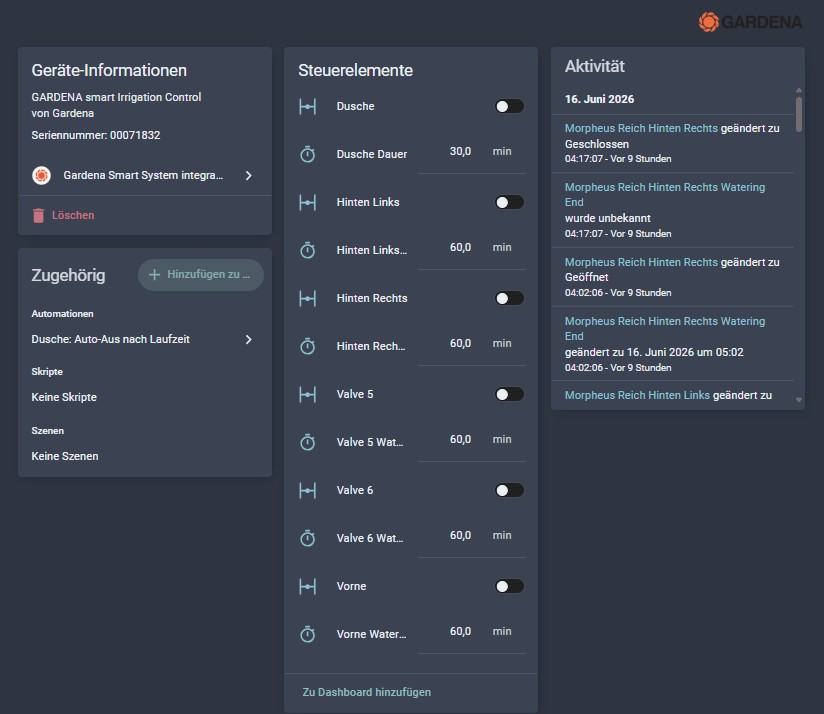
    📸 Screenshot der Gardena Integration in Home Assistant

    Das Problem: Wer kennt das nicht – man dreht die Dusche auf, geht kurz ins Haus und vergisst sie oder man nutzt die Dusche nur kurz und es liegt die ganze Zeit der Wassserdruck an. Gerade bei einer Gartendusche, die über ein steuerbares Ventil läuft, ist eine automatische Abschaltung ein Muss.

    Außerdem liefert das Ventil intern die Zustände „open“ und „closed“ – für ein deutschsprachiges Dashboard möchte ich lieber „Ein“ und „Aus“ sehen.


    🎯 Ziele

    • ⏱️ Dusche schaltet sich nach konfigurierbarer Zeit automatisch ab (Standard: 60 Minuten)
    • 🔢 Laufzeit per Eingabefeld einstellbar (5–180 Minuten) – kein Schieberegler
    • 🔄 Öffnet man die Dusche erneut während der Timer läuft, startet der Countdown von vorne
    • 🏷️ Dashboard-Button zeigt „Ein“ / „Aus“ statt der internen Zustände „open“ / „closed“

    🧩 Helper

    • input_number.dusche_laufzeit – Einstellbare Laufzeit bis zum automatischen Abschalten. Standard: 30 Min, Bereich: 5–180 Min, Eingabe als Zahlenfeld (kein Schieberegler).

    🤖 Die Automation: Auto-Aus nach Laufzeit

    Die Automation ist einfach und zuverlässig aufgebaut:

    • Trigger: Ventil wird geöffnet
    • Action: Warte die konfigurierte Laufzeit, prüfe ob das Ventil noch offen ist, schließe es dann automatisch
    • mode: restart – Wird die Dusche erneut geöffnet während der Timer läuft, startet der Countdown neu. Es läuft immer nur ein Timer gleichzeitig.

    Die Condition vor dem Schließen ist wichtig: Hat jemand die Dusche in der Zwischenzeit manuell geschlossen, passiert beim automatischen Schließversuch nichts – kein unnötiger Schaltvorgang.


    🖥️ Die Dashboard-Button

    Die Button folgt dem gleichen Design wie die Jacuzzi-Buttons: grüner Hintergrund wenn die Dusche läuft, dunkler Hintergrund wenn sie geschlossen ist. Der interne Zustand „open“ / „closed“ wird per state_display-Template in „Ein“ / „Aus“ übersetzt. Und dann noch der Button über den die Laufzeit eingestellt werden kann.
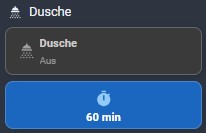
    📸 Screenshot des Dusche-Buttons im Dashboard – sowie der Laufzeit

    📋 Der YAML-Code

    Helper & Automation (config/packages/dusche.yaml)

    # config/packages/dusche.yaml
    
    # --- Helper ---
    input_number:
      dusche_laufzeit:
        name: "Dusche Laufzeit (Min)"
        initial: 60
        min: 5
        max: 180
        step: 5
        unit_of_measurement: min
        mode: box
        icon: mdi:timer-outline
    
    # --- Automation ---
    automation:
      - alias: "Dusche: Auto-Aus nach Laufzeit"
        description: "Schließt das Duschventil automatisch nach konfigurierbarer Zeit"
        mode: restart
        trigger:
          - platform: state
            entity_id: valve.morpheus_reich_valve_4
            to: "open"
        action:
          - delay:
              minutes: "{{ states('input_number.dusche_laufzeit') | int(60) }}"
          - condition: state
            entity_id: valve.morpheus_reich_valve_4
            state: "open"
          - service: valve.close_valve
            target:
              entity_id: valve.morpheus_reich_valve_4
          - service: system_log.write
            data:
              message: >
                Dusche: automatisch geschlossen nach
                {{ states('input_number.dusche_laufzeit') | int }} Min
              level: info
    

    Dashboard-Button (Lovelace YAML)

    square: false
    type: grid
    cards:
      - type: custom:button-card
        entity: valve.morpheus_reich_valve_4
        name: Dusche
        icon: mdi:shower-head
        show_state: true
        size: 22px
        state_display: |
          [[[
            return entity.state === 'open' ? 'Ein' : 'Aus';
          ]]]
        tap_action:
          action: toggle
        hold_action:
          action: more-info
        state:
          - value: open
            styles:
              card:
                - background: "#2e7d32"
                - border: 2px solid "#2e7d32"
              icon:
                - color: "#ffffff"
              name:
                - color: "#ffffff"
              state:
                - color: "#e8f5e9"
          - value: closed
            styles:
              card:
                - background: "#3a3a3a"
                - border: "1px solid #666"
              icon:
                - color: "#9e9e9e"
              name:
                - color: "#cccccc"
              state:
                - color: "#aaaaaa"
        styles:
          card:
            - height: 60px
            - padding: 6px 10px
            - border-radius: 10px
            - background: var(--ha-card-background)
            - border: 1px solid var(--divider-color)
            - cursor: pointer
          grid:
            - grid-template-areas: "\"i n\" \"i s\""
            - grid-template-columns: 32px auto
            - grid-template-rows: auto auto
            - align-items: center
            - justify-items: start
          icon:
            - width: 22px
            - height: 22px
            - color: var(--secondary-text-color)
          name:
            - font-size: 14px
            - font-weight: 600
            - justify-self: start
            - text-align: left
          state:
            - font-size: 12px
            - opacity: 0.8
            - justify-self: start
            - text-align: left
      - type: custom:button-card
        name: Dauer
        icon: mdi:timer
        show_name: false
        entity: input_number.dusche_laufzeit
        tap_action:
          action: call-service
          service: input_number.increment
          target:
            entity_id: input_number.dusche_laufzeit
        hold_action:
          action: call-service
          service: input_number.decrement
          target:
            entity_id: input_number.dusche_laufzeit
        double_tap_action:
          action: more-info
        show_state: true
        state_display: |
          [[[
            const v = Number(entity.state);
            return `${v} min`;
          ]]]
        aspect_ratio: 3/1
        size: 22px
        styles:
          card:
            - height: 60px
            - padding: 6px 10px
            - border-radius: 10px
            - border: 1px solid
            - background: |
                [[[
                  const v = Number(entity.state);
                  if (v === 0) return '#424242';       // aus / deaktiviert
                  if (v <= 90) return '#2e7d32';        // grün (kurz, sicher)
                  if (v <= 150) return '#f9a825';       // gelb (normal)
                  return '#c62828';                    // rot (lang)
                ]]]
          name:
            - font-size: 14px
            - font-weight: 600
            - color: "#cccccc"
          icon:
            - width: 22px
            - height: 22px
            - color: "#bdbdbd"
          state:
            - font-size: 14px
            - font-weight: bold
            - color: "#ffffff"
    columns: 2
    

    ✅ Fazit

    Mit relativ wenig Aufwand ist aus einem gewöhnlichen Garten-Jacuzzi und einer Dusche eine vollständig smarte Wellness-Oase geworden. Der Jacuzzi heizt praktisch kostenlos mit Solarstrom, filtert das Wasser zuverlässig auch an sonnenarmen Tagen – und schaltet sich bei manueller Nutzung einfach gar nicht erst in den Weg. Die Gartendusche vergisst sich nicht mehr von selbst.

    Was mich dabei am meisten überzeugt: Das System ist robust gegenüber manuellen Eingriffen. Wer den Spa von Hand einschaltet, wird nicht von der Automatisierung überrascht. Wer die Dusche früher zudreht als geplant, muss sich nicht um den laufenden Timer sorgen. Die Automatisierung hilft – sie übernimmt nicht die Kontrolle.

    Hast du ähnliche Geräte im Garten? Ich freue mich über Fragen und Feedback in den Kommentaren! 👇
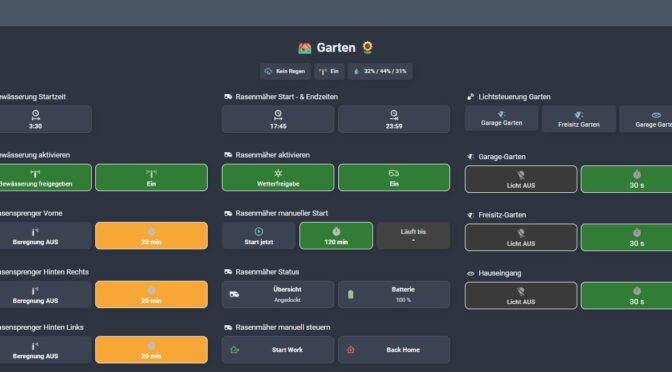
    🤖 Intelligente Steuerung für den Mähroboter mit Home Assistant

    Als Besitzer eines automatischen Mähroboters steht man vor der Herausforderung, ihn möglichst effizient, wetterabhängig und zeitschonend zu steuern.

    In meinem Smart Home nutze ich Home Assistant, um meinen Green Cruiser Mähroboter (Gardena smart SILENO city, 500 m²) perfekt in meinen Alltag zu integrieren.

    Heute möchte ich dir meine finale Automatisierungslösung vorstellen, die ich über mehrere Wochen optimiert habe. Ich erkläre dir genau, wie die Steuerung funktioniert, welche Automatisierungen ich dafür eingesetzt habe, welche Helfer-Entitäten dabei eine wichtige Rolle spielen und wie die Benutzeroberfläche zur Steuerung aufgebaut ist.


    🔧 Ausgangsproblem

    Der Gardena Mähroboter bringt von Haus aus ein eigenes Scheduling-System mit.

    Dieses steuert:

    • wann der Roboter fährt
    • wann er lädt
    • wann er pausiert

    👉 Problem:

    • Zeitplan aktiv → ✅ gutes Ladeverhalten, ❌ automatisches Starten
    • Zeitplan deaktiviert → ✅ keine Eigenstarts, ❌ Ladeverhalten teilweise suboptimal

    Zusätzlich:

    • der Zeitplan lässt sich nur „pausieren“
    • wird aber im Hintergrund teilweise wieder automatisch aktiviert

    🎯 Ziele meiner Automatisierung

    • ✅ Mähen nur in festgelegten Zeitfenstern
    • 🌧️ Kein Mähen bei Regen
    • 🔋 Automatisches Fortsetzen des Mähens nach dem Aufladen
    • ⚡ Manuelles, spontanes Mähen für eine selbstgewählte Dauer unabhängig von Zeitfenstern
    • 🛑 Verhindern unerlaubter Starts außerhalb erlaubter Zeitfenster ohne expliziten Home Assistant-Trigger
    • 📊 Übersichtliche Bedienelemente und Statusanzeigen in Home Assistant
    • 👉 Home Assistant soll die einzige Steuerinstanz sein – ohne unkontrolliertes Eigenverhalten des Roboters

    🧩 Architektur meines Systems

    Das gesamte System basiert auf drei zentralen Bausteinen:

    • Automatikbetrieb (Zeit + Wetter + Akku)
    • Spontanbetrieb (manuell über UI)
    • Schutz-Mechanismus gegen Fremdstarts

    🧩 Wichtigste Hilfsmittel: Helper (Input-Entitäten)

    Damit die Automatisierungen flexibel und nutzerfreundlich sind, verwende ich verschiedene Helper in Home Assistant:

    🔘 1. Steuer-Flags

    • ▶️ input_boolean.mahroboter_spontan_akti
      Steuert den manuellen, spontanen Mähmodus. Wird dieser aktiviert, läuft der Mäher unabhängig vom Zeitfenster.
    • 📌 input_boolean.mahroboter_hat_gemaeht
      Merkt sich, ob der Mäher bereits gemäht hat – wichtig, um nach vollständigem Akku-Laden richtig zu entscheiden.

    ⏱ 2. Zeitsteuerung

    • 🕒 input_datetime.mahroboter_startzeit und input_datetime.mahroboter_endzeit
      Dienen zur Definition der erlaubten Mähzeitfenster. So kann man jederzeit bequem per UI Start- und Endzeit anpassen.

    ⏳ 3. Spontanmodus Parameter

    • ⏱ input_number.mahroboter_spontan_dauer
      Einstellbarer Timer, wie lange das spontane Mähen laufen soll.
    • 📅 input_datetime.mahroboter_spontan_ende
      Speichert das Ende des spontanen Mähvorgangs zeitlich ab, damit es in der UI angezeigt werden kann.

    Diese Helper sind essentiell, um dynamisch und intelligent auf Zeit, Regen und Batterielevel reagieren zu können.


    🌦 Wetterlogik (Binary Sensor)

    Ein wichtiger Bestandteil ist ein eigener Sensor:

    👉 „Mähroboter Regen OK“

    Funktion

    • wertet die Regenrate aus
    • entscheidet, ob Mähen aktuell erlaubt ist

    Logik (vereinfacht)

    • Regenrate < 0.1 → OK
    • Regenrate >= 0.1 → gesperrt

    YAML – Code

    - binary_sensor:
        - name: "Mähroboter Regen OK"
          unique_id: maehroboter_regen_ok
          state: >
            {{ states('sensor.gw1100a_rain_rate') | float(0) < 0.1 }}
          icon: >
            {% if states('sensor.gw1100a_rain_rate') | float(0) < 0.1 %}
              mdi:weather-sunny
            {% else %}
              mdi:weather-rainy
            {% endif %}

    👉 Vorteil:

    ✅ klare Freigabe / Sperre
    ✅ direkt im Dashboard sichtbar
    ✅ einfache Integration in Automationen


    ⚙️ Die drei finalen Automatisierungen im Detail

    1. 🌱 Intelligente Regen-, Akku- und Zeitsteuerung

    Diese Automatisierung sorgt dafür, dass der Green Cruiser nur im definierten Zeitfenster mäht, bei Regen sofort ins Dock zurückkehrt und nach vollem Akku-Aufladen sein Mähen fortsetzt.

    Trigger:

    • ⏰ Startzeit erreicht (input_datetime.mahroboter_startzeit)
    • 🏁 Endzeit erreicht (input_datetime.mahroboter_endzeit)
    • 🌧 Regen beginnt
    • ☀️ Regen ist mindestens 2 Stunden vorbei
    • 🔋 Akku voll (>95%)

    Bedingungen & Ablauf:

    • ➡️ Start bei passenden Bedingungen innerhalb Zeitfenster
    • 🚫 Kein Start bei Regen
    • 🔄 Fortsetzung nach dem Laden
    • 🛑 Rückkehr bei Regen oder Endzeit

    Diese Logik sorgt für maximale Effizienz: Kein Mähen bei Regen, nur im definierten Fenster, und automatische Fortsetzung nach Laden.

    alias: "Mähroboter: Intelligente Regen-, Akku- und Zeitsteuerung"
    description: >
      Green Cruiser fährt nur im Zeitfenster, reagiert auf Regen und setzt nach
      Laden fort.
    triggers:
      - trigger: time
        at: input_datetime.mahroboter_startzeit
        id: zeit_start
      - trigger: time
        at: input_datetime.mahroboter_endzeit
        id: zeit_ende
      - trigger: numeric_state
        entity_id: sensor.gw1100a_rain_rate
        above: 0
        id: regen_start
      - trigger: numeric_state
        entity_id: sensor.gw1100a_rain_rate
        below: 0.1
        for: "02:00:00"
        id: regen_vorbei
      - trigger: numeric_state
        entity_id: sensor.green_cruiser_battery_level_2
        above: 95
        id: akku_voll
    actions:
      - choose:
          - conditions:
              - condition: state
                entity_id: input_boolean.mahroboter_spontan_akti
                state: "off"
              - condition: or
                conditions:
                  - condition: trigger
                    id: zeit_start
                  - condition: trigger
                    id: regen_vorbei
                  - condition: trigger
                    id: akku_voll
              - condition: time
                after: input_datetime.mahroboter_startzeit
                before: input_datetime.mahroboter_endzeit
              - condition: numeric_state
                entity_id: sensor.gw1100a_rain_rate
                below: 0.1
              - condition: state
                entity_id: lawn_mower.green_cruiser_lawn_mower
                state: docked
              - condition: or
                conditions:
                  - condition: not
                    conditions:
                      - condition: trigger
                        id: akku_voll
                  - condition: state
                    entity_id: input_boolean.mahroboter_hat_gemaeht
                    state: "on"
            sequence:
              - action: button.press
                target:
                  entity_id: button.green_cruiser_start_mowing_now
              - action: input_boolean.turn_on
                target:
                  entity_id: input_boolean.mahroboter_hat_gemaeht
          - conditions:
              - condition: state
                entity_id: input_boolean.mahroboter_spontan_akti
                state: "off"
              - condition: or
                conditions:
                  - condition: trigger
                    id: zeit_ende
                  - condition: trigger
                    id: regen_start
            sequence:
              - action: button.press
                target:
                  entity_id: button.green_cruiser_return_to_dock_2
              - condition: trigger
                id: zeit_ende
              - action: input_boolean.turn_off
                target:
                  entity_id: input_boolean.mahroboter_hat_gemaeht
    mode: restart
    

    🧠 Besonderheit

    Die Automation nutzt gezielt:

    • Trigger-ID (zeit_start, regen_vorbei, akku_voll)
    • Zustandslogik (mahroboter_hat_gemaeht)

    👉 Dadurch entsteht eine sehr präzise Steuerung ohne Chaoszustände

    2. ⚡ Spontan mähen für Dauer

    Manchmal will man nicht auf Zeitfenster warten und den Mäher spontan starten lassen – z. B. an einem sonnigen Tag zwischendurch.

    Trigger:

    • ▶️ Spontanmodus wird aktiviert
    • 🔋 Akku ist voll

    Ablauf:

    • 🚀 Start aus dem Dock
    • 📅 Berechnung der Endzeit
    • ⏱ Lauf für definierte Dauer
    • 🏠 Rückkehr ins Dock
    • 🔁 Neustart nach Laden wenn nötig
    alias: "Mähroboter: Spontan mähen für Dauer"
    description: ""
    triggers:
      - trigger: state
        entity_id: input_boolean.mahroboter_spontan_akti
        to: "on"
        id: start
      - trigger: numeric_state
        entity_id: sensor.green_cruiser_battery_level_2
        above: 95
        id: akku_voll
    actions:
      - choose:
          - conditions:
              - condition: trigger
                id: start
              - condition: state
                entity_id: lawn_mower.green_cruiser_lawn_mower
                state: docked
            sequence:
              - action: button.press
                target:
                  entity_id: button.green_cruiser_start_mowing_now
              - action: input_boolean.turn_on
                target:
                  entity_id: input_boolean.mahroboter_hat_gemaeht
              - action: input_datetime.set_datetime
                target:
                  entity_id: input_datetime.mahroboter_spontan_ende
                data:
                  datetime: >
                    {{ (now() +
                    timedelta(minutes=states('input_number.mahroboter_spontan_dauer')
                    | int)).strftime('%Y-%m-%d %H:%M:%S') }}
              - delay:
                  minutes: "{{ states('input_number.mahroboter_spontan_dauer') | int }}"
              - action: button.press
                target:
                  entity_id: button.green_cruiser_return_to_dock_2
              - action: input_boolean.turn_off
                target:
                  entity_id: input_boolean.mahroboter_spontan_akti
          - conditions:
              - condition: trigger
                id: akku_voll
              - condition: state
                entity_id: input_boolean.mahroboter_spontan_akti
                state: "on"
              - condition: state
                entity_id: input_boolean.mahroboter_hat_gemaeht
                state: "on"
              - condition: state
                entity_id: lawn_mower.green_cruiser_lawn_mower
                state: docked
            sequence:
              - action: button.press
                target:
                  entity_id: button.green_cruiser_start_mowing_now
    mode: restart
    

    🧠 Besonderheit

    👉 Diese Automation funktioniert unabhängig vom Zeitfenster

    → daher war eine zusätzliche Schutzlogik notwendig

    3. 🛡 Unerlaubten Start blockieren

    Manche Mäher starten auch mal spontan oder ungewollt. Diese Automatisierung verhindert genau das – auch unter realen Bedingungen mit verzögerten Zustandswechseln und Cloud-abhängigem Verhalten.

    Problem (genaue Beschreibung am Ende vom Beitrag):

    Der Gardena Zeitplan darf:

    • aktiviert bleiben (für Ladeverhalten)
    • startet aber trotzdem eigenständig

    Trigger:

    • ⚡ Zustand wechselt auf „mowing“

    Bedingungen:

    • 🚫 Spontanmodus aus
    • ⏰ außerhalb Zeitfenster

    Ablauf:

    • ⏳ kurze Wartezeit, bis der Mäher in einem stabilen Zustand ist
    • 🔁 Stop-Befehl wird gezielt und mehrfach gesende
    • 🧠 robuste Logik, die nicht von einem einzelnen Zustand abhängig ist
    • 🏠 Rückfahrt zum Dock wird aktiv erzwungen

    Im praktischen Einsatz hat sich gezeigt, dass der Mähroboter nach dem Start nicht sofort auf Steuerbefehle reagiert und intern verschiedene Zwischenzustände durchläuft (z. B. Start, Bewegung, Positionierung).

    Daher wurde die Automatisierung bewusst so aufgebaut, dass:

    • ⏱ genügend Zeit für stabile Zustandswechsel eingeplant wird
    • 🔁 Stop-Befehle wiederholt gesendet werden (Retry-Mechanismus)
    • 📡 auch Cloud- oder Integrationsverzögerungen berücksichtigt werden
    • 🔍 Debug-Informationen zur Analyse ausgegeben werde

    👉 Dadurch wird sichergestellt, dass der Mähroboter auch bei Änderungen durch Firmware- oder Integrations-Updates zuverlässig gestoppt wird.

    alias: "Mähroboter: Unerlaubten Start blockieren mit Notifications"
    description: ""
    triggers:
      - trigger: state
        entity_id: lawn_mower.green_cruiser_lawn_mower
        to: mowing
    conditions:
      - condition: state
        entity_id: input_boolean.mahroboter_spontan_akti
        state: "off"
      - condition: template
        value_template: >
          {% set now_time = now().time() %} {% set start =
          strptime(states('input_datetime.mahroboter_startzeit'), '%H:%M:%S').time()
          %} {% set end = strptime(states('input_datetime.mahroboter_endzeit'),
          '%H:%M:%S').time() %} {{ now_time < start or now_time > end }}
    actions:
      - data:
          level: warning
          message: >
            MC: Fremdstart erkannt → adaptive Prüfung startet State={{
            states('lawn_mower.green_cruiser_lawn_mower') }}, Time={{ now() }}
        action: system_log.write
      - data:
          title: Achtung - Mähroboter unerlaubter Start
          message: >
            Der Mähroboter hat außerhalb der erlaubten Zeit gestartet ({{
            now().strftime('%H:%M') }} Uhr).
          target: [email protected]
        action: notify.kottlowski_gmail_com
      - repeat:
          while:
            - condition: template
              value_template: >
                {{ states('lawn_mower.green_cruiser_lawn_mower') not in ['docked',
                'charging', 'returning'] }}
            - condition: template
              value_template: |
                {{ repeat.index <= 6 }}
          sequence:
            - target:
                entity_id: button.green_cruiser_return_to_dock_2
              action: button.press
            - data:
                level: warning
                message: >
                  MC: STOP Versuch {{ repeat.index }} State={{
                  states('lawn_mower.green_cruiser_lawn_mower') }}, Time={{ now() }}
              action: system_log.write
            - wait_template: >
                {{ states('lawn_mower.green_cruiser_lawn_mower') in ['docked',
                'charging', 'returning'] }}
              timeout: "00:00:15"
      - wait_template: >
          {{ states('lawn_mower.green_cruiser_lawn_mower') in ['docked', 'charging'] }}
        timeout: "00:05:00"
        continue_on_timeout: true
      - choose:
          - conditions:
              - condition: template
                value_template: >
                  {{ states('lawn_mower.green_cruiser_lawn_mower') in ['docked',
                  'charging'] }}
            sequence:
              - data:
                  level: info
                  message: |
                    MC: Roboter erfolgreich zurück zur Basis Time={{ now() }}
                action: system_log.write
        default:
          - data:
              level: error
              message: |
                MC: FEHLER – Roboter konnte nicht gestoppt werden Time={{ now() }}
            action: system_log.write
          - data:
              title: Achtung - Mähroboter konnte nicht gestoppt werden!
              message: >
                Der Mähroboter mäht weiterhin außerhalb der erlaubten Zeit und
                konnte nicht automatisch gestoppt werden!
              target: [email protected]
            action: notify.kottlowski_gmail_com
    mode: restart
    

    🧠 Ergebnis

    👉 Der Zeitplan bleibt aktiv
    👉 das Ladeverhalten bleibt optimal
    👉 aber jede unerwünschte Bewegung wird sofort gestoppt


    📊 Die Steuerungsoberfläche (UI) für den Mähroboter

    Mähroboters

    Um die Steuerung einfach und intuitiv zu halten, habe ich in Home Assistant eine übersichtliche View aufgebaut.

    • 🕒 Zeit-Fenster Steuerung
    • 🌦 Wetterfreigabe
    • ⚙️ Automationsstatus
    • ▶️ Manueller Start
    • 📊 Status & Batterie
    • 🎮 Direkte Steuerung

    Der Aufbau nutzt Custom Button Cards, die das UI optisch ansprechend und übersichtlich gestalten.

    
          - type: grid
            cards:
              - type: heading
                heading: Rasenmäher Start - & Endzeiten
                heading_style: title
                icon: mdi:robot-mower
              - square: false
                type: grid
                columns: 2
                grid_options:
                  rows: 1
                cards:
                  - type: custom:button-card
                    entity: input_datetime.mahroboter_startzeit
                    icon: mdi:clock-start
                    show_name: false
                    show_state: true
                    show_icon: true
                    tap_action:
                      action: more-info
                    layout: vertical
                    aspect_ratio: 3/1
                    size: 22px
                    styles:
                      card:
                        - height: 60px
                        - padding: 4px
                        - border-radius: 10px
                        - border: '1px solid #555'
                        - background: var(--card-background-color)
                      grid:
                        - grid-template-areas: '"i" "s"'
                        - grid-template-rows: 1fr auto
                        - justify-items: center
                      icon:
                        - width: 24px
                        - height: 24px
                      state:
                        - font-size: 14px
                        - font-weight: bold
                  - type: custom:button-card
                    entity: input_datetime.mahroboter_endzeit
                    icon: mdi:clock-end
                    show_name: false
                    show_state: true
                    show_icon: true
                    tap_action:
                      action: more-info
                    layout: vertical
                    aspect_ratio: 3/1
                    size: 22px
                    styles:
                      card:
                        - height: 60px
                        - padding: 4px
                        - border-radius: 10px
                        - border: '1px solid #555'
                        - background: var(--card-background-color)
                      grid:
                        - grid-template-areas: '"i" "s"'
                        - grid-template-rows: 1fr auto
                        - justify-items: center
                      icon:
                        - width: 24px
                        - height: 24px
                      state:
                        - font-size: 14px
                        - font-weight: bold
              - type: heading
                heading_style: title
                icon: ''
              - type: heading
                heading: Rasenmäher aktivieren
                heading_style: title
                icon: mdi:robot-mower
              - square: false
                type: grid
                cards:
                  - type: custom:button-card
                    entity: binary_sensor.maehroboter_regen_ok
                    aspect_ratio: 3/1
                    size: 22px
                    name: Wetterfreigabe
                    show_name: true
                    show_state: false
                    icon: |
                      [[[
                        const s = states['binary_sensor.mahroboter_regen_ok']?.state;
                        return s === 'on'
                          ? 'mdi:weather-sunny'
                          : 'mdi:weather-rainy';
                      ]]]
                    tap_action:
                      action: none
                    hold_action:
                      action: none
                    double_tap_action:
                      action: none
                    styles:
                      card:
                        - height: 60px
                        - padding: 6px 10px
                        - border-radius: 10px
                        - border: 1px solid
                        - background: |
                            [[[
                              const s = states['binary_sensor.mahroboter_regen_ok']?.state;
                              if (s === 'on') return '#2e7d32';   // grün → Freigabe erteilt
                              return '#c62828';                  // rot → gesperrt (Regen)
                            ]]]
                      name:
                        - font-size: 14px
                        - color: '#ffffff'
                      icon:
                        - width: 22px
                        - height: 22px
                        - color: '#ffffff'
                  - type: custom:button-card
                    entity: >-
                      automation.mahroboter_intelligente_regen_akku_und_zeitsteuerung
                    icon: mdi:robot-mower-outline
                    show_name: false
                    show_state: true
                    layout: vertical
                    aspect_ratio: 3/1
                    size: 22px
                    styles:
                      card:
                        - height: 60px
                        - padding: 6px 10px
                        - border-radius: 10px
                        - border: '1px solid #555'
                      grid:
                        - grid-template-areas: '"i" "s"'
                        - grid-template-rows: 1fr auto
                        - justify-items: center
                      icon:
                        - width: 24px
                        - height: 24px
                      state:
                        - font-size: 14px
                        - font-weight: bold
                    state:
                      - value: 'on'
                        styles:
                          card:
                            - background: '#2e7d32'
                            - border: '1px solid #ffffff'
                          icon:
                            - color: '#a5d6a7'
                          state:
                            - color: '#e8f5e9'
                      - value: 'off'
                        styles:
                          card:
                            - background: '#c62828'
                            - border: '1px solid #ffffff'
                          icon:
                            - color: '#ffcdd2'
                          state:
                            - color: '#ffebee'
                columns: 2
                grid_options:
                  columns: 12
                  rows: 1
              - type: heading
                heading_style: title
                icon: ''
              - type: heading
                heading: Rasenmäher manueller Start
                heading_style: title
                icon: mdi:robot-mower
              - square: false
                type: grid
                cards:
                  - type: custom:button-card
                    entity: input_boolean.mahroboter_spontan_akti
                    aspect_ratio: 3/1
                    size: 22px
                    name: Start jetzt
                    icon: mdi:play-circle-outline
                    tap_action:
                      action: toggle
                    styles:
                      card:
                        - height: 60px
                        - padding: 6px 10px
                        - border-radius: 10px
                        - cursor: default
                      name:
                        - font-size: 14px
                        - font-weight: 600
                      icon:
                        - width: 22px
                        - height: 22px
                  - type: custom:button-card
                    name: Dauer
                    icon: mdi:timer
                    show_name: false
                    entity: input_number.mahroboter_spontan_dauer
                    tap_action:
                      action: call-service
                      service: input_number.increment
                      target:
                        entity_id: input_number.mahroboter_spontan_dauer
                    hold_action:
                      action: call-service
                      service: input_number.decrement
                      target:
                        entity_id: input_number.mahroboter_spontan_dauer
                    double_tap_action:
                      action: more-info
                    show_state: true
                    state_display: |
                      [[[
                        const v = Number(entity.state);
                        return `${v} min`;
                      ]]]
                    aspect_ratio: 3/1
                    size: 22px
                    styles:
                      card:
                        - height: 60px
                        - padding: 6px 10px
                        - border-radius: 10px
                        - border: 1px solid
                        - background: |
                            [[[
                              const v = Number(entity.state);
                              if (v === 0) return '#424242';       // aus / deaktiviert
                              if (v <= 120) return '#2e7d32';        // grün (kurz, sicher)
                              if (v <= 240) return '#f9a825';       // gelb (normal)
                              return '#c62828';                    // rot (lang)
                            ]]]
                      name:
                        - font-size: 14px
                        - font-weight: 600
                        - color: '#cccccc'
                      icon:
                        - width: 22px
                        - height: 22px
                        - color: '#bdbdbd'
                      state:
                        - font-size: 14px
                        - font-weight: bold
                        - color: '#ffffff'
                  - type: custom:button-card
                    name: Läuft bis
                    icon: mdi:clock-end
                    show_state: true
                    show_icon: false
                    state_display: |
                      [[[
                        const e = states['input_datetime.mahroboter_spontan_ende'];
                        if (!e || !e.state) return "-";
    
                        const d = new Date(e.state);
                        if (isNaN(d)) return "-";
    
                        return d.toLocaleTimeString([], {hour: '2-digit', minute:'2-digit'});
                      ]]]
                    styles:
                      card:
                        - height: 60px
                        - border-radius: 10px
                        - border: |
                            [[[
                              const e = states['input_datetime.mahroboter_spontan_ende'];
                              if (!e || !e.state) return 'none';
    
                              const end = new Date(e.state);
                              const now = new Date();
    
                              return (end > now) ? '1px solid white' : 'none';
                            ]]]
                        - background: |
                            [[[
                              const e = states['input_datetime.mahroboter_spontan_ende'];
                              if (!e || !e.state) return '#424242';
    
                              const end = new Date(e.state);
                              const now = new Date();
    
                              return (end > now) ? '#2e7d32' : '#424242';
                            ]]]
                      name:
                        - font-size: 14px
                        - font-weight: 600
                        - color: |
                            [[[
                              const e = states['input_datetime.mahroboter_spontan_ende'];
                              if (!e || !e.state) return '#cccccc';
    
                              const end = new Date(e.state);
                              const now = new Date();
    
                              return (end > now) ? 'white' : '#cccccc';
                            ]]]
                      icon:
                        - width: 22px
                        - height: 22px
                        - color: |
                            [[[
                              const e = states['input_datetime.mahroboter_spontan_ende'];
                              if (!e || !e.state) return '#bdbdbd';
    
                              const end = new Date(e.state);
                              const now = new Date();
    
                              return (end > now) ? 'white' : '#bdbdbd';
                            ]]]
                      state:
                        - font-size: 16px
                        - font-weight: bold
                        - color: white
                  - type: custom:button-card
                    show_name: false
                    show_icon: false
                    show_state: false
                    styles:
                      card:
                        - height: 60px
                        - background: none
                        - box-shadow: none
                        - border: none
                columns: 3
                grid_options:
                  rows: 1
              - type: heading
                heading_style: title
                icon: ''
              - type: heading
                heading: Rasenmäher Status
                heading_style: title
                icon: mdi:robot-mower
              - square: false
                type: grid
                cards:
                  - type: custom:button-card
                    entity: lawn_mower.green_cruiser_lawn_mower
                    name: Übersicht
                    icon: mdi:robot-mower
                    show_state: true
                    aspect_ratio: 3/1
                    size: 22px
                    tap_action:
                      action: more-info
                    hold_action:
                      action: none
                    double_tap_action:
                      action: none
                    state:
                      - value: mowing
                        styles:
                          card:
                            - background: '#2e7d32'
                            - border: 2px solid "#2e7d32"
                          icon:
                            - color: '#ffffff'
                          name:
                            - color: '#ffffff'
                          state:
                            - color: '#e8f5e9'
                      - value: returning
                        styles:
                          card:
                            - background: '#ef6c00'
                            - border: 2px solid "#ef6c00"
                          icon:
                            - color: '#ffffff'
                          name:
                            - color: '#ffffff'
                          state:
                            - color: '#fff3e0'
                    styles:
                      card:
                        - height: 60px
                        - padding: 6px 10px
                        - border-radius: 10px
                        - background: var(--ha-card-background)
                        - border: 1px solid var(--divider-color)
                        - cursor: pointer
                      grid:
                        - grid-template-areas: '"i n" "i s"'
                        - grid-template-columns: 32px auto
                        - grid-template-rows: auto auto
                        - align-items: center
                        - column-gap: 8px
                      icon:
                        - width: 22px
                        - height: 22px
                        - color: var(--secondary-text-color)
                      name:
                        - font-size: 14px
                        - font-weight: 600
                      state:
                        - font-size: 12px
                        - opacity: 0.8
                  - type: custom:button-card
                    entity: sensor.green_cruiser_battery_level_2
                    name: Batterie
                    icon: mdi:battery
                    show_state: true
                    aspect_ratio: 3/1
                    size: 22px
                    tap_action:
                      action: more-info
                    hold_action:
                      action: none
                    double_tap_action:
                      action: none
                    styles:
                      card:
                        - height: 60px
                        - padding: 6px 10px
                        - border-radius: 10px
                        - background: var(--ha-card-background)
                        - border: 1px solid var(--divider-color)
                        - cursor: pointer
                      grid:
                        - grid-template-areas: '"i n" "i s"'
                        - grid-template-columns: 32px auto
                        - grid-template-rows: auto auto
                        - align-items: center
                        - column-gap: 8px
                      icon:
                        - width: 22px
                        - height: 22px
                      name:
                        - font-size: 14px
                        - font-weight: 600
                      state:
                        - font-size: 12px
                        - opacity: 0.75
                columns: 2
              - type: heading
                heading: Rasenmäher manuell steuern
                heading_style: title
                icon: mdi:robot-mower
              - square: false
                type: grid
                cards:
                  - type: custom:button-card
                    entity: button.green_cruiser_start_mowing_now
                    name: Start Work
                    icon: mdi:home-export-outline
                    show_state: false
                    aspect_ratio: 3/1
                    size: 22px
                    tap_action:
                      action: call-service
                      service: button.press
                      target:
                        entity_id: button.green_cruiser_start_mowing_now
                    hold_action:
                      action: none
                    double_tap_action:
                      action: none
                    styles:
                      card:
                        - height: 60px
                        - padding: 6px 10px
                        - border-radius: 10px
                        - background: var(--ha-card-background)
                        - border: 1px solid var(--divider-color)
                        - cursor: pointer
                      grid:
                        - grid-template-areas: '"i n"'
                        - grid-template-columns: 32px auto
                        - align-items: center
                        - column-gap: 8px
                      icon:
                        - width: 22px
                        - height: 22px
                        - color: '#66bb6a'
                      name:
                        - font-size: 14px
                        - font-weight: 600
                  - type: custom:button-card
                    entity: button.green_cruiser_return_to_dock_2
                    name: Back Home
                    icon: mdi:home-import-outline
                    show_state: false
                    aspect_ratio: 3/1
                    size: 22px
                    tap_action:
                      action: call-service
                      service: button.press
                      target:
                        entity_id: button.green_cruiser_return_to_dock_2
                    hold_action:
                      action: none
                    double_tap_action:
                      action: none
                    styles:
                      card:
                        - height: 60px
                        - padding: 6px 10px
                        - border-radius: 10px
                        - background: var(--ha-card-background)
                        - border: 1px solid var(--divider-color)
                        - cursor: pointer
                      grid:
                        - grid-template-areas: '"i n"'
                        - grid-template-columns: 32px auto
                        - align-items: center
                        - column-gap: 8px
                      icon:
                        - width: 22px
                        - height: 22px
                        - color: '#e57373'
                      name:
                        - font-size: 14px
                        - font-weight: 600
                columns: 2

    ✅ Fazit und Ausblick

    Mit diesen Automatisierungen steuere ich meinen Mähroboter effizient, wetterabhängig und flexibel in Home Assistant.

    Die Kombination aus Zeitsteuerung, Regenwettererkennung, Akkustatus und manueller Spontansteuerung sorgt für maximale Automatisierung mit Benutzerkomfort.

    Die Helper erlauben individuelle Anpassungen ohne Codeänderung und die UI macht die Bedienung kinderleicht.

    Ich hoffe, dieser umfassende Einblick in meine Mähroboter-Steuerung zeigt dir, wie smart und flexibel man selbst vermeintlich simple Geräte in Home Assistant automatisieren kann!


    ⚠️ Problem: Der Gardena Zeitplan als „unsichtbarer Gegenspieler“

    Im Laufe der Umsetzung bin ich auf ein zentrales Problem gestoßen, das vermutlich viele Gardena-Nutzer kennen: Der in der App konfigurierte Zeitplan übernimmt nicht nur die Steuerung des Mähzeitraums, sondern beeinflusst auch das interne Verhalten des Roboters deutlich stärker als zunächst gedacht.

    Wird der Zeitplan aktiv genutzt, sorgt er zwar für ein stabiles Ladeverhalten, jedoch startet der Mähroboter automatisch zu den im Plan definierten Zeiten – unabhängig davon, ob Home Assistant gerade andere Bedingungen vorgibt.

    Eine einfache Lösung wie das „Pausieren“ des Zeitplans führt dabei nicht zum Ziel, da dieser Zustand von der Cloud bzw. vom Gerät selbst jederzeit wieder aufgehoben werden kann. In der Praxis bedeutet das: Der Mähroboter kann plötzlich wieder eigenständig starten, z. B. früh am Morgen, obwohl dies im Smart Home so gar nicht vorgesehen ist.

    Auf der anderen Seite führt ein vollständiges Deaktivieren oder Entfernen des Zeitplans häufig dazu, dass der Roboter nicht mehr zuverlässig vollständig lädt, da die interne Energiemanagement-Logik ebenfalls daran gekoppelt ist.

    👉 Es entsteht also ein klassischer Zielkonflikt:

    • ✅ Zeitplan aktiv → stabiles Laden, aber ungewollte Starts
    • ❌ Zeitplan aus → volle Kontrolle über Home Assistant, aber suboptimales Ladeverhalten

    Die Lösung dieses Problems ist kein simples Umschalten, sondern eine gezielte Kombination aus beiden Welten:

    • ✅ Der Zeitplan bleibt aktiv (für optimales Ladeverhalten)
    • ✅ Home Assistant übernimmt die eigentliche Steuerung
    • 🛡 Unerwünschte Starts werden aktiv erkannt und sofort korrigiert

    Genau aus diesem Grund ist die dritte Automatisierung „Unerlaubten Start blockieren“ ein essenzieller Bestandteil der Gesamtarchitektur. Sie fungiert als Schutzmechanismus, der sicherstellt, dass ausschließlich Home Assistant bestimmt, wann der Roboter tatsächlich mäht.

    Intelligentes Energiemanagement für Bosch Wärmepumpe mit Home Assistant

    In diesem Beitrag teile ich meine Erfahrungen und die Umsetzung eines Energy Managers in Home Assistant (HA) für meine Bosch Wärmepumpe Compress 5800i AW 12 ORE‑T in Kombination mit einer PV‑Anlage und einer Tesla Powerwall.

    🎉Energiemanagement – Motivation

    Bosch bietet einen kostenpflichtigen Energiemanager an, der die Wärmepumpe abhängig vom PV-Überschuss steuert:

    Viel PV-Strom-Überschuss → Wärmepumpe läuft intensiver
    Kein PV-Überschuss → Wärmepumpe im Normalmodus

    Ich wollte das in Home Assistant selbst umsetzen: Ein umfassendes System, das PV-Überschuss, Hausverbrauch und Powerwall-Ladestatus intelligent auswertet und steuert. Dabei sollten auch Temperaturbedingungen berücksichtigt werden. Das System sollte flexibel über Schalter und Zahlen steuerbar sein und automatisch die Wärmepumpe je nach Restüberschuss regeln.

    🧰Ausgangslage

    Seit etwa einem Jahr habe ich die Bosch Wärmepumpe und eine PV-Anlage installiert. Die PV-Anlage und die Tesla Powerwall ließen sich problemlos in HA integrieren (z.B. mit der „SMA Solar“ und der “Tesla Powerwall” Integration). Die Wärmepumpe von Bosch war allerdings schwieriger: Bosch stellt keine offizielle Schnittstelle für die über 150 Entitäten der Wärmepumpe zur Verfügung.

    👑Lösung: EMS-Bus-Gateway von BBQKees Electronics

    Nach längerer Recherche bin ich auf das EMS-Bus-Gateway von BBQKees Electronics gestoßen. Dieses Gateway bietet eine umfangreiche Knowledge Base und lässt sich gut über Matter in HA integrieren. So habe ich endlich Zugriff auf die Wärmepumpen-Daten bekommen.

    📟Dashboard

    Mein erstes Ziel war ein Dashboard mit den wichtigsten Wärmepumpen-Daten. Dabei hat mir die Webseite bosch-buderus-wp.github.io sehr geholfen.

    Hier der zugehörige Auszug aus der RAW-Konfigurationsdatei:

    YAML
      - type: custom:grid-layout
        path: waermepumpe
        title: Wärmepumpe
        theme: Nordic
        cards:
          - square: false
            type: grid
            cards:
              - square: false
                type: grid
                cards:
                  - graph: line
                    type: sensor
                    entity: sensor.boiler_burner_current_power
                    detail: 1
                    name: Modulation
                    icon: mdi:fan
                  - graph: line
                    type: sensor
                    entity: sensor.boiler_current_flow_temperature
                    detail: 1
                    name: Vorlauf
                    icon: mdi:thermometer-lines
                  - graph: line
                    type: sensor
                    entity: sensor.boiler_return_temperature
                    detail: 1
                    name: Rücklauf
                    icon: mdi:thermometer-lines
                  - graph: line
                    type: sensor
                    entity: sensor.shellyhtg3_543204575c94_temperature
                    detail: 1
                    name: Innentemperatur
                    icon: mdi:home-thermometer-outline
                  - graph: line
                    type: sensor
                    entity: sensor.boiler_air_inlet_temperature_tl2
                    detail: 1
                    name: Außentemperatur
                    icon: mdi:home-thermometer-outline
                    limits:
                      min: 0
                      max: 10
                  - type: gauge
                    unit: kW
                    name: WP Gesamt Extern
                    needle: true
                    grid_options:
                      columns: 6
                      rows: auto
                    severity:
                      green: 0
                      yellow: 10
                      red: 25
                    entity: sensor.warmepumpen_verbrauch_gesamt_taglich
                    max: 40
                  - type: gauge
                    entity: sensor.ems_verbrauchte_energie_taglich
                    unit: kW
                    name: WP Heizung
                    min: 0
                    needle: true
                    grid_options:
                      columns: 6
                      rows: auto
                    severity:
                      green: 0
                      yellow: 10
                      red: 25
                    max: 40
                  - type: gauge
                    entity: sensor.ems_erzeugte_energie_taglich
                    unit: kW
                    min: 0
                    name: Energieabgabe
                    needle: true
                    max: 100
                    severity:
                      green: 0
                      yellow: 100
                      red: 100
                  - type: gauge
                    entity: sensor.warmepumpe_cop
                    min: 0
                    name: COP
                    needle: true
                    unit: ' '
                    max: 20
                  - type: gauge
                    entity: sensor.starts_pro_kwh
                    min: 0
                    name: Starts pro kWh
                    severity:
                      green: 0
                      yellow: 5
                      red: 8
                    max: 10
                columns: 5
            columns: 1
          - type: history-graph
            entities:
              - entity: sensor.boiler_compressor_activity
                name: ' '
            hours_to_show: 24
            grid_options:
              columns: full
              rows: auto
            logarithmic_scale: false
            title: Heute
          - chart_type: bar
            period: hour
            type: statistics-graph
            entities:
              - sensor.ems_erzeugte_energie_taglich
              - sensor.ems_verbrauchte_energie_taglich
            stat_types:
              - change
            days_to_show: 1
        visible:
          - user: 9c3a30d6645649c386acf6485e8d39e3
        badges:
          - type: entity
            show_name: true
            show_state: true
            show_icon: true
            entity: sensor.boiler_compressor_activity
            name: Heizen
            icon: mdi:heat-pump
          - type: entity
            show_name: true
            show_state: true
            show_icon: true
            entity: select.boiler_aux_heater_mode
            name: Modus
            icon: mdi:auto-mode
        icon: mdi:heat-pump
        subview: true
      - type: sections
        max_columns: 3
        title: System
        path: system
        icon: mdi:archive-cog
        sections:
          - type: grid
            cards:
              - type: heading
                heading: System
                heading_style: title
              - type: tile
                entity: update.home_assistant_operating_system_update
                features_position: bottom
                vertical: false
                name: Operating System
              - type: tile
                entity: sensor.home_assistant_operating_system_newest_version
                features_position: bottom
                vertical: false
                name: Neueste Version
                icon: mdi:cogs
              - type: tile
                features_position: bottom
                vertical: false
                color: yellow
                tap_action:
                  action: toggle
                entity: button.ignore_all_issues
                name: Fehler löschen
              - type: tile
                entity: sensor.active_issues
              - type: tile
                entity: sensor.ignored_issues
              - type: tile
                entity: sensor.issues
              - type: tile
                features_position: bottom
                vertical: false
                name: 'Neu starten '
                color: red
                tap_action:
                  action: toggle
                entity: button.homeassistant_restart
              - type: tile
                features_position: bottom
                vertical: false
                entity: button.homeassistant_reload
                name: 'Neu laden '
                color: red
                tap_action:
                  action: toggle
          - type: grid
            cards:
              - type: heading
                heading: FRITZ!Box
                heading_style: title
              - type: tile
                entity: update.fritz_box_7530_fritz_os
                features_position: bottom
                vertical: false
                name: Firmware
              - type: tile
                entity: binary_sensor.fritz_box_7530_verbindung
                features_position: bottom
                vertical: false
                name: Verbunden
              - type: tile
                entity: sensor.fritz_box_7530_link_download_durchsatz
                features_position: bottom
                vertical: false
                name: Download Rate
              - type: tile
                entity: sensor.fritz_box_7530_link_upload_durchsatz
                features_position: bottom
                vertical: false
                name: Upload Rate
              - type: tile
                features_position: bottom
                vertical: false
                name: 'Neu starten '
                color: red
                tap_action:
                  action: toggle
                entity: button.fritz_box_7530_neu_starten
              - type: tile
                features_position: bottom
                vertical: false
                entity: button.fritz_box_7530_neu_verbinden
                name: 'Neu verbinden '
                color: red
                tap_action:
                  action: toggle
              - type: tile
                features_position: bottom
                vertical: false
                color: yellow
                tap_action:
                  action: toggle
                entity: button.fritz_box_7530_firmware_update
                name: 'Firmware Update '
              - type: tile
                features_position: bottom
                vertical: false
                color: yellow
                tap_action:
                  action: toggle
                entity: button.fritz_box_7530_aufraumen
                name: 'Aufräumen '
          - type: grid
            cards:
              - type: heading
                icon: mdi:fridge
                heading: NAS-Server
                heading_style: title
              - type: tile
                entity: update.diskstation_dsm_update
                features_position: bottom
                vertical: false
                name: DSM Update
              - type: tile
                entity: sensor.diskstation_temperatur
                features_position: bottom
                vertical: false
                name: Temperatur
              - type: tile
                features_position: bottom
                vertical: false
                color: red
                tap_action:
                  action: toggle
                entity: button.diskstation_reboot
                name: Reboot
              - type: tile
                features_position: bottom
                vertical: false
                color: red
                tap_action:
                  action: toggle
                entity: button.diskstation_shutdown
                name: Shutdown
              - type: gauge
                entity: sensor.diskstation_volume_1_belegter_speicherplatz
                max: 2.7
                name: Belegter Speicherplatz V1
                theme: Github Dark Theme
                grid_options:
                  columns: 6
                  rows: auto
                severity:
                  green: 0
                  yellow: 2
                  red: 2.4
              - type: gauge
                entity: sensor.diskstation_volume_2_belegter_speicherplatz
                max: 2.7
                name: Belegter Speicherplatz V2
                grid_options:
                  columns: 6
                  rows: auto
                severity:
                  green: 0
                  yellow: 2
                  red: 2.4
          - type: grid
            cards:
              - type: heading
                heading_style: title
                heading: Kamerabilder
              - show_name: true
                show_icon: true
                type: button
                name: Snapshots löschen
                icon: mdi:delete
                tap_action:
                  action: call-service
                  service: automation.trigger
                  service_data:
                    entity_id: automation.snapshots_sofort_loschen
                grid_options:
                  columns: 12
                  rows: 2
              - type: heading
                heading_style: title
                heading: Lichtsteuerung Urlaub
                grid_options:
                  columns: 6
                  rows: 1
              - type: markdown
                content: |
                  **Status:** {{ states('automation.zeitsteuerung_flur_zufall') }}
                text_only: true
                grid_options:
                  columns: 12
                  rows: auto
              - show_name: true
                show_icon: true
                type: button
                name: Automationen einschalten
                icon: mdi:power-cycle
                tap_action:
                  action: perform-action
                  target:
                    entity_id:
                      - automation.zeitsteuerung_lichterkette_garten
                      - automation.zeitsteuerung_schlafzimmer
                      - automation.zufall_steuerung_spitzboden
                      - automation.zeitsteuerung_flur_zufall
                      - automation.zufalls_steuerung_licht_wohnzimmer_schraenke
                      - automation.zufalls_steuerung_stehlampe_wz
                      - automation.zufall_steuerung_schreibtisch_buro_rene
                      - automation.zufall_steuerung_licht_treppenhaus
                  perform_action: automation.turn_on
                  data: {}
                show_state: false
                grid_options:
                  columns: 6
                  rows: 2
              - show_name: true
                show_icon: true
                type: button
                name: Automationen ausschalten
                icon: mdi:power-off
                tap_action:
                  action: perform-action
                  target:
                    entity_id:
                      - automation.zeitsteuerung_lichterkette_garten
                      - automation.zeitsteuerung_schlafzimmer
                      - automation.zufall_steuerung_spitzboden
                      - automation.zeitsteuerung_flur_zufall
                      - automation.zufalls_steuerung_licht_wohnzimmer_schraenke
                      - automation.zufalls_steuerung_stehlampe_wz
                      - automation.zufall_steuerung_schreibtisch_buro_rene
                      - automation.zufall_steuerung_licht_treppenhaus
                  perform_action: automation.turn_off
                  data:
                    stop_actions: true
          - type: grid
            cards:
              - type: heading
                heading_style: title
                heading: Backup
              - type: tile
                features_position: bottom
                vertical: false
                entity: sensor.backup_nachstes_geplantes_automatisches_backup
                name: Nächste auto. Backup
              - type: tile
                features_position: bottom
                vertical: false
                entity: sensor.backup_letztes_erfolgreiches_automatisches_backup
                name: Letztes auto. Backup
              - show_name: true
                show_icon: true
                type: button
                name: Voll-Backup starten
                icon: mdi:backup-restore
                tap_action:
                  action: call-service
                  service: automation.trigger
                  service_data:
                    entity_id: automation.backup_manuell_komplett
              - show_name: true
                show_icon: true
                type: button
                name: Teil-Backup starten
                icon: mdi:backup-restore
                tap_action:
                  action: call-service
                  service: automation.trigger
                  service_data:
                    entity_id: automation.backup_manuell_teilbackup
          - type: grid
            cards:
              - type: heading
                heading_style: title
                heading: EMS-ESP
              - type: tile
                entity: sensor.system_ems_bus
              - type: tile
                entity: binary_sensor.system_status
              - type: tile
                entity: sensor.system_version
                features_position: bottom
                vertical: false
                name: Firmware
              - type: tile
                entity: sensor.system_uptime
                features_position: bottom
                vertical: false
                name: Uptime
              - type: tile
                entity: sensor.system_rx_fails
              - type: tile
                entity: sensor.system_rx_received
                features_position: bottom
                vertical: false
                name: RX Received
              - type: tile
                entity: sensor.system_tx_reads
              - type: tile
                entity: sensor.system_tx_fails
        theme: Nordic
        visible:
          - user: xxx
        cards: []
        subview: true
    

    🧱Bestandteile und Funktionen meines Energy Manager Packages

    1) Helpers / Controls – Was ist definiert und wofür?

    Im Package werden diverse Input‑Helper verwendet, um den Energy Manager flexibel steuerbar zu machen. Ich erkläre sie nacheinander:

    Input Booleans

    • input_boolean.energy_manager_enabled

      Beschreibt, ob der Energy Manager grundsätzlich aktiv ist. Wird verwendet als Hauptschalter: viele Automationen und Logik prüfen diesen Zustand.
    • input_boolean.energy_manager_temp_ok

      Signalisiert, ob die Außentemperatur (bzw. der Luftansaugtemperatur der WP) in einem Bereich liegt, in dem das Energiemanagement arbeiten soll. Das verhindert sinnlose Heizaktivitäten bei sehr niedrigen Außentemperaturen.
    • input_boolean.energy_manager_force_zero

      Ein Start‑/Initialisierungs‑Flag: beim Start von HA wird temporär gesetzt, damit die gemittelten Sensoren nicht wegen initialer fehlender Rohdaten fälschlicherweise Werte liefern. Wird automatisch wieder ausgeschaltet.
    • input_boolean.em_allow_aux

      Erlaubt die Nutzung des Aux‑Heaters (Nachheizung). Standardmäßig aus, kann manuell eingeschaltet werden, wenn Zusatzheizung erwünscht ist.
    • input_boolean.em_dhw_charging

      Kennzeichnet, ob eine gezielte Boiler‑/DHW‑Ladung via PV‑Überschuss aktuell aktiv ist.
    • input_boolean.em_safe_mode

      Ein Schutzschalter, um den Manager in einen sicheren Zustand zu versetzen (Stopschalter, z. B. während Reset oder Wartung).

    Input Select

    • input_select.energy_manager_mode

      Umschaltbar zwischen „Sommer“ und „Winter“. In Sommer wird der Energiemanager weitestgehend deaktiviert (z. B. keine Heizaktivitäten), in Winter wird er aktiviert und die zugehörigen Automationen eingeschaltet.

    Input Numbers

    Diese Zahlen erlauben die Feinabstimmung des Managers ohne Anpassung der YAML‑Logik:

    • pw_max_charge – max. gewünschte Ladeleistung für die Powerwall (kW).
    • energy_manager_temp_start / energy_manager_temp_stop – Temperatur‑Hysterese für energy_manager_temp_ok (Start‑ und Stop‑Schwellen).
    • em_flow_temp_min / em_flow_temp_max – zulässiger Bereich für die Vorlauftemperatur, in dem der Manager die WP steuert.
    • em_flow_temp_step_k – Schrittgröße (°C) für das schrittweise Erhöhen der ausgewählten Vorlauftemperatur (Ramping).
    • em_min_runtime – minimale Kompressor‑Laufzeit (Minuten) (in der aktuellen Config als Parameter geplant, wird aber nicht direkt in allen Automationen verwendet).
    • em_pv_threshold_start / em_pv_threshold_stop – Grenzwerte (kW) für bestimmte PV‑Aktionen (Start / Stop), z. B. für DHW‑Ladung (werden aber in weiteren Logiken die tatsächlichen Avail‑Schwellwerte verwendet).
    • em_dhw_max_temp / em_dhw_min_temp – maximale/minimale Boiler‑Temperatur für DHW‑Ladung und für Blockierung des Aux‑Heaters.
    • em_dhw_charge_min_duration – minimale Ladezeit für DHW‑Ladevorgänge (Minuten) zur Vermeidung zu kurzer Schaltzyklen.
    • em_avail_start / em_avail_stop – Schwellen zur Aktivierung/Deaktivierung der Wärmepumpen‑Regelung basierend auf verfügbarer überschüssiger Leistung (kW).

    2) Filter Sensoren (Glättung)

    Rohdaten der PV‑Anlage, des Hausverbrauchs und der Batterie können stark schwanken. Um „flattern“ (häufiges An‑/Abschalten) zu vermeiden, werden diese Werte geglättet:

    • sensor.em_pv_power_smoothed

      Quelle: sensor.my_home_solar_energie

      Filter: lowpass (time_constant: 2, precision: 2).

      Zweck: Glättet kurzzeitige PV‑Spitzen/-Tiefen. Niedriger Time Constant (2s) sorgt für relativ schnelle Reaktion bei gleichzeitigem Dämpfen von kurzen Ausschlägen.
    • sensor.em_home_load_smoothed

      Quelle: sensor.my_home_last_leistung

      Filter: time_simple_moving_average (window_size: 3).

      Zweck: Glättet den Hausverbrauch mit einfachem gleitendem Mittelwert über 3 Messpunkte (reduziert kurzzeitige Peaks).
    • sensor.em_powerwall_battery_power_smoothed

      Quelle: sensor.my_home_batterie_leistung

      Filter: lowpass (time_constant: 6).

      Zweck: Batterieströme können stark schwanken (z. B. Wechsel zwischen Laden/Entladen). Ein längeres Lowpass (6s) sorgt für stabile Erkennung der Ladeleistung.

    Warum Glätten? Weil Steuerentscheidungen (z. B. Vorlauf‑Temp erhöhen, DHW starten) bittere Konsequenzen haben können (häufiges Schalten, unnötige Laufzeiten). Glättung reduziert Noise und setzt auf „echte“ Trends.


    3) Template Sensors (Kernlogik)

    Die Template‑Sensoren bilden das Herz des EM: Sie berechnen korrigierte Werte, Überschuss, verfügbarer Anteil für die WP und daraus das Ziel für die Vorlauftemperatur.

    • em_pv_power_corrected (kW)

      Logik: Nimmt entweder den geglätteten PV‑Wert (sensor.em_pv_power_smoothed) oder 0, falls das Force‑Zero‑Flag aktiv ist (input_boolean.energy_manager_force_zero) oder der rohe Wert nahe 0 liegt. Damit schützt man vor falschen Messungen beim Systemstart und vermeidet winzige Rauschwerte.
    • em_home_load_corrected (kW)

      Entspricht dem obigen Prinzip für Hausverbrauch (sensor.em_home_load_smoothed). Ziel: saubere Basis für Überschussberechnung.
    • em_powerwall_charge_corrected (kW)

      Korrigiert die Powerwall‑Leistung: returns 0 wenn Force‑Zero gesetzt oder wenn die absolute Rohleistung < 0.02 kW (Schwellenwert). Ansonsten verwendet es den geglätteten Wert. Zusätzlich wird in em_pw_current_charge der absolute Wert genommen (positive Ladeleistung).
    • em_energy_surplus (kW)

      Überschuss = em_pv_power_corrected − em_home_load_corrected. Der zentrale Kennwert, der anzeigt, wieviel Leistung theoretisch zur Verfügung steht.
    • em_pw_max_charge (kW)

      Schlicht die Eingabe (input_number.pw_max_charge). Praktisch Referenzwert zur Begrenzung der Batterieladung durch andere Logiken (derzeit als Informativ verwendet).
    • em_pw_current_charge (kW)

      Absoluter (gegenseitiger) Ladewert der Batterie – wieviel gerade in die Powerwall fließt (kW). Wichtig beim Verteilen des Überschusses: wenn die Batterie schon lädt, reduziert sie den Überschuss, der der WP zur Verfügung steht.
    • em_available_for_heatpump (kW)

      Zentrale Logik: Verfügbarer Überschuss für die Wärmepumpe = max(0, surplus − current_battery_charge). Implementiert eine einfache Regel: Wird PV‑Überschuss erzeugt, nutzt zuerst die Batterie das Laden (wenn sie gerade lädt). Der Rest geht an die WP. Negative oder fehlende Überschüsse werden als 0 betrachtet. Es gibt ein implizites kleines Threshold‑Handling (pw_curr > 0.02 wird als „nutzt Batterie“ angenommen).
    • em_target_flow_temp (°C)

      Hier wird aus em_available_for_heatpump eine Zielvorlauftemperatur berechnet. Formel: linearer Interpolationsansatz zwischen em_flow_temp_min und em_flow_temp_max, basierend auf einem angenommenen maximalen Heizleistungsbudget (in der Config ist max_power = 6 kW als Referenz). Ratio = clamp(avail / max_power, 0, 1). Zieltemp = min_t + (max_t − min_t) * ratio. Ergebnis ist stufenlos und wird in 0.1°C gerundet.
    • em_current_flow_temp (°C)

      Liest die aktuelle WP‑Vorlauftemperatur (sensor.boiler_current_flow_temperature). Wird benötigt, um zu entscheiden, ob erhöht werden soll.
    • em_dhw_boiler_temp (°C)

      Aktuelle Boiler‑Temperatur (für Warmwasser). Grundlage für DHW‑Ladungsentscheidungen.
    • em_dhw_charge_state

      Ein einfacher on/off‑Sensor, abgeleitet vom input_boolean.em_dhw_charging, dient dem Dashboard und anderen Automationen als bequeme Sicht auf den DHW‑Lademodus.

    Diese Sensoren liefern zusammen die Basis, auf der Automationen entscheiden, ob die WP angehoben wird, ob Boiler geladen wird oder ob Aux‑Heater blockiert wird.


    4) Binary Sensor: wp_laufzeit_startbedingung

    Der Binary Sensor fasst mehrere Bedingungen zusammen und liefert ein klares „laufen / nicht laufen“ Signal, ob die WP laufen (im Sinne: die Vorlauftemperatur erhöht werden soll).

    Zustand (true), wenn:

    • Energy Manager ist aktiviert (energy_manager_enabled = on)
    • Temperatur‑Bedingung ist ok (energy_manager_temp_ok = on)
    • Safe Mode ist aus (em_safe_mode = off)
    • Verfügbare Überschussleistung (em_available_for_heatpump) ist größer als em_avail_start
    • Target Vorlauftemperatur ist deutlich (> current + hysteresis 0.2°C) über der aktuellen Vorlauftemperatur

    Der Sensor hat zahlreiche Attribute, z. B. em_enabled, avail_for_hp_kW, target_flow_temp_C, current_flow_temp_C und eine berechnete “would_set_to_C” Angabe die zeigt, auf welche Temperatur die WP gesetzt würde (current + step, mit Cap auf target und max). Außerdem liefert das Attribut “reason” eine hilfreiche Diagnosen‑Kette (z. B. warum gerade nicht gestartet wird), was fürs Troubleshooting sehr praktisch ist.


    5) Integration Sensor: wp_laufzeit_bei_uberschuss_heute_neu

    Hinweis: Nicht bestandteil des Packages!

    Dieser history_stats‑Sensor wertet die Laufzeit eines Binary‑Sensors aus (in meinem Fall
    binary_sensor.wp_laufzeit_startbedingung) und berechnet daraus, wie lange dieser heute bzw. im aktuellen Monat auf on stand.
    Das Ergebnis ist eine Laufzeit in Dezimalstunden (z. B. 1.75 = 1 h 45 min).

    Ich habe diesen Sensor in einer separaten Datei angelegt:

    /homeassistant/integration_sensors/laufzeit_wp.yaml

    mit folgendem Inhalt:

    YAML
    - platform: history_stats
      name: "WP Laufzeit bei Überschuss heute neu"
      unique_id: wp_laufzeit_bei_uberschuss_heute_neu
      entity_id: binary_sensor.wp_laufzeit_startbedingung
      state: "on"
      type: time
      start: "{{ now().replace(hour=0, minute=0, second=0, microsecond=0) }}"
      end: "{{ now() }}"
    
    - platform: history_stats
      name: "WP Laufzeit bei Überschuss Monat"
      unique_id: wp_laufzeit_bei_uberschuss_monat
      entity_id: binary_sensor.wp_laufzeit_startbedingung
      state: "on"
      type: time
      start: "{{ now().replace(day=1, hour=0, minute=0, second=0, microsecond=0) }}"
      end: "{{ now() }}"

    Damit Home Assistant diesen Sensor überhaupt kennt, habe ich die Datei zusätzlich in der configuration.yaml eingebunden:

    YAML
    # Allgemeine Sensoren (verschiedene Integrationen)
    sensor: !include_dir_merge_list integration_sensors/

    Erst dadurch wird  sensor.wp_laufzeit_bei_uberschuss_heute_neu erzeugt und kann anschließend im Dashboard (z. B. in der button-card) verwendet werden.
    Die JavaScript‑Logik in der Card dient dann nur noch dazu, den Stundenwert optisch als hh:mm:ss darzustellen (siehe Scrennshot unten)

    6) Automatisierungen – Funktionen im Detail

    Das Package enthält mehrere Automationen. Ich erläutere kurz jede einzelne samt Triggern, Bedingungen und Zweck.

    EM Temp OK Status aktualisieren

    Zweck: Setzt input_boolean.energy_manager_temp_ok abhängig von der gemessenen Lufteinlasstemperatur sensor.boiler_air_inlet_temperature_tl2 mit Debounce (60 s).

    Logik:

    • Auslöser: jede Änderung der inlet‑Temp.
    • Wenn Temp < energy_manager_temp_start → nach 60 s nochmals prüfen und dann input_boolean.energy_manager_temp_ok = on (Manager darf arbeiten).
    • Wenn Temp > energy_manager_temp_stop → nach 60 s prüfen und input_boolean.energy_manager_temp_ok = off (zu warm / nicht heizrelevant).

    Hinweis: Der Start/Stop ist hystereseartig gestaltet (separierte Start/Stop‑Schwellen), um Flattern zu vermeiden.

    EM: Vorlauftemperatur regeln

    Zweck: Erhöht stufenweise die ausgewählte Vorlauftemperatur (number.boiler_selected_flow_temperature) – nur Erhöhungen, kein aktives Absenken. Das vermeidet unnötige Absenk‑Schaltungen der WP und ermöglicht sanftes Ramping.

    Trigger: Änderung von em_available_for_heatpump, em_current_flow_temp oder den Eingangs‑Booleans.

    Voraussetzungen: Manager aktiv, Temp OK, Safe Mode off, avail > em_avail_start.

    Aktion:

    • Berechnet target_temp_raw und current_temp sowie step und max_t.
    • Wenn target > current → Kandidat = current + step; cappe auf target und max_t → setze number.boiler_selected_flow_temperature auf new_temp_capped.
    • Schreibt einen Logeintrag mit Änderung.

    Warum nur Erhöhungen? Absenken sollte – je nach WP – eher vom Gerät selbst oder durch separate Strategien übernommen werden, um kurze zyklische Belastungen zu vermeiden.

    EM: DHW Ladung steuern

    Zweck: Startet / Stoppt Boiler‑DHW‑Ladung basierend auf PV‑Überschuss, Boiler‑Temperatur, Hysterese und Mindestladezeit.

    Trigger: Änderungen an em_available_for_heatpump, Boiler‑Temp, Manager‑Flags.

    Logik:

    • Start: Wenn pv_avail > em_avail_start UND Boiler Temp < em_dhw_max_temp UND (noch nicht ladend oder bereits ladend, aber Mindestdauer erfüllt) → input_boolean.em_dhw_charging = on, switch.boiler_dhw_one_time_charging = on.
    • Stop: Wenn Boiler Temp >= em_dhw_max_temp ODER pv_avail < em_avail_stop UND Mindestladezeit erfüllt → stoppe DHW‑Ladung und setze Flag off.

    Die Mindestladezeit verhindert zu kurzes Ein/Aus‑Schalten; die Start/Stop‑Schwellen gewährleisten saubere Schaltbedingungen mit Hysterese.

    EM: Aux‑Heater Steuerung

    Zweck: Blockiert oder erlaubt den Aux‑Heater basierend auf em_allow_aux, Boiler Temp, DHW‑Ladestatus und PV‑Verfügbarkeit.

    Logik:

    • Wenn Aux nicht erlaubt (em_allow_aux = off), Boiler Temp über em_dhw_min_temp, DHW charging aktiv und PV avail > em_avail_stop → schalte Aux‑Heater aus (switch.boiler_aux_heater_only = off).
    • Wenn em_allow_aux = on → schalte Aux‑Heater an.

    Zusätzlich werden Logeinträge geschrieben – praktisch beim Debugging und zur Nachverfolgung der Steuerung.

    EM: Force smoothed zero on startup

    Zweck: Diese Automation verhindert initiale Fehlinterpretationen der geglätteten Sensoren direkt nach einem Home Assistant Neustart. Oft sind Rohsensoren zu Beginn noch „unknown“ oder liefern spurige Werte — das Force‑Zero‑Flag sorgt dafür, dass die auf Glättung basierenden Sensoren zunächst 0 melden, bis verlässliche Rohdaten vorliegen.

    Logik im Ablauf:

    • Beim Start von Home Assistant wird input_boolean.energy_manager_force_zero kurz gesetzt.
    • Die Automation wartet, bis mindestens einer der Rohsensoren (PV, Hauslast, Batterie) initialisiert ist; Timeout sind 20 Sekunden.
    • Nach einer kleinen Verzögerung werden die geglätteten Sensoren sowie die wichtigsten Template‑Sensoren einmalig per homeassistant.update_entity aktualisiert, um konsistente Startwerte zu erzwingen.
    • Anschließend wird das Force‑Zero‑Flag wieder deaktiviert und das System arbeitet mit echten Werten weiter.

    Nutzen: Robustheit beim Systemstart — keine spontanen Aktionen (z. B. Boiler‑Start) aufgrund falscher Anfangswerte.

    EM: Aux‑Heater max Laufzeit

    Zweck: Failsafe gegen dauerhaft eingeschalteten Aux‑Heater. Wenn der Aux‑Heater manuell oder durch andere Logiken eingeschaltet wurde, schaltet diese Automation ihn nach 20 Minuten automatisch aus.

    Warum notwendig: Aux‑Heater sind in der Regel elektrische Zusatzheizungen mit hohem Verbrauch. Ein unbeabsichtigtes oder klemmendes Relais könnte ansonsten unnötig hohe Kosten verursachen oder die Energieeffizienz komplett zunichte machen.

    EM: Aux‑Heater aus bei keinem PV-Überschuss

    Zweck: Verhindert das Einschalten des Aux‑Heaters, wenn kein ausreichender PV‑Überschuss mehr vorhanden ist.

    Logik:

    • Wenn der verfügbare PV-Überschuss (sensor.em_available_for_heatpump) unter 0,3 kW fällt und für mindestens 2 Minuten bleibt, wird der Aux‑Heater automatisch ausgeschaltet.
    • Das schützt vor unnötiger Netzstromaufnahme durch den Aux‑Heater, der nur bei Überschuss laufen soll.

    EM: Moduswechsel ausführen

    Zweck: Schaltet den Energy Manager automatisch in den Sommer‑ oder Wintermodus um, wenn die Auswahl im input_select.energy_manager_mode geändert wird.

    In der Automation wird das Script em_set_mode ausgelöst, welches die notwendigen Input Booleans, Automationen und Werte entsprechend setzt.

    EM: HARD Restore Modus nach Neustart

    Zweck: Nach einem Home Assistant Neustart wird der zuletzt gewählte Modus aus dem input_select.energy_manager_mode gelesen und über das Script em_set_mode hart wiederhergestellt.

    So wird sichergestellt, dass der Manager nicht in einem unerwarteten Zustand startet.


    💾Package Struktur

    YAML
    # config/packages/energy_manager.yaml
    
    # --- Helpers / Controls ---
    input_boolean:
      energy_manager_enabled:
        name: "Energy Manager aktiv"
        initial: on
    
      energy_manager_temp_ok:
        name: "Energy Manager: Temp OK"
        initial: on
    
      energy_manager_force_zero:
        name: "Energy Manager: Force smoothed zero"
        initial: off
        icon: mdi:power-off
    
      em_allow_aux:
        name: "EM: Aux-Heater erlauben"
        initial: off
    
      em_dhw_charging:
        name: "EM DHW Ladung aktiv"
        initial: off
    
      em_safe_mode:
        name: "EM Safe Mode"
        initial: off
        icon: mdi:shield-alert
    
    
    input_select:
      energy_manager_mode:
        name: "Energy Manager Modus"
        options:
          - "Sommer"
          - "Winter"
    
    
    input_number:
      pw_max_charge:
        name: "Powerwall max Ladeleistung (kW)"
        initial: 4.6
        min: 0
        max: 11.0
        step: 0.1
        unit_of_measurement: kW
    
      energy_manager_temp_start:
        name: "EM Temp Start (°C)"
        initial: 14
        min: -40
        max: 40
        step: 0.5
    
      energy_manager_temp_stop:
        name: "EM Temp Stop (°C)"
        initial: 17
        min: -40
        max: 40
        step: 0.5
    
      em_flow_temp_min:
        name: "EM Vorlauf Minimum (°C)"
        initial: 38
        min: 20
        max: 45
        step: 0.5
    
      em_flow_temp_max:
        name: "EM Vorlauf Maximum (°C)"
        initial: 50
        min: 40
        max: 60
        step: 0.5
    
      em_flow_temp_step_k:
        name: "EM Vorlauf Änderung pro Intervall (°C)"
        initial: 0.5
        min: 0.1
        max: 2
        step: 0.1
    
      em_min_runtime:
        name: "EM Kompressor Mindestlaufzeit (Minuten)"
        initial: 15
        min: 5
        max: 60
        step: 1
    
      em_pv_threshold_start:
        name: "EM PV Überschuss Startschwelle (kW)"
        initial: 3
        min: 0
        max: 5
        step: 0.1
    
      em_pv_threshold_stop:
        name: "EM PV Überschuss Stoppschwelle (kW)"
        initial: 1
        min: 0
        max: 5
        step: 0.1
    
      em_dhw_max_temp:
        name: "EM DHW Max Temperatur (°C)"
        initial: 55
        min: 45
        max: 70
        step: 0.5
    
      em_dhw_min_temp:
        name: "EM DHW Min Temperatur (°C)"
        initial: 45
        min: 35
        max: 55
        step: 0.5
    
      em_dhw_charge_min_duration:
        name: "EM DHW Mindestladezeit (Minuten)"
        initial: 20
        min: 5
        max: 60
        step: 1
    
      em_avail_start:
        name: "EM Avail Start (kW)"
        initial: 0.6
        min: 0
        max: 10
        step: 0.1
    
      em_avail_stop:
        name: "EM Avail Stop (kW)"
        initial: 0.4
        min: 0
        max: 10
        step: 0.1
    
    
    # --- Scripts ---
    script:
    
      em_set_mode:
        alias: "EM: Modus anwenden"
        mode: single
        sequence:
    
          - variables:
              mode: "{{ states('input_select.energy_manager_mode') }}"
    
          - choose:
    
              - conditions:
                  - condition: template
                    value_template: "{{ mode == 'Winter' }}"
                sequence:
                  - service: input_boolean.turn_on
                    target:
                      entity_id: input_boolean.energy_manager_enabled
    
                  - service: input_boolean.turn_on
                    target:
                      entity_id: input_boolean.energy_manager_temp_ok
    
                  - service: input_boolean.turn_off
                    target:
                      entity_id: input_boolean.em_safe_mode
    
                  - service: number.set_value
                    target:
                      entity_id: number.boiler_selected_flow_temperature
                    data:
                      value: "{{ states('input_number.em_flow_temp_min') | float(38) }}"
                  
                  - delay: "00:00:02"
                  
                  - service: automation.turn_on
                    target:
                      entity_id:
                        - automation.em_vorlauftemperatur_regeln
                        - automation.em_dhw_ladung_steuern
                        - automation.em_aux_heater_steuerung
    
                  - service: system_log.write
                    data:
                      message: "EM: Wintermodus aktiviert"
                      level: info
    
              - conditions:
                  - condition: template
                    value_template: "{{ mode == 'Sommer' }}"
                sequence:
                  - service: input_boolean.turn_off
                    target:
                      entity_id:
                        - input_boolean.energy_manager_enabled
                        - input_boolean.em_dhw_charging
                        - input_boolean.em_allow_aux
    
                  - service: automation.turn_off
                    target:
                      entity_id:
                        - automation.em_vorlauftemperatur_regeln
                        - automation.em_dhw_ladung_steuern
                        - automation.em_aux_heater_steuerung
    
                  - service: script.em_reset_to_defaults
    
                  - service: system_log.write
                    data:
                      message: "EM: Sommermodus aktiviert"
                      level: warning
    
      em_toggle_mode:
        alias: "EM: Modus umschalten"
        mode: single
        sequence:
          - variables:
              current: "{{ states('input_select.energy_manager_mode') }}"
    
          - service: input_select.select_option
            target:
              entity_id: input_select.energy_manager_mode
            data:
              option: >
                {% if current == 'Winter' %}
                  Sommer
                {% else %}
                  Winter
                {% endif %}
                
      em_reset_to_defaults:
        alias: "EM: Reset auf Standardwerte"
        mode: single
        sequence:
    
          # 🛡 Safe Mode aktivieren (verhindert Zwischenzustände)
          - service: input_boolean.turn_on
            target:
              entity_id: input_boolean.em_safe_mode
    
          - delay: "00:00:01"
    
          # 🧹 Grundsystem deaktivieren
          - service: input_boolean.turn_off
            target:
              entity_id:
                - input_boolean.energy_manager_enabled
                - input_boolean.energy_manager_force_zero
                - input_boolean.em_allow_aux
                - input_boolean.em_dhw_charging
    
          # ✔ Temp Status initialisieren
          - service: input_boolean.turn_on
            target:
              entity_id: input_boolean.energy_manager_temp_ok
    
          # 🔧 Input Numbers Reset
          - service: input_number.set_value
            data:
              entity_id: input_number.pw_max_charge
              value: 4.6
    
          - service: input_number.set_value
            data:
              entity_id: input_number.energy_manager_temp_start
              value: 14
    
          - service: input_number.set_value
            data:
              entity_id: input_number.energy_manager_temp_stop
              value: 17
    
          - service: input_number.set_value
            data:
              entity_id: input_number.em_flow_temp_min
              value: 38
    
          - service: input_number.set_value
            data:
              entity_id: input_number.em_flow_temp_max
              value: 50
    
          - service: input_number.set_value
            data:
              entity_id: input_number.em_flow_temp_step_k
              value: 0.5
    
          - service: input_number.set_value
            data:
              entity_id: input_number.em_min_runtime
              value: 15
    
          - service: input_number.set_value
            data:
              entity_id: input_number.em_pv_threshold_start
              value: 3
    
          - service: input_number.set_value
            data:
              entity_id: input_number.em_pv_threshold_stop
              value: 1
    
          - service: input_number.set_value
            data:
              entity_id: input_number.em_dhw_max_temp
              value: 55
    
          - service: input_number.set_value
            data:
              entity_id: input_number.em_dhw_min_temp
              value: 45
    
          - service: input_number.set_value
            data:
              entity_id: input_number.em_dhw_charge_min_duration
              value: 20
    
          - service: input_number.set_value
            data:
              entity_id: input_number.em_avail_start
              value: 0.6
    
          - service: input_number.set_value
            data:
              entity_id: input_number.em_avail_stop
              value: 0.4
    
          # 🌡 Boiler Startwert setzen
          - service: number.set_value
            data:
              entity_id: number.boiler_selected_flow_temperature
              value: "{{ states('input_number.em_flow_temp_min') | float(38) }}"
    
          # 🔌 Aktoren sicher aus
          - service: switch.turn_off
            target:
              entity_id:
                - switch.boiler_dhw_one_time_charging
                - switch.boiler_aux_heater_only
    
    # --- Filter Sensoren (Glättung) ---
    sensor:
      - platform: filter
        name: "em_pv_power_smoothed"
        entity_id: sensor.my_home_solar_energie
        filters:
          - filter: lowpass
            time_constant: 2
            precision: 2
    
      - platform: filter
        name: "em_home_load_smoothed"
        entity_id: sensor.my_home_last_leistung
        filters:
          - filter: time_simple_moving_average
            window_size: 3
            precision: 2
    
      - platform: filter
        name: "em_powerwall_battery_power_smoothed"
        entity_id: sensor.my_home_batterie_leistung
        filters:
          - filter: lowpass
            time_constant: 6
            precision: 2
    
    # --- Template Sensors & Binary Sensors ---
    template:
      - sensor:
          - name: "em_pv_power_corrected"
            unit_of_measurement: "kW"
            state: >-
              {% set force = is_state('input_boolean.energy_manager_force_zero', 'on') %}
              {% set raw = states('sensor.my_home_solar_energie') | float(0) %}
              {% set sm = states('sensor.em_pv_power_smoothed') | float(0) %}
              {% if force or raw < 0.02 %}
                0
              {% else %}
                {{ sm | round(2) }}
              {% endif %}
    
          - name: "em_home_load_corrected"
            unit_of_measurement: "kW"
            state: >-
              {% set force = is_state('input_boolean.energy_manager_force_zero', 'on') %}
              {% set raw = states('sensor.my_home_last_leistung') | float(0) %}
              {% set sm = states('sensor.em_home_load_smoothed') | float(0) %}
              {% if force or raw < 0.02 %}
                0
              {% else %}
                {{ sm | round(2) }}
              {% endif %}
    
          - name: "em_powerwall_charge_corrected"
            unit_of_measurement: "kW"
            state: >-
              {% set force = is_state('input_boolean.energy_manager_force_zero', 'on') %}
              {% set raw = states('sensor.my_home_batterie_leistung') | float(0) %}
              {% set sm = states('sensor.em_powerwall_battery_power_smoothed') | float(0) %}
              {% if force or (raw | abs) < 0.02 %}
                0
              {% else %}
                {{ sm | round(2) }}
              {% endif %}
    
          - name: "em_energy_surplus"
            unit_of_measurement: "kW"
            state: >-
              {{ (states('sensor.em_pv_power_corrected') | float(0) - states('sensor.em_home_load_corrected') | float(0)) | round(2) }}
    
          - name: "em_pw_max_charge"
            unit_of_measurement: "kW"
            state: >-
              {{ states('input_number.pw_max_charge') | float(4.6) }}
    
          - name: "em_pw_current_charge"
            unit_of_measurement: "kW"
            state: >-
              {{ (states('sensor.em_powerwall_charge_corrected') | float(0)) | abs | round(2) }}
    
          - name: "em_available_for_heatpump"
            unit_of_measurement: "kW"
            state: >-
              {% set surplus = states('sensor.em_energy_surplus') | float(0) %}
              {% set pw_curr = states('sensor.em_pw_current_charge') | float(0) %}
              {% set threshold = 0.02 %}
              {% if surplus > 0 %}
                {% set used = pw_curr if pw_curr > threshold else 0 %}
                {{ [surplus - used, 0] | max | round(2) }}
              {% else %}
                0
              {% endif %}
            attributes:
              note: "Surplus minus current battery charge (threshold 0.02 kW)"
    
          - name: "em_target_flow_temp"
            unit_of_measurement: "°C"
            state: >-
              {% set min_t = states('input_number.em_flow_temp_min') | float(0) %}
              {% set max_t = states('input_number.em_flow_temp_max') | float(0) %}
              {% set avail = states('sensor.em_available_for_heatpump') | float(0) %}
              {% set max_power = 6 %}
              {% set ratio = (avail / max_power) | float(0) %}
              {% set ratio = [ratio, 0] | max %}
              {% set ratio = [ratio, 1] | min %}
              {% set target = min_t + (max_t - min_t) * ratio %}
              {{ target | round(1) }}
    
          - name: "em_current_flow_temp"
            unit_of_measurement: "°C"
            state: "{{ states('sensor.boiler_current_flow_temperature') | float(0) }}"
    
          - name: "em_dhw_boiler_temp"
            unit_of_measurement: "°C"
            state: "{{ states('sensor.boiler_heat_carrier_forward_tc1') | float(0) }}"
    
          - name: "em_dhw_charge_state"
            state: >-
              {{ 'on' if is_state('input_boolean.em_dhw_charging', 'on') else 'off' }}
    
      - binary_sensor:
        - name: "wp_laufzeit_startbedingung"
          unique_id: wp_laufzeit_startbedingung
          device_class: running
          state: >-
            {% set enabled    = is_state('input_boolean.energy_manager_enabled','on') %}
            {% set temp_ok    = is_state('input_boolean.energy_manager_temp_ok','on') %}
            {% set safe_off   = is_state('input_boolean.em_safe_mode','off') %}
            {% set avail      = states('sensor.em_available_for_heatpump') | float(0) %}
            {% set start_th   = states('input_number.em_avail_start') | float(0) %}
            {% set target_t   = states('sensor.em_target_flow_temp') | float(0) %}
            {% set current_t  = states('sensor.em_current_flow_temp') | float(0) %}
            {% set hysteresis = 0.2 %}
            {{ enabled and temp_ok and safe_off and (avail > start_th) and (target_t > current_t + hysteresis) }}
            {# Optional zusätzlich: or is_state('input_boolean.em_dhw_charging','on') #}
          attributes:
            em_enabled: "{{ states('input_boolean.energy_manager_enabled') }}"
            em_temp_ok: "{{ states('input_boolean.energy_manager_temp_ok') }}"
            em_safe_mode: "{{ states('input_boolean.em_safe_mode') }}"
            avail_for_hp_kW: "{{ states('sensor.em_available_for_heatpump') }}"
            avail_start_kW: "{{ states('input_number.em_avail_start') }}"
            target_flow_temp_C: "{{ states('sensor.em_target_flow_temp') }}"
            current_flow_temp_C: "{{ states('sensor.em_current_flow_temp') }}"
            would_set_to_C: >-
              {% set step  = states('input_number.em_flow_temp_step_k') | float(0.5) %}
              {% set max_t = states('input_number.em_flow_temp_max')   | float(50) %}
              {% set cand  = (states('sensor.em_current_flow_temp') | float(0)) + step %}
              {% set tgt   = states('sensor.em_target_flow_temp')  | float(0) %}
              {% set capped = [cand, tgt, max_t] | min %}
              {{ capped | round(1) }}
            reason: >-
              {# Variablen in Attribut-Template erneut setzen, da separat gerendert #}
              {% set enabled    = is_state('input_boolean.energy_manager_enabled','on') %}
              {% set temp_ok    = is_state('input_boolean.energy_manager_temp_ok','on') %}
              {% set safe_off   = is_state('input_boolean.em_safe_mode','off') %}
              {% set avail      = states('sensor.em_available_for_heatpump') | float(0) %}
              {% set start_th   = states('input_number.em_avail_start') | float(0) %}
              {% set target_t   = states('sensor.em_target_flow_temp') | float(0) %}
              {% set current_t  = states('sensor.em_current_flow_temp') | float(0) %}
              {% set hysteresis = 0.2 %}
              {% set reasons = [] %}
              {% if not enabled %}{% set reasons = reasons + ['disabled'] %}{% endif %}
              {% if not temp_ok %}{% set reasons = reasons + ['temp_not_ok'] %}{% endif %}
              {% if not safe_off %}{% set reasons = reasons + ['safe_mode_on'] %}{% endif %}
              {% if not (avail > start_th) %}{% set reasons = reasons + ['avail_below_start'] %}{% endif %}
              {% if not (target_t > current_t + hysteresis) %}{% set reasons = reasons + ['target_not_above_current'] %}{% endif %}
              {{ 'all_conditions_met' if reasons|length == 0 else reasons|join(',') }}
          availability: >-
            {{
              (states('sensor.em_available_for_heatpump') not in ['unknown','unavailable','']) and
              (states('sensor.em_target_flow_temp') not in ['unknown','unavailable','']) and
              (states('sensor.em_current_flow_temp') not in ['unknown','unavailable',''])
            }}
    
    # --- Automationen (alle in einem Block) ---
    automation:
      - alias: "EM Temp OK Status aktualisieren"
        description: "Setzt input_boolean.energy_manager_temp_ok basierend auf Temperatur mit Debounce 60s"
        mode: restart
        trigger:
          - platform: state
            entity_id: sensor.boiler_air_inlet_temperature_tl2
        condition: []
        action:
          - choose:
              - conditions:
                  - condition: template
                    value_template: >-
                      {% set temp = states('sensor.boiler_air_inlet_temperature_tl2') %}
                      {% set start = states('input_number.energy_manager_temp_start') %}
                      {{ temp not in ['unavailable', 'unknown', ''] and
                         start not in ['unavailable', 'unknown', ''] and
                         (temp | float(0)) < (start | float(0)) }}
                sequence:
                  - delay: "00:01:00"
                  - condition: template
                    value_template: >-
                      {% set temp = states('sensor.boiler_air_inlet_temperature_tl2') %}
                      {% set start = states('input_number.energy_manager_temp_start') %}
                      {{ temp not in ['unavailable', 'unknown', ''] and
                         start not in ['unavailable', 'unknown', ''] and
                         (temp | float(0)) < (start | float(0)) }}
                  - service: input_boolean.turn_on
                    target:
                      entity_id: input_boolean.energy_manager_temp_ok
              - conditions:
                  - condition: template
                    value_template: >-
                      {% set temp = states('sensor.boiler_air_inlet_temperature_tl2') %}
                      {% set stop = states('input_number.energy_manager_temp_stop') %}
                      {{ temp not in ['unavailable', 'unknown', ''] and
                         stop not in ['unavailable', 'unknown', ''] and
                         (temp | float(0)) > (stop | float(0)) }}
                sequence:
                  - delay: "00:01:00"
                  - condition: template
                    value_template: >-
                      {% set temp = states('sensor.boiler_air_inlet_temperature_tl2') %}
                      {% set stop = states('input_number.energy_manager_temp_stop') %}
                      {{ temp not in ['unavailable', 'unknown', ''] and
                         stop not in ['unavailable', 'unknown', ''] and
                         (temp | float(0)) > (stop | float(0)) }}
                  - service: input_boolean.turn_off
                    target:
                      entity_id: input_boolean.energy_manager_temp_ok
    
      # Automation: EM: Vorlauftemperatur regeln (nur Erhöhungen, kein Absenken)
      - alias: "EM: Vorlauftemperatur regeln"
        description: "Erhöht Selected flow temperature stufenlos mit Ramping (nur Anheben, kein aktives Absenken)"
        trigger:
          - platform: state
            entity_id:
              - sensor.em_available_for_heatpump
              - sensor.em_current_flow_temp
              - input_boolean.energy_manager_enabled
              - input_boolean.energy_manager_temp_ok
        condition:
          - condition: state
            entity_id: input_boolean.energy_manager_enabled
            state: 'on'
          - condition: state
            entity_id: input_boolean.energy_manager_temp_ok
            state: 'on'
          - condition: state
            entity_id: input_boolean.em_safe_mode
            state: 'off'
          # Hysterese-Bedingung: nur wenn verfügbar > Start-Schwelle
          - condition: template
            value_template: >-
              {{ (states('sensor.em_available_for_heatpump') | float(0)) > (states('input_number.em_avail_start') | float(0)) }}
        action:
          - variables:
              target_temp_raw: "{{ states('sensor.em_target_flow_temp') | float(0) }}"
              current_temp: "{{ states('sensor.em_current_flow_temp') | float(0) }}"
              step: "{{ states('input_number.em_flow_temp_step_k') | float(0) }}"
              max_t: "{{ states('input_number.em_flow_temp_max') | float(0) }}"
              last_change: "{{ state_attr('number.boiler_selected_flow_temperature', 'last_changed') }}"
              time_since_change_min: >-
                {% if last_change is none %}
                  9999
                {% else %}
                  ((as_timestamp(now()) - as_timestamp(last_change)) / 60)
                {% endif %}
          - choose:
              - conditions:
                  # Nur erhöhen, wenn Ziel > Ist
                  - condition: template
                    value_template: >-
                      {{ target_temp_raw > current_temp }}
                sequence:
                  - variables:
                      # Kandidat ist Ist + Schritt, aber nicht über Ziel
                      candidate_temp: >-
                        {% set cand = current_temp + step %}
                        {% if cand > target_temp_raw %}
                          {{ target_temp_raw }}
                        {% else %}
                          {{ cand }}
                        {% endif %}
                      # Kappe auf maximalen erlaubten Wert
                      new_temp_capped: >-
                        {{ [ (candidate_temp | float), (max_t | float) ] | min | round(1) }}
                  - service: number.set_value
                    data:
                      entity_id: number.boiler_selected_flow_temperature
                      value: "{{ new_temp_capped }}"
                  - service: system_log.write
                    data:
                      message: "EM: Vorlaufregelung erhöht von {{ current_temp }}°C auf {{ new_temp_capped }}°C (Ziel {{ target_temp_raw }}°C, Max {{ max_t }}°C)"
                      level: info
            default: []
    
      - alias: "EM: DHW Ladung steuern"
        description: "Steuert DHW Charging basierend auf PV Überschuss und Boiler Temperatur, mit Hysterese"
        trigger:
          - platform: state
            entity_id:
              - sensor.em_available_for_heatpump
              - sensor.em_dhw_boiler_temp
              - input_boolean.energy_manager_enabled
              - input_boolean.energy_manager_temp_ok
              - input_boolean.em_dhw_charging
        condition:
          - condition: state
            entity_id: input_boolean.energy_manager_enabled
            state: 'on'
          - condition: state
            entity_id: input_boolean.energy_manager_temp_ok
            state: 'on'
          - condition: state
            entity_id: input_boolean.em_safe_mode
            state: 'off'
        action:
          - variables:
              pv_avail: "{{ states('sensor.em_available_for_heatpump') | float(0) }}"
              boiler_temp: "{{ states('sensor.boiler_heat_carrier_forward_tc1') | float(0) }}"
              dhw_charging: "{{ is_state('input_boolean.em_dhw_charging', 'on') }}"
              max_temp: "{{ states('input_number.em_dhw_max_temp') | float(0) }}"
              min_temp: "{{ states('input_number.em_dhw_min_temp') | float(0) }}"
              min_duration: "{{ states('input_number.em_dhw_charge_min_duration') | int }}"
              last_on: "{{ state_attr('input_boolean.em_dhw_charging', 'last_changed') }}"
              time_on_min: >-
                {% if last_on is none %}
                  9999
                {% else %}
                  ((as_timestamp(now()) - as_timestamp(last_on)) / 60)
                {% endif %}
              start_thresh: "{{ states('input_number.em_avail_start') | float(0) }}"
              stop_thresh: "{{ states('input_number.em_avail_stop') | float(0) }}"
          - choose:
              # Start DHW Charging wenn PV Überschuss über Startschwelle und Boiler Temp < max_temp
              - conditions:
                  - condition: template
                    value_template: >-
                      {{ pv_avail > start_thresh }}
                  - condition: template
                    value_template: >-
                      {{ boiler_temp < max_temp }}
                  - condition: template
                    value_template: >-
                      {{ not dhw_charging or (dhw_charging and time_on_min > min_duration) }}
                sequence:
                  - service: input_boolean.turn_on
                    target:
                      entity_id: input_boolean.em_dhw_charging
                  - service: switch.turn_on
                    target:
                      entity_id: switch.boiler_dhw_one_time_charging
                  - service: system_log.write
                    data:
                      message: "EM: DHW Charging gestartet (Boiler {{ boiler_temp }}°C, PV Überschuss {{ pv_avail }} kW)"
                      level: info
    
              # Stop DHW Charging wenn PV unter Stop-Schwelle oder Boiler Temp >= max_temp und Mindestladezeit erfüllt
              - conditions:
                  - condition: template
                    value_template: >-
                      {{ (boiler_temp >= max_temp) or (pv_avail < stop_thresh) }}
                  - condition: template
                    value_template: >-
                      {{ dhw_charging and time_on_min > min_duration }}
                sequence:
                  - service: input_boolean.turn_off
                    target:
                      entity_id: input_boolean.em_dhw_charging
                  - service: switch.turn_off
                    target:
                      entity_id: switch.boiler_dhw_one_time_charging
                  - service: system_log.write
                    data:
                      message: "EM: DHW Charging gestoppt (Boiler {{ boiler_temp }}°C, PV Überschuss {{ pv_avail }} kW)"
                      level: info
    
      - alias: "EM: Aux-Heater Steuerung"
        description: "Blockiert Aux-Heater wenn nicht erlaubt oder Boiler Temp ausreichend, mit Hysterese"
        trigger:
          - platform: state
            entity_id:
              - input_boolean.em_allow_aux
              - sensor.boiler_heat_carrier_forward_tc1
              - input_boolean.em_dhw_charging
              - sensor.em_available_for_heatpump
        condition:
          - condition: state
            entity_id: input_boolean.em_safe_mode
            state: 'off'
        action:
          - variables:
              allow_aux: "{{ is_state('input_boolean.em_allow_aux', 'on') }}"
              boiler_temp: "{{ states('sensor.boiler_heat_carrier_forward_tc1') | float(0) }}"
              min_temp: "{{ states('input_number.em_dhw_min_temp') | float(0) }}"
              dhw_charging: "{{ is_state('input_boolean.em_dhw_charging', 'on') }}"
              pv_avail: "{{ states('sensor.em_available_for_heatpump') | float(0) }}"
              start_thresh: "{{ states('input_number.em_avail_start') | float(0) }}"
              stop_thresh: "{{ states('input_number.em_avail_stop') | float(0) }}"
          - choose:
              - conditions:
                  - condition: template
                    value_template: >-
                      {{ not allow_aux and boiler_temp > min_temp and dhw_charging and pv_avail > stop_thresh }}
                sequence:
                  - service: switch.turn_off
                    target:
                      entity_id: switch.boiler_aux_heater_only
                  - service: system_log.write
                    data:
                      message: "EM: Aux-Heater deaktiviert wegen Energiemanager"
                      level: info
    
              - conditions:
                  - condition: template
                    value_template: "{{ allow_aux }}"
                sequence:
                  - service: switch.turn_on
                    target:
                      entity_id: switch.boiler_aux_heater_only
                  - service: system_log.write
                    data:
                      message: "EM: Aux-Heater erlaubt durch Energiemanager"
                      level: info
    
      - alias: "EM: Force smoothed zero on startup"
        description: "Setzt beim HA-Start kurzzeitig das Force-Zero-Flag, bis Rohsensoren initialisiert sind"
        mode: single
        trigger:
          - platform: homeassistant
            event: start
        action:
          - service: input_boolean.turn_on
            target:
              entity_id: input_boolean.energy_manager_force_zero
          - wait_for_trigger:
              - platform: template
                value_template: >-
                  {% set s1 = states('sensor.my_home_solar_energie') %}
                  {% set s2 = states('sensor.my_home_last_leistung') %}
                  {% set s3 = states('sensor.my_home_batterie_leistung') %}
                  {{ [s1, s2, s3] | select('match', '^(?!unknown$|^unavailable$|^$).+') | list | count > 0 }}
            timeout: "00:00:20"
          - delay: "00:00:02"
          - service: homeassistant.update_entity
            target:
              entity_id:
                - sensor.em_pv_power_smoothed
                - sensor.em_home_load_smoothed
                - sensor.em_powerwall_battery_power_smoothed
                - sensor.em_pv_power_corrected
                - sensor.em_home_load_corrected
                - sensor.em_powerwall_charge_corrected
                - sensor.em_energy_surplus
                - sensor.em_available_for_heatpump
                - sensor.em_pw_current_charge
                - sensor.em_pw_max_charge
                - sensor.em_target_flow_temp
                - sensor.em_current_flow_temp
                - sensor.boiler_heat_carrier_forward_tc1
          - delay: "00:00:01"
          - service: input_boolean.turn_off
            target:
              entity_id: input_boolean.energy_manager_force_zero
    
      - alias: "EM: Aux-Heater max Laufzeit"
        description: "Schaltet den Aux-Heater automatisch nach definierter Zeit wieder aus (Failsafe)"
        mode: restart
        trigger:
          - platform: state
            entity_id: switch.boiler_aux_heater_only
            to: "on"
            for: "00:20:00"
        condition: []
        action:
          - service: switch.turn_off
            target:
              entity_id: switch.boiler_aux_heater_only
          - service: system_log.write
            data:
              message: "EM: Aux-Heater wurde nach 20 Minuten automatisch abgeschaltet (Failsafe)"
              level: warning
    
      - alias: "EM: Aux-Heater aus bei keinem PV-Überschuss"
        description: "Schaltet den Aux-Heater aus, wenn kein ausreichender PV-Überschuss vorhanden ist"
        mode: restart
        trigger:
          - platform: numeric_state
            entity_id: sensor.em_available_for_heatpump
            below: 0.3
            for: "00:02:00"
        condition: []
        action:
          - condition: state
            entity_id: switch.boiler_aux_heater_only
            state: "on"
          - service: switch.turn_off
            target:
              entity_id: switch.boiler_aux_heater_only
          - service: system_log.write
            data:
              message: "EM: Aux-Heater deaktiviert wegen fehlendem PV-Überschuss"
              level: warning
              
      - alias: "EM: Moduswechsel ausführen"
        mode: single
        trigger:
          - platform: state
            entity_id: input_select.energy_manager_mode
        action:
          - service: script.em_set_mode
          
      - alias: "EM: HARD Restore Modus nach Neustart"
        mode: single
    
        trigger:
          - platform: homeassistant
            event: start
    
        action:
          # ⏱ wirklich warten bis alles stabil ist
          - delay: "00:00:20"
    
          # 🧠 Modus hart lesen (mit Fallback!)
          - variables:
              mode: "{{ states('input_select.energy_manager_mode') | default('Winter') }}"
    
          # 🧯 Debug zur Kontrolle
          - service: system_log.write
            data:
              message: "EM START: gespeicherter Modus = {{ mode }}"
              level: warning
    
          # 🔥 HARTE WIEDERHERSTELLUNG
          - choose:
              - conditions:
                  - condition: template
                    value_template: "{{ mode == 'Sommer' }}"
                sequence:
                  - service: script.em_set_mode
    
              - conditions:
                  - condition: template
                    value_template: "{{ mode == 'Winter' }}"
                sequence:
                  - service: script.em_set_mode

    🕶️Überblick zur Funktionsweise des Energy Managers

    Das Energiemanagement arbeitet in mehreren, klar strukturierten Schritten:

    Datenaufnahme & Glättung

    Rohdaten aus den Quellen PV-Anlage, Hausverbrauch und Powerwall-Batterie werden zunächst mit Filtern geglättet. Dadurch werden kurzfristige Schwankungen und Messrauschen reduziert, um stabile Steuerentscheidungen zu ermöglichen.

    Überschussberechnung & Verteilung

    Aus den geglätteten Werten wird ein Energieüberschuss berechnet (PV-Erzeugung minus Hausverbrauch). Von diesem Überschuss wird sukzessive der aktuelle Ladebedarf der Powerwall subtrahiert, da die Batterie Vorrang beim Laden hat.

    Der verbleibende Überschuss steht dann der Wärmepumpe zur Verfügung – dieser Wert steuert, wie intensiv die Wärmepumpe beheizt wird.

    Temperaturabhängige Aktivierung

    Der Manager berücksichtigt über einen eigenen Input Boolean, ob die Temperaturbedingungen (bspw. Außentemperatur am Luftansaugpunkt) geeignet sind. Nur wenn die Temperatur im definierten Bereich ist, aktiviert er Heizprozesse – das erhöht Effizienz und schützt die Anlage.

    Automatische Steuerung

    Die Wärmepumpe wird nur dann hochgefahren, wenn ein Restüberschuss nach Batterieladung verbleibt. Die Vorlauftemperatur der WP wird sanft in kleinen Schritten erhöht, um eine zu schnelle Hysterese zu vermeiden.

    Die Powerwall wird vorrangig mit Überschussstrom geladen, wobei eine maximale Ladeleistung definiert ist.

    Außerdem steuert der Manager die Warmwasserbereitung (DHW), indem er das Boilerladen abhängig von PV-Überschuss, Boiler-Temperatur und definierten Zeiträumen ein- und ausschaltet.

    Der Aux-Heater wird je nach Einstellung blockiert oder zugelassen, um unnötigen Stromverbrauch zu verhindern.

    Manuelle Steuerung

    Über definierte Input Booleans kann der Nutzer den Manager manuell ein- oder ausschalten. Ein Force-Flag sorgt beim Start für stabile Initialisierung, Safe Mode verhindert temporär alle automatischen Aktionen, und verschiedene Schalter erlauben die manuelle Aktivierung von DHW-Ladung oder Aux-Heater.

    Mit dieser Kombination aus Helpern, Glättung, Logiksensoren und Automationen entsteht ein flexibles, robuster Energiemanager, der PV-Überschuss gezielt für Heizungs- und Warmwasserbetrieb nutzt und gleichzeitig Hausverbrauch und Batterie berücksichtigt. So wird der Eigenverbrauch erhöht, Stromkosten gesenkt und der Komfort gewahrt.


    🔭Visualisierung im Dashboard

    Im Hauptdashboard zeige ich aktuell nur den Betriebsmodus der Wärmepumpe mit einer custom:button-card an:

    Hier der zugehörige YAML-Code:

    YAML
    type: custom:button-card
    entity: binary_sensor.wp_laufzeit_startbedingung
    name: Wärmepumpe
    icon: |
      [[[ return entity.state === 'on'
          ? 'mdi:fire'
          : 'mdi:fire-off'; ]]]
    show_icon: true
    show_name: true
    show_state: true
    tap_action:
      action: navigate
      navigation_path: /lovelace/WPDaten
    state_display: |
      [[[ return entity.state === 'on'
          ? 'Aufheizen aktiv'
          : 'Normaler Betrieb'; ]]]
    styles:
      grid:
        - grid-template-areas: "\"i n\" \"i s\""
        - grid-template-columns: 48px 1fr
        - grid-template-rows: auto auto
      card:
        - padding: 10px 12px
        - border-radius: 8px
        - box-shadow: none
        - text-align: left
      icon:
        - width: 32px
        - height: 32px
      name:
        - font-size: 16px
        - font-weight: 600
      state:
        - font-size: 13px
    state:
      - value: "on"
        styles:
          card:
            - background-color: "#FF8C00"
            - border-color: "#FF8C00"
          icon:
            - color: white
          name:
            - color: white
          state:
            - color: white
    

    Zusätzlich habe ich ein rudimentäres Dashboard mit allen relevanten Entitäten zur Steuerung der Wärmepumpe erstellt (rein zur Übersicht und prüfen der Daten die alles steuern):

    • Screenshot Sommermodus
    • Screenshot Wintermodus

    Hier der zugehörige Auszug aus der RAW-Konfigurationsdatei:

    YAML
      - title: WP Automatisierung
        path: WPDaten
        icon: mdi:heat-pump-outline
        theme: Nordic
        cards: []
        type: sections
        layout:
          width: 400
          max_cols: 3
        visible:
          - user: 9c3a30d6645649c386acf6485e8d39e3
        sections:
          - type: grid
            cards:
              - type: heading
                heading_style: title
                heading: Wärmepumpe - Betriebsmodus
                icon: mdi:heat-pump
              - type: custom:button-card
                entity: input_select.energy_manager_mode
                name: Energy Manager
                show_icon: true
                show_name: true
                show_state: false
                tap_action:
                  action: call-service
                  service: input_select.select_option
                  target:
                    entity_id: input_select.energy_manager_mode
                  data:
                    option: |
                      [[[
                        return entity.state === "Winter" ? "Sommer" : "Winter";
                      ]]]
                state:
                  - value: Winter
                    icon: mdi:snowflake
                    name: Wintermodus
                    styles:
                      card:
                        - background: '#4DA3FF'
                        - border-radius: 8px
                        - box-shadow: none
                      name:
                        - color: white
                        - font-weight: 600
                      icon:
                        - color: white
                  - value: Sommer
                    icon: mdi:white-balance-sunny
                    name: Sommermodus
                    styles:
                      card:
                        - background: '#D32F2F'
                        - border-radius: 8px
                        - box-shadow: none
                      name:
                        - color: white
                        - font-weight: 600
                      icon:
                        - color: white
                styles:
                  card:
                    - padding: 12px
                    - font-size: 16px
                    - text-align: center
                    - border-radius: 6px
                  icon:
                    - width: 32px
                    - height: 32px
                  name:
                    - font-size: 16px
              - type: custom:button-card
                entity: binary_sensor.wp_laufzeit_startbedingung
                name: Extra Heißmodus
                show_icon: true
                icon: mdi:fire
                show_name: true
                show_state: false
                state:
                  - value: 'on'
                    color: white
                    icon: mdi:fire
                    name: Aufheiz-Betrieb
                    styles:
                      card:
                        - background: '#FF8C00'
                        - border-radius: 8px
                        - box-shadow: none
                      name:
                        - color: white
                        - font-weight: 600
                      state:
                        - color: white
                  - value: 'off'
                    color: white
                    icon: mdi:fire-off
                    name: Normal-Betrieb
                    styles:
                      card:
                        - background: '#2E8B57'
                        - border-radius: 8px
                        - box-shadow: none
                      name:
                        - color: white
                        - font-weight: 600
                      state:
                        - color: white
                styles:
                  card:
                    - padding: 12px
                    - font-size: 16px
                    - text-align: center
                    - color: white
                    - border-radius: 6px
                    - box-shadow: none
                  icon:
                    - width: 32px
                    - height: 32px
                  name:
                    - font-size: 16px
                  state:
                    - font-size: 14px
              - square: false
                type: grid
                cards:
                  - type: custom:button-card
                    entity: sensor.wp_laufzeit_bei_uberschuss_heute_neu
                    name: WP Laufzeit bei Überschuss heute
                    icon: mdi:clock-time-five-outline
                    show_icon: false
                    show_name: true
                    show_state: false
                    show_label: true
                    label: |
                      [[[
                        // raw = Stunden im Dezimalformat (z.B. 1.75 = 1h45min)
                        const raw = states['sensor.wp_laufzeit_bei_uberschuss_heute_neu']?.state;
                        const val = parseFloat(raw);
                        if (isNaN(val)) return "–";
    
                        // Umrechnung: Dezimalstunden → Sekunden
                        const totalSeconds = Math.round(val * 3600);
    
                        const hours   = Math.floor(totalSeconds / 3600);
                        const minutes = Math.floor((totalSeconds % 3600) / 60);
                        const seconds = totalSeconds % 60;
    
                        // Format hh:mm:ss
                        return `${hours.toString().padStart(2,'0')}:` +
                               `${minutes.toString().padStart(2,'0')}:` +
                               `${seconds.toString().padStart(2,'0')}`;
                      ]]]
                    styles:
                      card:
                        - font-size: 18px
                        - text-align: center
                        - padding: 8px
                      label:
                        - font-weight: bold
                        - color: var(--primary-text-color)
                columns: 1
              - square: false
                type: grid
                cards:
                  - type: custom:button-card
                    entity: sensor.wp_laufzeit_bei_uberschuss_monat
                    name: WP Laufzeit bei Überschuss Monat
                    icon: mdi:clock-time-five-outline
                    show_icon: false
                    show_name: true
                    show_state: false
                    show_label: true
                    label: |
                      [[[
                        // raw = Stunden im Dezimalformat (z.B. 1.75 = 1h45min)
                        const raw = states['sensor.wp_laufzeit_bei_uberschuss_monat']?.state;
                        const val = parseFloat(raw);
                        if (isNaN(val)) return "–";
    
                        // Umrechnung: Dezimalstunden → Sekunden
                        const totalSeconds = Math.round(val * 3600);
    
                        const hours   = Math.floor(totalSeconds / 3600);
                        const minutes = Math.floor((totalSeconds % 3600) / 60);
                        const seconds = totalSeconds % 60;
    
                        // Format hh:mm:ss
                        return `${hours.toString().padStart(2,'0')}:` +
                               `${minutes.toString().padStart(2,'0')}:` +
                               `${seconds.toString().padStart(2,'0')}`;
                      ]]]
                    styles:
                      card:
                        - font-size: 18px
                        - text-align: center
                        - padding: 8px
                      label:
                        - font-weight: bold
                        - color: var(--primary-text-color)
                columns: 1
              - type: horizontal-stack
                cards:
                  - type: custom:button-card
                    entity: input_boolean.energy_manager_enabled
                    name: EM aktiv
                    show_state: true
                    icon: mdi:flash
                    tap_action:
                      action: toggle
                    styles:
                      card:
                        - padding: 12px
                        - font-size: 16px
                        - text-align: center
                        - color: white
                        - border-radius: 6px
                        - box-shadow: none
                  - type: custom:button-card
                    entity: input_boolean.em_safe_mode
                    name: SAFE MODE
                    show_state: true
                    styles:
                      card:
                        - padding: 12px
                        - font-size: 16px
                        - text-align: center
                        - color: white
                        - border-radius: 6px
                        - box-shadow: none
                    state:
                      - value: 'on'
                        color: red
                        icon: mdi:shield-alert
                        name: SAFE MODE ON
                      - value: 'off'
                        color: green
                        icon: mdi:shield-check
                        name: Safe Mode
                    tap_action:
                      action: toggle
                    hold_action:
                      action: more-info
              - type: horizontal-stack
                cards:
                  - type: custom:button-card
                    entity: sensor.em_dhw_charge_state
                    name: DHW State
                    show_state: true
                    show_icon: false
                    tap_action:
                      action: toggle
                    styles:
                      card:
                        - padding: 12px
                        - font-size: 16px
                        - text-align: center
                        - color: white
                        - border-radius: 6px
                        - box-shadow: none
                  - type: custom:button-card
                    entity: input_boolean.em_dhw_charging
                    name: DHW Charging
                    show_state: true
                    show_icon: false
                    tap_action:
                      action: toggle
                    styles:
                      card:
                        - padding: 12px
                        - font-size: 16px
                        - text-align: center
                        - color: white
                        - border-radius: 6px
                        - box-shadow: none
              - type: horizontal-stack
                cards:
                  - type: custom:button-card
                    entity: input_boolean.energy_manager_force_zero
                    name: Force Zero
                    show_state: true
                    icon: mdi:power-off
                    tap_action:
                      action: toggle
                    styles:
                      card:
                        - padding: 12px
                        - font-size: 16px
                        - text-align: center
                        - color: white
                        - border-radius: 6px
                        - box-shadow: none
                  - type: custom:button-card
                    entity: input_boolean.em_allow_aux
                    name: Aux erlauben
                    show_state: true
                    icon: mdi:radiator
                    tap_action:
                      action: toggle
                    styles:
                      card:
                        - padding: 12px
                        - font-size: 16px
                        - text-align: center
                        - color: white
                        - border-radius: 6px
                        - box-shadow: none
              - type: horizontal-stack
                cards:
                  - type: custom:button-card
                    entity: script.em_reset_to_defaults
                    name: Reset Defaults
                    show_state: false
                    icon: mdi:restart-alert
                    styles:
                      card:
                        - padding: 12px
                        - font-size: 16px
                        - text-align: center
                        - color: white
                        - border-radius: 6px
                        - box-shadow: none
                    tap_action:
                      action: call-service
                      service: script.turn_on
                      service_data:
                        entity_id: script.em_reset_to_defaults
                    hold_action:
                      action: more-info
                    show_icon: true
                    show_name: true
                    confirmation:
                      text: Reset auf Standardwerte ausführen?
                      confirm: true
                grid_options:
                  columns: 6
                  rows: auto
          - type: grid
            cards:
              - type: heading
                heading_style: title
                heading: 'Aktueller Status:'
                icon: mdi:list-status
              - type: vertical-stack
                cards:
                  - type: vertical-stack
                    cards:
                      - type: horizontal-stack
                        cards:
                          - type: tile
                            entity: sensor.em_pv_power_corrected
                            name: PV (kW)
                            vertical: false
                            features_position: bottom
                          - type: tile
                            entity: sensor.em_home_load_corrected
                            name: Hausverbrauch (kW)
                            vertical: false
                            features_position: bottom
                      - type: horizontal-stack
                        cards:
                          - type: tile
                            entity: sensor.em_pw_current_charge
                            name: Batterie (kW)
                            vertical: false
                            features_position: bottom
                          - type: tile
                            entity: sensor.my_home_ladung
                            name: Powerwall Aufladung
                            vertical: false
                            features_position: bottom
                      - type: horizontal-stack
                        cards:
                          - type: tile
                            entity: sensor.em_target_flow_temp
                            name: Ziel Vorlauf (°C)
                            vertical: false
                            features_position: bottom
                          - type: tile
                            entity: sensor.em_current_flow_temp
                            name: Ist Vorlauf (°C)
                            vertical: false
                            features_position: bottom
                      - type: horizontal-stack
                        cards:
                          - type: tile
                            entity: sensor.em_dhw_boiler_temp
                            name: Boiler (°C)
                            vertical: false
                            features_position: bottom
                          - type: tile
                            entity: number.thermostat_hc1_selected_room_temperature
                            name: Soll-Temp
                            vertical: false
                            features_position: bottom
              - type: tile
                entity: sensor.boiler_air_inlet_temperature_tl2
                name: Außentemp.
                vertical: false
                features_position: bottom
              - type: tile
                entity: input_number.em_flow_temp_step_k
                name: Vorlauf Step (°C)
                vertical: false
                features_position: bottom
              - type: heading
                heading_style: title
                heading: 'Vorgaben:'
                icon: mdi:heat-pump
              - type: vertical-stack
                cards:
                  - type: vertical-stack
                    cards:
                      - type: horizontal-stack
                        cards:
                          - type: tile
                            entity: input_number.em_pv_threshold_start
                            name: PV Start (kW)
                            vertical: false
                            features_position: bottom
                          - type: tile
                            entity: input_number.em_pv_threshold_stop
                            name: PV Stop (kW)
                            vertical: false
                            features_position: bottom
                      - type: horizontal-stack
                        cards:
                          - type: tile
                            entity: input_number.pw_max_charge
                            name: PW Max (kW)
                            vertical: false
                            features_position: bottom
                          - type: tile
                            entity: input_number.em_flow_temp_step_k
                            name: Vorlauf Step (°C)
                            vertical: false
                            features_position: bottom
                      - type: horizontal-stack
                        cards:
                          - type: tile
                            entity: input_number.em_flow_temp_min
                            name: Vorlauf Min (°C)
                            vertical: false
                            features_position: bottom
                          - type: tile
                            entity: input_number.em_flow_temp_max
                            name: Vorlauf Max (°C)
                            vertical: false
                            features_position: bottom
              - type: tile
                entity: input_number.energy_manager_temp_start
                vertical: false
                features_position: bottom
              - type: tile
                entity: input_number.energy_manager_temp_stop
                vertical: false
                features_position: bottom
          - type: grid
            cards:
              - type: heading
                heading: Geglättete Werte
                heading_style: title
              - type: tile
                entity: sensor.em_pv_power_smoothed
                name: 'Smoothed PV Power '
                vertical: false
                features_position: bottom
              - type: tile
                entity: sensor.em_home_load_smoothed
                name: 'Smoothed Home Load '
                vertical: false
                features_position: bottom
              - type: tile
                entity: sensor.em_powerwall_battery_power_smoothed
                name: Smoothed Ladestrom Batterie
                vertical: false
                features_position: bottom
              - type: heading
                heading: >-
                  Aktuelle Ladeleistung der Powerwall (negativer Wert bedeutet
                  Laden, wird positiv ausgegeben)
                heading_style: title
              - type: tile
                entity: sensor.em_pw_current_charge
                vertical: false
                features_position: bottom
              - type: heading
                heading: >-
                  Überschussleistung, die nach Batterieladung für die Wärmepumpe
                  verfügbar bleibt
                heading_style: title
                grid_options:
                  columns: full
                  rows: 1
              - type: tile
                entity: sensor.em_available_for_heatpump
                vertical: false
                features_position: bottom
              - type: heading
                heading: >-
                  Überschussleistung = PV-Leistung minus Hausverbrauch (beide
                  geglättet)
                heading_style: title
                grid_options:
                  columns: full
                  rows: 1
              - type: tile
                entity: sensor.em_energy_surplus
                vertical: false
                features_position: bottom
        max_columns: 3
        header: {}
        subview: true
    

    Ich hoffe, die ausführliche Beschreibung und Struktur hilft dir, die Lösung nachzuvollziehen und bei eigenen Projekten anzupassen.