
Mein ECOVACS DEEBOT T50 Omni saugt und wischt bei uns nicht mehr nach Gefühl, sondern nach Plan: zwei feste Zeitpläne mit Wochentagen und Räumen, dazu ein Sofortstart per Knopfdruck. Alles läuft in Home Assistant, ohne die Hersteller-App und ohne Cloud.
Die erste Fassung dieses Beitrags hatte eine Lücke, die mir eine Leserin oder ein Leser zu Recht angekreidet hat: Ich habe nur die Helfer-Namen aufgelistet, aber nicht erklärt, wie man die Helfer anlegt und vor allem wie die Räume des Roboters zu den Bereichen in Home Assistant kommen. Beides habe ich jetzt nachgeholt. Die Helfer und beide Automationen gibt es außerdem als fertiges Package, das du nur noch ablegen musst.
🎯 Ziel des Projekts
Das Setup soll am Ende Folgendes leisten:
- ✅ Plan 1 und Plan 2 – zeitgesteuert, jeweils mit eigener Uhrzeit, Wochentagen, Räumen und Reinigungsmodus
- ✅ Plan 3 – Sofortstart per Button mit eigener Raumauswahl
- ✅ Räume werden in einer festen Reihenfolge gereinigt, die du selbst festlegst
- ✅ Bedienung komplett über ein Dashboard, ohne YAML anzufassen
- ✅ Alles aus einer Datei: Helfer und Automationen als Package
🧭 Voraussetzungen
Bevor du loslegst, prüfe diese vier Punkte:
1️⃣ Der Roboter ist über Matter eingebunden
Mein T50 Omni hängt über Matter in Home Assistant, nicht über die Ecovacs-Integration. Matter läuft lokal im Heimnetz, du brauchst dafür keinen Hersteller-Account und keine Cloud. Das ist auch der Grund für den Satz oben: Die Steuerung geht in diesem Aufbau nicht über die Ecovacs-Cloud.
Hinweis: Ich habe dieses Setup nur mit meinem T50 Omni getestet. Welche Funktionen ein Saugroboter über Matter bereitstellt (Raumreinigung, Reinigungsmodus), hängt vom Modell und von dessen Firmware ab. Wenn du ein anderes Modell hast, prüfe zuerst die Punkte 2 und 3.
2️⃣ Die Raumreinigung ist verfügbar
Die Automationen starten die Reinigung mit der Aktion vacuum.clean_area. Sie braucht Bereiche, die den Räumen des Roboters zugeordnet sind. Wie das geht, zeige ich im Abschnitt „Raum-Mapping“. Bietet deine Saugroboter-Entität diese Zuordnung nicht an, funktioniert dieses Setup nicht.
3️⃣ Der Reinigungsmodus ist als Auswahl-Entität vorhanden
Bei mir gibt es eine select-Entität für den Reinigungsmodus mit den Optionen Vacuum & Mop, Vacuum-Only, Mopping und Mop after Vacuum. Deine Optionen können anders heißen. Wie du sie findest und im Package anpasst, steht im Abschnitt „Entitäten und Modi anpassen“.
4️⃣ Packages und Dashboard-Karten
In der configuration.yaml muss der Ordner für Packages eingebunden sein:
homeassistant:
  packages: !include_dir_named packages
Für das Dashboard nutze ich diese Karten aus HACS: Mushroom, button-card, time-picker-card und card_mod. Wer das Dashboard anders bauen will, kann die Helfer trotzdem verwenden.
🧩 Das Package einspielen
Früher habe ich alle Helfer von Hand angelegt, 42 Stück. Das ist mühsam und fehleranfällig, deshalb steckt jetzt alles in einer Datei. Sie legt diese Helfer an:
| Typ | Entitäten | Anzahl |
|---|---|---|
Startzeit (input_datetime, nur Uhrzeit) | sr_plan1_zeit, sr_plan2_zeit | 2 |
Reinigungsmodus (input_select) | sr_plan1_modus, sr_plan2_modus, sr_plan3_modus | 3 |
Wochentage (input_boolean) | sr_plan1_mo bis sr_plan1_so und sr_plan2_mo bis sr_plan2_so | 14 |
Räume (input_boolean) | sr_plan1_…, sr_plan2_… (je 7 Räume) und sr_plan3_… (9 Räume) | 23 |
Dazu kommen die beiden Automationen. Plan 3 hat keine Wochentage, weil er nur per Knopfdruck startet.
📌 So gehst du vor
- Die Datei als
/config/packages/saugroboter.yamlspeichern (Code unten). - Den Block
ANPASSENin beiden Automationen auf deinen Roboter einstellen (siehe die nächsten Abschnitte). - Unter Entwicklerwerkzeuge → YAML die Konfiguration prüfen.
- Home Assistant neu starten.
Wichtig, wenn du bereits Helfer mit sr_ hast: Lösche diese und die alten Automationen vorher. Sonst gibt es doppelte Helfer und doppelte Automationen. Dasselbe gilt, wenn du dir die Helfer wie in der ersten Fassung von Hand angelegt hast.
Gut zu wissen:
- Helfer und Automationen aus einem Package lassen sich in der Oberfläche nicht mehr bearbeiten. Du kannst sie ein- und ausschalten und die Werte der Helfer ändern, alles andere (Namen, Optionen, Automationen) änderst du in der Datei.
- Bei mir waren die Einstellungen der Helfer (Zeiten, Tage, Räume) nach dem Wechsel noch da. Ob das bei dir genauso ist, kann ich nicht versprechen. Notiere dir die Werte besser vorher.
- Bei Plan 1 und 2 gibt es keine Schalter für die Büros und den Eingangsflur, bei mir werden sie dort nicht gebraucht. Bei Bedarf ergänzt du sie wie die anderen Räume.
📜 Das komplette Package
input_boolean:
  # Plan 1 - Wochentage
  sr_plan1_mo:
    name: "Plan 1 Montag"
    icon: mdi:calendar
  sr_plan1_di:
    name: "Plan 1 Dienstag"
    icon: mdi:calendar
  sr_plan1_mi:
    name: "Plan 1 Mittwoch"
    icon: mdi:calendar
  sr_plan1_do:
    name: "Plan 1 Donnerstag"
    icon: mdi:calendar
  sr_plan1_fr:
    name: "Plan 1 Freitag"
    icon: mdi:calendar
  sr_plan1_sa:
    name: "Plan 1 Samstag"
    icon: mdi:calendar
  sr_plan1_so:
    name: "Plan 1 Sonntag"
    icon: mdi:calendar
  # Plan 1 - Räume
  sr_plan1_wohnzimmer:
    name: "Plan 1 Wohnzimmer"
    icon: mdi:sofa-outline
  sr_plan1_kueche:
    name: "Plan 1 Küche"
    icon: mdi:countertop-outline
  sr_plan1_bad:
    name: "Plan 1 Bad"
    icon: mdi:bathtub-outline
  sr_plan1_schlafzimmer:
    name: "Plan 1 Schlafzimmer"
    icon: mdi:bed-king-outline
  sr_plan1_flur_eingang:
    name: "Plan 1 Flur Eingang"
    icon: mdi:door-closed
  sr_plan1_flur:
    name: "Plan 1 Flur"
    icon: mdi:floor-plan
  sr_plan1_ankleide:
    name: "Plan 1 Ankleide"
    icon: mdi:hanger
  # Plan 2 - Wochentage
  sr_plan2_mo:
    name: "Plan 2 Montag"
    icon: mdi:calendar
  sr_plan2_di:
    name: "Plan 2 Dienstag"
    icon: mdi:calendar
  sr_plan2_mi:
    name: "Plan 2 Mittwoch"
    icon: mdi:calendar
  sr_plan2_do:
    name: "Plan 2 Donnerstag"
    icon: mdi:calendar
  sr_plan2_fr:
    name: "Plan 2 Freitag"
    icon: mdi:calendar
  sr_plan2_sa:
    name: "Plan 2 Samstag"
    icon: mdi:calendar
  sr_plan2_so:
    name: "Plan 2 Sonntag"
    icon: mdi:calendar
  # Plan 2 - Räume
  sr_plan2_wohnzimmer:
    name: "Plan 2 Wohnzimmer"
    icon: mdi:sofa-outline
  sr_plan2_kueche:
    name: "Plan 2 Küche"
    icon: mdi:countertop-outline
  sr_plan2_bad:
    name: "Plan 2 Bad"
    icon: mdi:bathtub-outline
  sr_plan2_schlafzimmer:
    name: "Plan 2 Schlafzimmer"
    icon: mdi:bed-king-outline
  sr_plan2_flur_eingang:
    name: "Plan 2 Flur Eingang"
    icon: mdi:door-closed
  sr_plan2_flur:
    name: "Plan 2 Flur"
    icon: mdi:floor-plan
  sr_plan2_ankleide:
    name: "Plan 2 Ankleide"
    icon: mdi:hanger
  # Plan 3 - Räume
  sr_plan3_wohnzimmer:
    name: "Plan 3 Wohnzimmer"
    icon: mdi:sofa-outline
  sr_plan3_kueche:
    name: "Plan 3 Küche"
    icon: mdi:countertop-outline
  sr_plan3_bad:
    name: "Plan 3 Bad"
    icon: mdi:bathtub-outline
  sr_plan3_schlafzimmer:
    name: "Plan 3 Schlafzimmer"
    icon: mdi:bed-king-outline
  sr_plan3_flur_eingang:
    name: "Plan 3 Flur Eingang"
    icon: mdi:door-closed
  sr_plan3_flur:
    name: "Plan 3 Flur"
    icon: mdi:floor-plan
  sr_plan3_ankleide:
    name: "Plan 3 Ankleide"
    icon: mdi:hanger
  sr_plan3_buero_rene:
    name: "Plan 3 Büro Rene"
    icon: mdi:chair-rolling
  sr_plan3_buero_sandra:
    name: "Plan 3 Büro Sandra"
    icon: mdi:chair-rolling

input_select:
  sr_plan1_modus:
    name: "Plan 1 Modus"
    icon: mdi:robot-vacuum
    options:
      - "Saugen & Wischen"
      - "Nur Saugen"
      - "Nur Wischen"
      - "Wischen nach Saugen"
  sr_plan2_modus:
    name: "Plan 2 Modus"
    icon: mdi:robot-vacuum
    options:
      - "Saugen & Wischen"
      - "Nur Saugen"
      - "Nur Wischen"
      - "Wischen nach Saugen"
  sr_plan3_modus:
    name: "Plan 3 Modus"
    icon: mdi:robot-vacuum
    options:
      - "Saugen & Wischen"
      - "Nur Saugen"
      - "Nur Wischen"
      - "Wischen nach Saugen"

input_datetime:
  sr_plan1_zeit:
    name: "Plan 1 Startzeit"
    icon: mdi:clock-time-eight-outline
    has_date: false
    has_time: true
  sr_plan2_zeit:
    name: "Plan 2 Startzeit"
    icon: mdi:clock-time-eight-outline
    has_date: false
    has_time: true

#########################################################
# Automationen
#########################################################

automation:

  # Zeitplan Plan 1 & 2: jede Minute pruefen, ob die Startzeit erreicht ist
  - id: "1773567134923"
    alias: "Staubsauger: Zeitplan Steuerung Plan 1 & 2"
    description: >-
      Führt die Reinigung basierend auf den Dashboard-Einstellungen für Plan 1
      und 2 aus.
    mode: parallel
    triggers:
      - trigger: time_pattern
        minutes: "*"
        seconds: 0
    variables:
      # ===== ANPASSEN =====
      vacuum_entity: vacuum.ecodeebot_3
      mode_select: select.ecodeebot_reinigungsmodus_3
      # Links: Helfer-Name (sr_planX_<name>), rechts: Bereichs-ID in Home Assistant
      area_map:
        ankleide: ankleide
        kueche: kuche
        wohnzimmer: wohnzimmer
        schlafzimmer: schlafzimmer
        flur: flur
        flur_eingang: flur_eingang
        bad: badezimmer
        buero_rene: arbeitszimmer
        buero_sandra: arbeitszimmer_dg
      # Reihenfolge der Reinigung
      sortierte_reihenfolge:
        - wohnzimmer
        - kueche
        - bad
        - schlafzimmer
        - flur_eingang
        - flur
        - ankleide
        - buero_rene
        - buero_sandra
      # Links: Auswahl im Dashboard, rechts: Option der Modus-Entitaet des Roboters
      modus_map:
        "Saugen & Wischen": "Vacuum & Mop"
        "Nur Saugen": "Vacuum-Only"
        "Nur Wischen": "Mopping"
        "Wischen nach Saugen": "Mop after Vacuum"
      # ===== AUSWERTUNG (normalerweise nicht aendern) =====
      aktuelle_zeit: "{{ now().strftime('%H:%M') }}"
      plan1_zeit: "{{ states('input_datetime.sr_plan1_zeit')[:5] }}"
      plan2_zeit: "{{ states('input_datetime.sr_plan2_zeit')[:5] }}"
      aktiver_plan: >-
        {{ 'plan1' if aktuelle_zeit == plan1_zeit
           else ('plan2' if aktuelle_zeit == plan2_zeit else 'none') }}
    conditions:
      - condition: template
        value_template: "{{ aktiver_plan != 'none' }}"
      # Wochentag aktiv? weekday(): 0 = Montag ... 6 = Sonntag
      - condition: template
        value_template: >-
          {% set heute = ['mo', 'di', 'mi', 'do', 'fr', 'sa', 'so'][now().weekday()] %}
          {{ is_state('input_boolean.sr_' ~ aktiver_plan ~ '_' ~ heute, 'on') }}
    actions:
      - variables:
          gewaehlte_bereiche: >-
            {%- set ns = namespace(found=[]) -%}
            {%- for raum in sortierte_reihenfolge -%}
              {%- if is_state('input_boolean.sr_' ~ aktiver_plan ~ '_' ~ raum, 'on') -%}
                {%- set ns.found = ns.found + [area_map[raum]] -%}
              {%- endif -%}
            {%- endfor -%}
            {{- ns.found -}}
          ecovacs_modus: "{{ modus_map[states('input_select.sr_' ~ aktiver_plan ~ '_modus')] }}"
      # Abbrechen, wenn kein Raum gewaehlt ist
      - condition: template
        value_template: "{{ gewaehlte_bereiche | count > 0 }}"
      - action: select.select_option
        target:
          entity_id: "{{ mode_select }}"
        data:
          option: "{{ ecovacs_modus }}"
      - action: vacuum.clean_area
        target:
          entity_id: "{{ vacuum_entity }}"
        data:
          cleaning_area_id: "{{ gewaehlte_bereiche }}"

  # Sofortstart Plan 3 (Dashboard-Button ruft diese Automation direkt auf)
  - id: "1773569569533"
    alias: "Staubsauger: Sofortstart Plan 3"
    description: >-
      Startet sofort die Reinigung basierend auf den ausgewählten
      Plan-3-Bereichen.
    mode: single
    triggers:
      - trigger: event
        event_type: plan3_start
    variables:
      # ===== ANPASSEN (wie bei Plan 1 & 2) =====
      vacuum_entity: vacuum.ecodeebot_3
      mode_select: select.ecodeebot_reinigungsmodus_3
      area_map:
        ankleide: ankleide
        kueche: kuche
        wohnzimmer: wohnzimmer
        schlafzimmer: schlafzimmer
        flur: flur
        flur_eingang: flur_eingang
        bad: badezimmer
        buero_rene: arbeitszimmer
        buero_sandra: arbeitszimmer_dg
      sortierte_reihenfolge:
        - wohnzimmer
        - kueche
        - bad
        - schlafzimmer
        - flur_eingang
        - flur
        - ankleide
        - buero_rene
        - buero_sandra
      modus_map:
        "Saugen & Wischen": "Vacuum & Mop"
        "Nur Saugen": "Vacuum-Only"
        "Nur Wischen": "Mopping"
        "Wischen nach Saugen": "Mop after Vacuum"
    actions:
      - variables:
          gewaehlte_bereiche: >-
            {%- set ns = namespace(found=[]) -%}
            {%- for raum in sortierte_reihenfolge -%}
              {%- if is_state('input_boolean.sr_plan3_' ~ raum, 'on') -%}
                {%- set ns.found = ns.found + [area_map[raum]] -%}
              {%- endif -%}
            {%- endfor -%}
            {{- ns.found -}}
          ecovacs_modus: "{{ modus_map[states('input_select.sr_plan3_modus')] }}"
      - condition: template
        value_template: "{{ gewaehlte_bereiche | count > 0 }}"
      - action: select.select_option
        target:
          entity_id: "{{ mode_select }}"
        data:
          option: "{{ ecovacs_modus }}"
      - action: vacuum.clean_area
        target:
          entity_id: "{{ vacuum_entity }}"
        data:
cleaning_area_id: "{{ gewaehlte_bereiche }}"🗺️ Raum-Mapping: Räume des Roboters den Bereichen zuordnen
Das ist der Teil, den ich in der ersten Fassung vergessen hatte. Der Roboter kennt seine Räume aus der Karte, Home Assistant kennt Bereiche. Damit vacuum.clean_area weiß, welcher Raum gemeint ist, müssen beide zusammengebracht werden. Das geschieht in drei Schritten.
1️⃣ Bereiche in Home Assistant anlegen
Unter Einstellungen → Bereiche, Labels & Zonen müssen deine Räume als Bereiche existieren, zum Beispiel Küche, Wohnzimmer und Badezimmer.
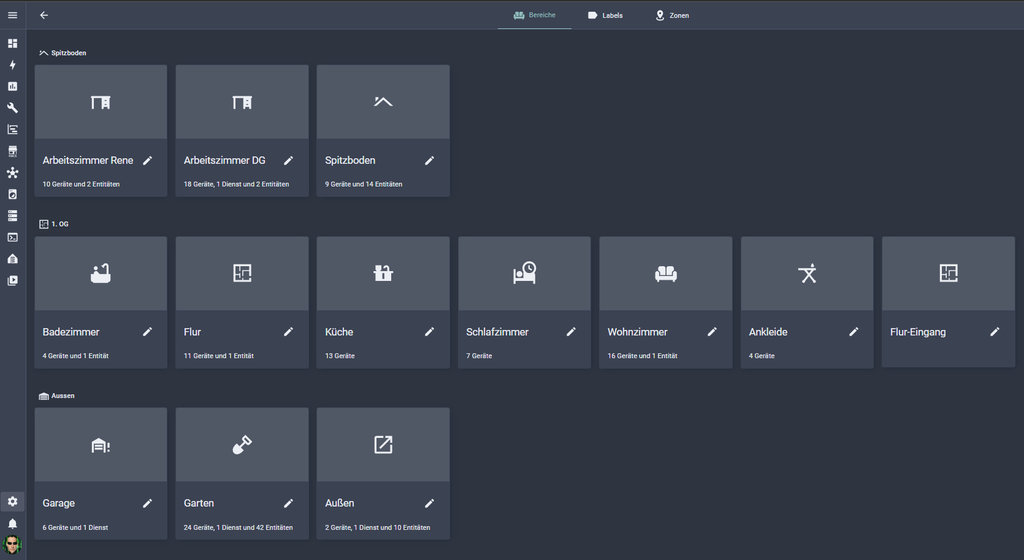
Bereiche in Home Assistant
2️⃣ Räume des Roboters den Bereichen zuordnen
Öffne deine Saugroboter-Entität (bei mir vacuum.ecodeebot_3) und rufe ihre Einstellungen auf. Dort ordnest du jeden Raum (Segment) aus der Karte des Roboters einem Bereich in Home Assistant zu.
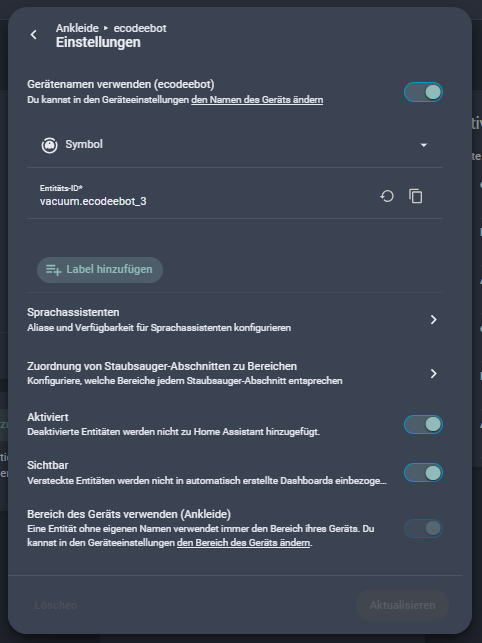
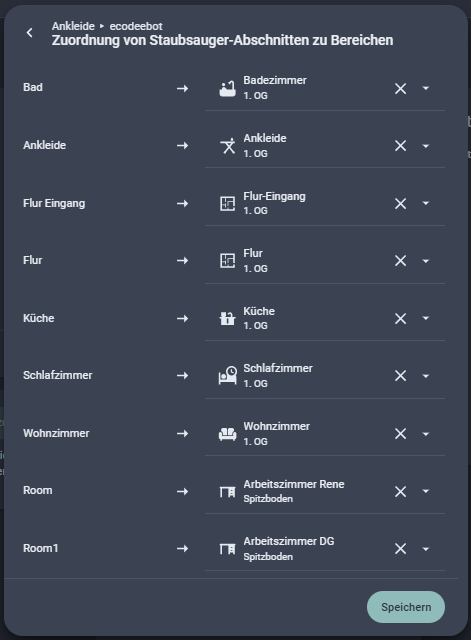
Einstellungen der Saugroboter-Entität mit der Zuordnung der Räume zu den Bereichen
Ohne diese Zuordnung läuft vacuum.clean_area ins Leere, der Roboter weiß dann nicht, welchen Raum er reinigen soll.
3️⃣ Die Bereichs-IDs auslesen und im Package eintragen
In der Automation steht im area_map links der Name deines Helfers und rechts die ID des Bereichs, nicht sein Anzeigename. Links muss exakt derselbe Name stehen wie in sortierte_reihenfolge (Kleinbuchstaben, ohne Umlaute, zum Beispiel kuche), sonst findet die Automation keinen Eintrag. Beides kann sich unterscheiden: Home Assistant erzeugt die ID beim Anlegen aus dem damaligen Namen (aus „Küche“ wird kuche) und ändert sie später nicht mehr, auch wenn du den Bereich umbenennst.
Die richtigen IDs liefert dieses Template unter Entwicklerwerkzeuge → Vorlage:
{% for a in areas() -%}
{{ a }};{{ area_name(a) }}
{% endfor %}
Die Ausgabe hat links die ID und rechts den Namen. Trage die ID in den area_map ein:
| Helfer (links) | Bereichs-ID (rechts) |
|---|---|
kueche | kuche |
bad | badezimmer |
buero_rene | arbeitszimmer |
buero_sandra | arbeitszimmer_dg |
Das sind meine IDs. Deine kannst du nicht übernehmen, sie hängen von deinen Bereichen ab.
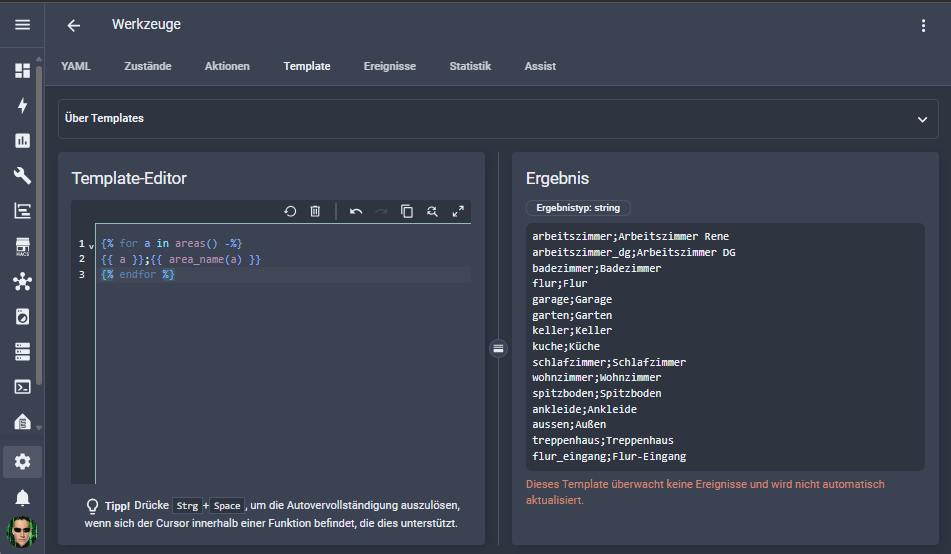
Entwicklerwerkzeuge → Vorlage mit der Ausgabe der Bereichs-IDs
🔧 Entitäten und Modi anpassen
Im Package gibt es pro Automation den Block ANPASSEN. Mehr musst du dort nicht ändern.
Die Entitäten deines Roboters
Trage deine eigenen Entitäten ein. Du findest sie unter Einstellungen → Geräte & Dienste → Geräte, wenn du deinen Saugroboter öffnest:
vacuum_entity: die Saugroboter-Entität (bei mirvacuum.ecodeebot_3)mode_select: die Auswahl für den Reinigungsmodus (bei mirselect.ecodeebot_reinigungsmodus_3)
Die Modi deines Roboters
Das Dashboard bietet vier deutsche Modi an, der Roboter erwartet seine eigenen Bezeichnungen. Die Übersetzung steht im modus_map. Deine Optionen findest du unter Entwicklerwerkzeuge → Zustände: Such die select-Entität und schau in das Attribut options.
| Im Dashboard | Beim Roboter (bei mir) |
|---|---|
| Saugen & Wischen | Vacuum & Mop |
| Nur Saugen | Vacuum-Only |
| Nur Wischen | Mopping |
| Wischen nach Saugen | Mop after Vacuum |
Hinweis: Die rechte Seite muss exakt so geschrieben sein wie die Option in deiner Entität, auch Groß- und Kleinschreibung zählt. Die linke Seite muss exakt mit den Optionen des Helfers sr_planX_modus übereinstimmen.
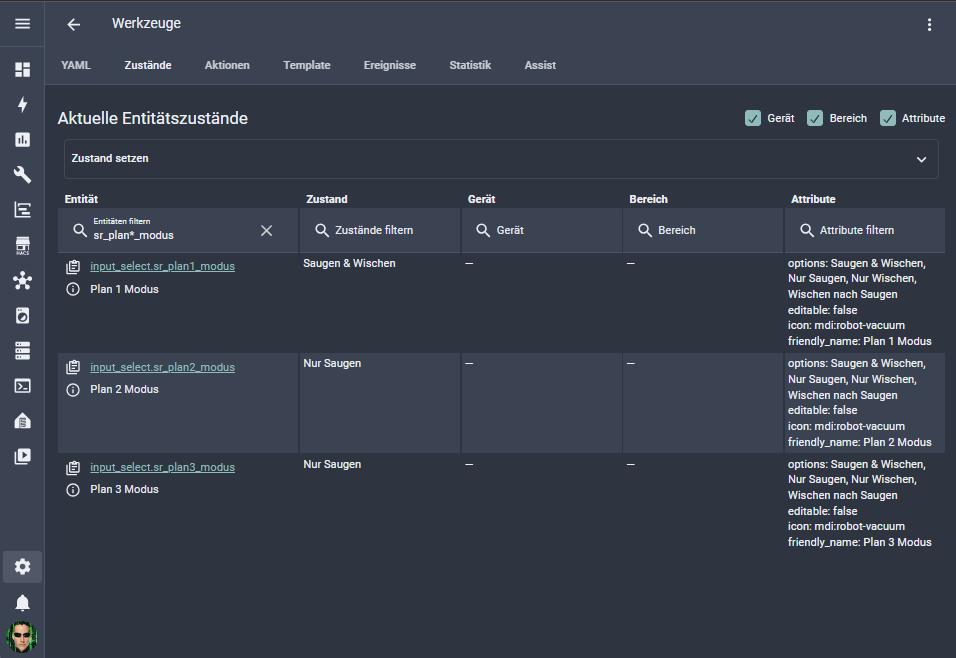
Entwicklerwerkzeuge → Zustände, Attribut „options“ der Modus-Entität
⚙️ So arbeiten die Automationen
Zeitplan Plan 1 und 2
- Die Automation läuft jede Minute und vergleicht die Uhrzeit mit den Startzeiten von Plan 1 und Plan 2.
- Passt die Zeit, prüft sie, ob der heutige Wochentag für diesen Plan eingeschaltet ist.
- Sie sammelt die gewählten Räume in deiner Reihenfolge und übersetzt sie in Bereichs-IDs.
- Ist kein Raum gewählt, bricht sie ab. Sonst setzt sie den Reinigungsmodus und startet die Reinigung mit
vacuum.clean_area.
Die Reihenfolge der Räume legst du in sortierte_reihenfolge fest. Bei mir beginnt es im Wohnzimmer und endet in den Büros.
Sofortstart Plan 3
Plan 3 funktioniert genauso, nur ohne Uhrzeit und Wochentag. Der Button im Dashboard ruft die Automation direkt auf, dafür brauchst du kein browser_mod.
🖥️ Mein Dashboard
Die Ansicht besteht aus diesen Teilen:
- Plan 1 und Plan 2 mit Modus, Uhrzeit, Wochentagen und Räumen
- Sofortstart (Plan 3) mit eigener Raumauswahl und Startbutton
- Aktueller Status und Batterie des Roboters
- Aktionen: Pause, Stop, Start und Zurück zur Station
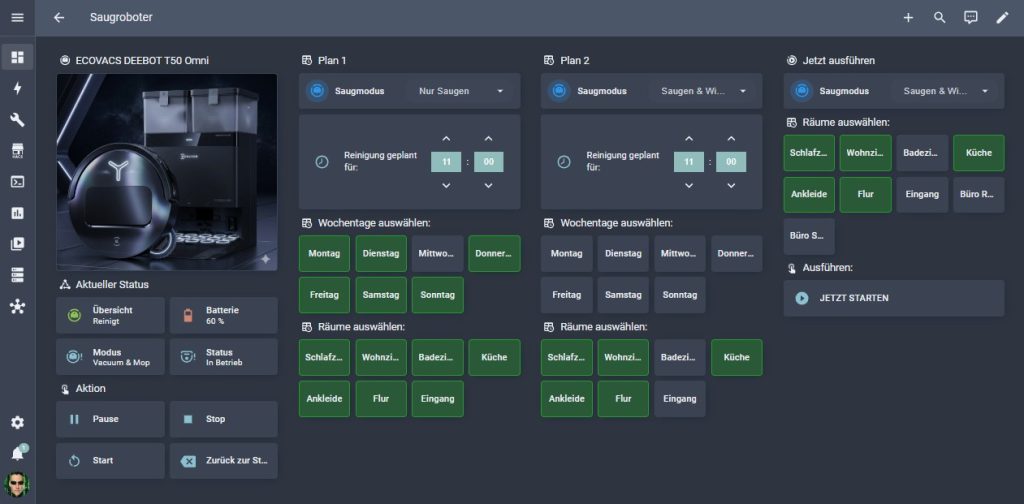
Aktuelle Dashboard-Ansicht
Eine Raumkarte
Jeder Raum und jeder Wochentag ist eine Mushroom-Template-Karte, die den Helfer umschaltet. Eingeschaltet ist sie grün, ausgeschaltet grau. Hier das Beispiel für das Wohnzimmer bei Plan 3, die anderen Karten unterscheiden sich nur im Helfer und im Text:
type: custom:mushroom-template-card
entity: input_boolean.sr_plan3_wohnzimmer
primary: Wohnzimmer
icon: ''
tap_action:
  action: toggle
grid_options:
  columns: 3
  rows: 1
color: transparent
features_position: bottom
vertical: true
card_mod:
  style: |
    ha-card {
      text-align: center;
      font-size: 16px;
      font-weight: 600;
      border-radius: 10px;

      {% if is_state('input_boolean.sr_plan3_wohnzimmer', 'on') %}
        background-color: #2e7d32;
        border: 2px solid #ffffff;
        color: #ffffff;
      {% else %}
        background-color: #3a3a3a;
        border: 1px solid #666;
        color: #cccccc;
      {% endif %}
}Der Startbutton für Plan 3
type: custom:button-card
name: JETZT STARTEN
icon: mdi:play-circle
tap_action:
  action: call-service
  service: automation.trigger
  data:
    entity_id: automation.staubsauger_sofortstart_plan_3
hold_action:
  action: none
double_tap_action:
  action: none
grid_options:
  columns: 12
  rows: 1
styles:
  card:
    - height: 60px
    - padding: 6px 10px
    - border-radius: 10px
    - background: '#3a3a3a'
    - border: '1px solid #666'
    - cursor: pointer
  grid:
    - grid-template-areas: '"i n"'
    - grid-template-columns: 32px auto
    - align-items: center
    - column-gap: 8px
  icon:
    - width: 22px
    - height: 22px
    - color: '#66bb6a'
  name:
    - font-size: 14px
    - font-weight: 600
- color: '#cccccc'Das gesamte Dashboard
- type: sections
max_columns: 4
title: Saugroboter
path: saugroboter
icon: mdi:robot-vacuum
visible:
- user: 9c3a30d6645649c386acf6485e8d39e3
sections:
- type: grid
cards:
- type: heading
heading_style: title
icon: mdi:robot-vacuum
heading: ECOVACS DEEBOT T50 Omni
- type: picture
image:
media_content_id: media-source://image_upload/ab3b8357ca0bdb89d6bac3e62fa6fca7
media_content_type: image/png
metadata:
title: 1000006546.png
thumbnail: /api/image/serve/ab3b8357ca0bdb89d6bac3e62fa6fca7/256x256
media_class: image
children_media_class: null
navigateIds:
- {}
- media_content_type: app
media_content_id: media-source://image_upload
- type: heading
icon: mdi:state-machine
heading_style: title
heading: Aktueller Status
- square: false
type: grid
cards:
- type: tile
entity: vacuum.ecodeebot_3
name: Übersicht
color: light-green
vertical: false
features_position: bottom
- type: tile
entity: sensor.ecodeebot_batterie_3
name: Batterie
vertical: false
features_position: bottom
- type: tile
entity: select.ecodeebot_reinigungsmodus_3
name: Modus
icon: mdi:robot-vacuum-alert
vertical: false
features_position: bottom
- type: tile
entity: sensor.ecodeebot_betriebszustand_3
name: Status
icon: mdi:robot-vacuum-variant-alert
vertical: false
features_position: bottom
columns: 2
- type: heading
icon: mdi:gesture-double-tap
heading: Aktion
heading_style: title
- square: false
type: grid
cards:
- type: custom:button-card
name: Pause
icon: mdi:pause
tap_action:
action: call-service
service: vacuum.pause
target:
entity_id: vacuum.ecodeebot_3
hold_action:
action: none
double_tap_action:
action: none
styles:
card:
- height: 60px
- padding: 6px 10px
- border-radius: 10px
- background: '#3a3a3a'
- border: '1px solid #666'
- cursor: pointer
grid:
- grid-template-areas: '"i n"'
- grid-template-columns: 32px auto
- align-items: center
- column-gap: 8px
icon:
- width: 22px
- height: 22px
- color: '#f9a825'
name:
- font-size: 14px
- font-weight: 600
- color: '#cccccc'
- type: custom:button-card
name: Stop
icon: mdi:stop
tap_action:
action: call-service
service: vacuum.stop
target:
entity_id: vacuum.ecodeebot_3
hold_action:
action: none
double_tap_action:
action: none
styles:
card:
- height: 60px
- padding: 6px 10px
- border-radius: 10px
- background: '#3a3a3a'
- border: '1px solid #666'
- cursor: pointer
grid:
- grid-template-areas: '"i n"'
- grid-template-columns: 32px auto
- align-items: center
- column-gap: 8px
icon:
- width: 22px
- height: 22px
- color: '#e57373'
name:
- font-size: 14px
- font-weight: 600
- color: '#cccccc'
- type: custom:button-card
name: Start
icon: mdi:restart
tap_action:
action: call-service
service: vacuum.start
target:
entity_id: vacuum.ecodeebot_3
hold_action:
action: none
double_tap_action:
action: none
styles:
card:
- height: 60px
- padding: 6px 10px
- border-radius: 10px
- background: '#3a3a3a'
- border: '1px solid #666'
- cursor: pointer
grid:
- grid-template-areas: '"i n"'
- grid-template-columns: 32px auto
- align-items: center
- column-gap: 8px
icon:
- width: 22px
- height: 22px
- color: '#66bb6a'
name:
- font-size: 14px
- font-weight: 600
- color: '#cccccc'
- type: custom:button-card
name: Zurück zur Station
icon: mdi:backspace
tap_action:
action: call-service
service: vacuum.return_to_base
target:
entity_id: vacuum.ecodeebot_3
hold_action:
action: none
double_tap_action:
action: none
styles:
card:
- height: 60px
- padding: 6px 10px
- border-radius: 10px
- background: '#3a3a3a'
- border: '1px solid #666'
- cursor: pointer
grid:
- grid-template-areas: '"i n"'
- grid-template-columns: 32px auto
- align-items: center
- column-gap: 8px
icon:
- width: 22px
- height: 22px
- color: '#90caf9'
name:
- font-size: 14px
- font-weight: 600
- color: '#cccccc'
columns: 2
- type: grid
cards:
- type: heading
heading_style: title
heading: Plan 1
icon: mdi:timetable
- type: custom:mushroom-select-card
entity: input_select.sr_plan1_modus
layout: horizontal
name: Saugmodus
secondary_info: none
- type: custom:time-picker-card
entity: input_datetime.sr_plan1_zeit
hour_mode: 24
hour_step: 1
minute_step: 15
layout:
hour_mode: double
align_controls: left
name: inside
embedded: false
hide:
seconds: true
icon: false
name: 'Reinigung geplant für: '
- type: heading
icon: mdi:timetable
heading_style: title
heading: 'Wochentage auswählen:'
- type: custom:mushroom-template-card
entity: input_boolean.sr_plan1_mo
primary: Montag
icon: ''
tap_action:
action: toggle
grid_options:
columns: 3
rows: 1
color: transparent
features_position: bottom
vertical: true
card_mod:
style: |
ha-card {
text-align: center;
font-size: 16px;
font-weight: 600;
border-radius: 10px;
{% if is_state('input_boolean.sr_plan1_mo', 'on') %}
background-color: #2e7d32;
border: 2px solid #ffffff;
color: #ffffff;
{% else %}
background-color: #3a3a3a;
border: 1px solid #666;
color: #cccccc;
{% endif %}
}
- type: custom:mushroom-template-card
entity: input_boolean.sr_plan1_di
primary: Dienstag
icon: ''
tap_action:
action: toggle
grid_options:
columns: 3
rows: 1
color: transparent
features_position: bottom
vertical: true
card_mod:
style: |
ha-card {
text-align: center;
font-size: 16px;
font-weight: 600;
border-radius: 10px;
{% if is_state('input_boolean.sr_plan1_di', 'on') %}
background-color: #2e7d32;
border: 2px solid #ffffff;
color: #ffffff;
{% else %}
background-color: #3a3a3a;
border: 1px solid #666;
color: #cccccc;
{% endif %}
}
- type: custom:mushroom-template-card
entity: input_boolean.sr_plan1_mi
primary: Mittwoch
icon: ''
tap_action:
action: toggle
grid_options:
columns: 3
rows: 1
color: transparent
features_position: bottom
vertical: true
card_mod:
style: |
ha-card {
text-align: center;
font-size: 16px;
font-weight: 600;
border-radius: 10px;
{% if is_state('input_boolean.sr_plan1_mi', 'on') %}
background-color: #2e7d32;
border: 2px solid #ffffff;
color: #ffffff;
{% else %}
background-color: #3a3a3a;
border: 1px solid #666;
color: #cccccc;
{% endif %}
}
- type: custom:mushroom-template-card
entity: input_boolean.sr_plan1_do
primary: Donnerstag
icon: ''
tap_action:
action: toggle
grid_options:
columns: 3
rows: 1
color: transparent
features_position: bottom
vertical: true
card_mod:
style: |
ha-card {
text-align: center;
font-size: 16px;
font-weight: 600;
border-radius: 10px;
{% if is_state('input_boolean.sr_plan1_do', 'on') %}
background-color: #2e7d32;
border: 2px solid #ffffff;
color: #ffffff;
{% else %}
background-color: #3a3a3a;
border: 1px solid #666;
color: #cccccc;
{% endif %}
}
- type: custom:mushroom-template-card
entity: input_boolean.sr_plan1_fr
primary: Freitag
icon: ''
tap_action:
action: toggle
grid_options:
columns: 3
rows: 1
color: transparent
features_position: bottom
vertical: true
card_mod:
style: |
ha-card {
text-align: center;
font-size: 16px;
font-weight: 600;
border-radius: 10px;
{% if is_state('input_boolean.sr_plan1_fr', 'on') %}
background-color: #2e7d32;
border: 2px solid #ffffff;
color: #ffffff;
{% else %}
background-color: #3a3a3a;
border: 1px solid #666;
color: #cccccc;
{% endif %}
}
- type: custom:mushroom-template-card
entity: input_boolean.sr_plan1_sa
primary: Samstag
icon: ''
tap_action:
action: toggle
grid_options:
columns: 3
rows: 1
color: transparent
features_position: bottom
vertical: true
card_mod:
style: |
ha-card {
text-align: center;
font-size: 16px;
font-weight: 600;
border-radius: 10px;
{% if is_state('input_boolean.sr_plan1_sa', 'on') %}
background-color: #2e7d32;
border: 2px solid #ffffff;
color: #ffffff;
{% else %}
background-color: #3a3a3a;
border: 1px solid #666;
color: #cccccc;
{% endif %}
}
- type: custom:mushroom-template-card
entity: input_boolean.sr_plan1_so
primary: Sonntag
icon: ''
tap_action:
action: toggle
grid_options:
columns: 3
rows: 1
color: transparent
features_position: bottom
vertical: true
card_mod:
style: |
ha-card {
text-align: center;
font-size: 16px;
font-weight: 600;
border-radius: 10px;
{% if is_state('input_boolean.sr_plan1_so', 'on') %}
background-color: #2e7d32;
border: 2px solid #ffffff;
color: #ffffff;
{% else %}
background-color: #3a3a3a;
border: 1px solid #666;
color: #cccccc;
{% endif %}
}
- type: custom:mushroom-empty-card
grid_options:
columns: 3
rows: 1
- type: heading
icon: mdi:timetable
heading_style: title
heading: 'Räume auswählen:'
- type: custom:mushroom-template-card
entity: input_boolean.sr_plan1_schlafzimmer
primary: Schlafzimmer
icon: ''
tap_action:
action: toggle
grid_options:
columns: 3
rows: 1
color: transparent
features_position: bottom
vertical: true
card_mod:
style: |
ha-card {
text-align: center;
font-size: 16px;
font-weight: 600;
border-radius: 10px;
{% if is_state('input_boolean.sr_plan1_schlafzimmer', 'on') %}
background-color: #2e7d32;
border: 2px solid #ffffff;
color: #ffffff;
{% else %}
background-color: #3a3a3a;
border: 1px solid #666;
color: #cccccc;
{% endif %}
}
- type: custom:mushroom-template-card
entity: input_boolean.sr_plan1_wohnzimmer
primary: Wohnzimmer
icon: ''
tap_action:
action: toggle
grid_options:
columns: 3
rows: 1
color: transparent
features_position: bottom
vertical: true
card_mod:
style: |
ha-card {
text-align: center;
font-size: 16px;
font-weight: 600;
border-radius: 10px;
{% if is_state('input_boolean.sr_plan1_wohnzimmer', 'on') %}
background-color: #2e7d32;
border: 2px solid #ffffff;
color: #ffffff;
{% else %}
background-color: #3a3a3a;
border: 1px solid #666;
color: #cccccc;
{% endif %}
}
- type: custom:mushroom-template-card
entity: input_boolean.sr_plan1_bad
primary: Badezimmer
icon: ''
tap_action:
action: toggle
grid_options:
columns: 3
rows: 1
color: transparent
features_position: bottom
vertical: true
card_mod:
style: |
ha-card {
text-align: center;
font-size: 16px;
font-weight: 600;
border-radius: 10px;
{% if is_state('input_boolean.sr_plan1_bad', 'on') %}
background-color: #2e7d32;
border: 2px solid #ffffff;
color: #ffffff;
{% else %}
background-color: #3a3a3a;
border: 1px solid #666;
color: #cccccc;
{% endif %}
}
- type: custom:mushroom-template-card
entity: input_boolean.sr_plan1_kueche
primary: Küche
icon: ''
tap_action:
action: toggle
grid_options:
columns: 3
rows: 1
color: transparent
features_position: bottom
vertical: true
card_mod:
style: |
ha-card {
text-align: center;
font-size: 16px;
font-weight: 600;
border-radius: 10px;
{% if is_state('input_boolean.sr_plan1_kueche', 'on') %}
background-color: #2e7d32;
border: 2px solid #ffffff;
color: #ffffff;
{% else %}
background-color: #3a3a3a;
border: 1px solid #666;
color: #cccccc;
{% endif %}
}
- type: custom:mushroom-template-card
entity: input_boolean.sr_plan1_ankleide
primary: Ankleide
icon: ''
tap_action:
action: toggle
grid_options:
columns: 3
rows: 1
color: transparent
features_position: bottom
vertical: true
card_mod:
style: |
ha-card {
text-align: center;
font-size: 16px;
font-weight: 600;
border-radius: 10px;
{% if is_state('input_boolean.sr_plan1_ankleide', 'on') %}
background-color: #2e7d32;
border: 2px solid #ffffff;
color: #ffffff;
{% else %}
background-color: #3a3a3a;
border: 1px solid #666;
color: #cccccc;
{% endif %}
}
- type: custom:mushroom-template-card
entity: input_boolean.sr_plan1_flur
primary: Flur
icon: ''
tap_action:
action: toggle
grid_options:
columns: 3
rows: 1
color: transparent
features_position: bottom
vertical: true
card_mod:
style: |
ha-card {
text-align: center;
font-size: 16px;
font-weight: 600;
border-radius: 10px;
{% if is_state('input_boolean.sr_plan1_flur', 'on') %}
background-color: #2e7d32;
border: 2px solid #ffffff;
color: #ffffff;
{% else %}
background-color: #3a3a3a;
border: 1px solid #666;
color: #cccccc;
{% endif %}
}
- type: custom:mushroom-template-card
entity: input_boolean.sr_plan1_flur_eingang
icon: ''
tap_action:
action: toggle
grid_options:
columns: 3
rows: 1
color: transparent
features_position: bottom
vertical: true
primary: Eingang
card_mod:
style: |
ha-card {
text-align: center;
font-size: 16px;
font-weight: 600;
border-radius: 10px;
{% if is_state('input_boolean.sr_plan1_flur_eingang', 'on') %}
background-color: #2e7d32;
border: 2px solid #ffffff;
color: #ffffff;
{% else %}
background-color: #3a3a3a;
border: 1px solid #666;
color: #cccccc;
{% endif %}
}
- type: grid
cards:
- type: heading
heading_style: title
heading: Plan 2
icon: mdi:timetable
- type: custom:mushroom-select-card
entity: input_select.sr_plan2_modus
layout: horizontal
name: Saugmodus
secondary_info: none
- type: custom:time-picker-card
entity: input_datetime.sr_plan2_zeit
hour_mode: 24
hour_step: 1
minute_step: 15
layout:
hour_mode: double
align_controls: left
name: inside
embedded: false
hide:
seconds: true
icon: false
name: 'Reinigung geplant für: '
- type: heading
icon: mdi:timetable
heading_style: title
heading: 'Wochentage auswählen:'
- type: custom:mushroom-template-card
entity: input_boolean.sr_plan2_mo
primary: Montag
icon: ''
tap_action:
action: toggle
grid_options:
columns: 3
rows: 1
color: transparent
features_position: bottom
vertical: true
card_mod:
style: |
ha-card {
text-align: center;
font-size: 16px;
font-weight: 600;
border-radius: 10px;
{% if is_state('input_boolean.sr_plan2_mo', 'on') %}
background-color: #2e7d32;
border: 2px solid #ffffff;
color: #ffffff;
{% else %}
background-color: #3a3a3a;
border: 1px solid #666;
color: #cccccc;
{% endif %}
}
- type: custom:mushroom-template-card
entity: input_boolean.sr_plan2_di
primary: Dienstag
icon: ''
tap_action:
action: toggle
grid_options:
columns: 3
rows: 1
color: transparent
features_position: bottom
vertical: true
card_mod:
style: |
ha-card {
text-align: center;
font-size: 16px;
font-weight: 600;
border-radius: 10px;
{% if is_state('input_boolean.sr_plan2_di', 'on') %}
background-color: #2e7d32;
border: 2px solid #ffffff;
color: #ffffff;
{% else %}
background-color: #3a3a3a;
border: 1px solid #666;
color: #cccccc;
{% endif %}
}
- type: custom:mushroom-template-card
entity: input_boolean.sr_plan2_mi
primary: Mittwoch
icon: ''
tap_action:
action: toggle
grid_options:
columns: 3
rows: 1
color: transparent
features_position: bottom
vertical: true
card_mod:
style: |
ha-card {
text-align: center;
font-size: 16px;
font-weight: 600;
border-radius: 10px;
{% if is_state('input_boolean.sr_plan2_mi', 'on') %}
background-color: #2e7d32;
border: 2px solid #ffffff;
color: #ffffff;
{% else %}
background-color: #3a3a3a;
border: 1px solid #666;
color: #cccccc;
{% endif %}
}
- type: custom:mushroom-template-card
entity: input_boolean.sr_plan2_do
primary: Donnerstag
icon: ''
tap_action:
action: toggle
grid_options:
columns: 3
rows: 1
color: transparent
features_position: bottom
vertical: true
card_mod:
style: |
ha-card {
text-align: center;
font-size: 16px;
font-weight: 600;
border-radius: 10px;
{% if is_state('input_boolean.sr_plan2_do', 'on') %}
background-color: #2e7d32;
border: 2px solid #ffffff;
color: #ffffff;
{% else %}
background-color: #3a3a3a;
border: 1px solid #666;
color: #cccccc;
{% endif %}
}
- type: custom:mushroom-template-card
entity: input_boolean.sr_plan2_fr
primary: Freitag
icon: ''
tap_action:
action: toggle
grid_options:
columns: 3
rows: 1
color: transparent
features_position: bottom
vertical: true
card_mod:
style: |
ha-card {
text-align: center;
font-size: 16px;
font-weight: 600;
border-radius: 10px;
{% if is_state('input_boolean.sr_plan2_fr', 'on') %}
background-color: #2e7d32;
border: 2px solid #ffffff;
color: #ffffff;
{% else %}
background-color: #3a3a3a;
border: 1px solid #666;
color: #cccccc;
{% endif %}
}
- type: custom:mushroom-template-card
entity: input_boolean.sr_plan2_sa
primary: Samstag
icon: ''
tap_action:
action: toggle
grid_options:
columns: 3
rows: 1
color: transparent
features_position: bottom
vertical: true
card_mod:
style: |
ha-card {
text-align: center;
font-size: 16px;
font-weight: 600;
border-radius: 10px;
{% if is_state('input_boolean.sr_plan2_sa', 'on') %}
background-color: #2e7d32;
border: 2px solid #ffffff;
color: #ffffff;
{% else %}
background-color: #3a3a3a;
border: 1px solid #666;
color: #cccccc;
{% endif %}
}
- type: custom:mushroom-template-card
entity: input_boolean.sr_plan2_so
primary: Sonntag
icon: ''
tap_action:
action: toggle
grid_options:
columns: 3
rows: 1
color: transparent
features_position: bottom
vertical: true
card_mod:
style: |
ha-card {
text-align: center;
font-size: 16px;
font-weight: 600;
border-radius: 10px;
{% if is_state('input_boolean.sr_plan2_so', 'on') %}
background-color: #2e7d32;
border: 2px solid #ffffff;
color: #ffffff;
{% else %}
background-color: #3a3a3a;
border: 1px solid #666;
color: #cccccc;
{% endif %}
}
- type: custom:mushroom-empty-card
grid_options:
columns: 3
rows: 1
- type: heading
icon: mdi:timetable
heading_style: title
heading: 'Räume auswählen:'
- type: custom:mushroom-template-card
entity: input_boolean.sr_plan2_schlafzimmer
primary: Schlafzimmer
icon: ''
tap_action:
action: toggle
grid_options:
columns: 3
rows: 1
color: transparent
features_position: bottom
vertical: true
card_mod:
style: |
ha-card {
text-align: center;
font-size: 16px;
font-weight: 600;
border-radius: 10px;
{% if is_state('input_boolean.sr_plan2_schlafzimmer', 'on') %}
background-color: #2e7d32;
border: 2px solid #ffffff;
color: #ffffff;
{% else %}
background-color: #3a3a3a;
border: 1px solid #666;
color: #cccccc;
{% endif %}
}
- type: custom:mushroom-template-card
entity: input_boolean.sr_plan2_wohnzimmer
primary: Wohnzimmer
icon: ''
tap_action:
action: toggle
grid_options:
columns: 3
rows: 1
color: transparent
features_position: bottom
vertical: true
card_mod:
style: |
ha-card {
text-align: center;
font-size: 16px;
font-weight: 600;
border-radius: 10px;
{% if is_state('input_boolean.sr_plan2_wohnzimmer', 'on') %}
background-color: #2e7d32;
border: 2px solid #ffffff;
color: #ffffff;
{% else %}
background-color: #3a3a3a;
border: 1px solid #666;
color: #cccccc;
{% endif %}
}
- type: custom:mushroom-template-card
entity: input_boolean.sr_plan2_bad
primary: Badezimmer
icon: ''
tap_action:
action: toggle
grid_options:
columns: 3
rows: 1
color: transparent
features_position: bottom
vertical: true
card_mod:
style: |
ha-card {
text-align: center;
font-size: 16px;
font-weight: 600;
border-radius: 10px;
{% if is_state('input_boolean.sr_plan2_bad', 'on') %}
background-color: #2e7d32;
border: 2px solid #ffffff;
color: #ffffff;
{% else %}
background-color: #3a3a3a;
border: 1px solid #666;
color: #cccccc;
{% endif %}
}
- type: custom:mushroom-template-card
entity: input_boolean.sr_plan2_kueche
primary: Küche
icon: ''
tap_action:
action: toggle
grid_options:
columns: 3
rows: 1
color: transparent
features_position: bottom
vertical: true
card_mod:
style: |
ha-card {
text-align: center;
font-size: 16px;
font-weight: 600;
border-radius: 10px;
{% if is_state('input_boolean.sr_plan2_kueche', 'on') %}
background-color: #2e7d32;
border: 2px solid #ffffff;
color: #ffffff;
{% else %}
background-color: #3a3a3a;
border: 1px solid #666;
color: #cccccc;
{% endif %}
}
- type: custom:mushroom-template-card
entity: input_boolean.sr_plan2_ankleide
primary: Ankleide
icon: ''
tap_action:
action: toggle
grid_options:
columns: 3
rows: 1
color: transparent
features_position: bottom
vertical: true
card_mod:
style: |
ha-card {
text-align: center;
font-size: 16px;
font-weight: 600;
border-radius: 10px;
{% if is_state('input_boolean.sr_plan2_ankleide', 'on') %}
background-color: #2e7d32;
border: 2px solid #ffffff;
color: #ffffff;
{% else %}
background-color: #3a3a3a;
border: 1px solid #666;
color: #cccccc;
{% endif %}
}
- type: custom:mushroom-template-card
entity: input_boolean.sr_plan2_flur
primary: Flur
icon: ''
tap_action:
action: toggle
grid_options:
columns: 3
rows: 1
color: transparent
features_position: bottom
vertical: true
card_mod:
style: |
ha-card {
text-align: center;
font-size: 16px;
font-weight: 600;
border-radius: 10px;
{% if is_state('input_boolean.sr_plan2_flur', 'on') %}
background-color: #2e7d32;
border: 2px solid #ffffff;
color: #ffffff;
{% else %}
background-color: #3a3a3a;
border: 1px solid #666;
color: #cccccc;
{% endif %}
}
- type: custom:mushroom-template-card
entity: input_boolean.sr_plan2_flur_eingang
icon: ''
tap_action:
action: toggle
grid_options:
columns: 3
rows: 1
color: transparent
features_position: bottom
vertical: true
primary: Eingang
card_mod:
style: |
ha-card {
text-align: center;
font-size: 16px;
font-weight: 600;
border-radius: 10px;
{% if is_state('input_boolean.sr_plan2_flur_eingang', 'on') %}
background-color: #2e7d32;
border: 2px solid #ffffff;
color: #ffffff;
{% else %}
background-color: #3a3a3a;
border: 1px solid #666;
color: #cccccc;
{% endif %}
}
- type: grid
cards:
- type: heading
heading_style: title
icon: mdi:motion-play
heading: Jetzt ausführen
- type: custom:mushroom-select-card
entity: input_select.sr_plan3_modus
layout: horizontal
name: Saugmodus
secondary_info: none
- type: heading
icon: mdi:timetable
heading_style: title
heading: 'Räume auswählen:'
- type: custom:mushroom-template-card
entity: input_boolean.sr_plan3_schlafzimmer
primary: Schlafzimmer
icon: ''
tap_action:
action: toggle
grid_options:
columns: 3
rows: 1
color: transparent
features_position: bottom
vertical: true
card_mod:
style: |
ha-card {
text-align: center;
font-size: 16px;
font-weight: 600;
border-radius: 10px;
{% if is_state('input_boolean.sr_plan3_schlafzimmer', 'on') %}
background-color: #2e7d32;
border: 2px solid #ffffff;
color: #ffffff;
{% else %}
background-color: #3a3a3a;
border: 1px solid #666;
color: #cccccc;
{% endif %}
}
- type: custom:mushroom-template-card
entity: input_boolean.sr_plan3_wohnzimmer
primary: Wohnzimmer
icon: ''
tap_action:
action: toggle
grid_options:
columns: 3
rows: 1
color: transparent
features_position: bottom
vertical: true
card_mod:
style: |
ha-card {
text-align: center;
font-size: 16px;
font-weight: 600;
border-radius: 10px;
{% if is_state('input_boolean.sr_plan3_wohnzimmer', 'on') %}
background-color: #2e7d32;
border: 2px solid #ffffff;
color: #ffffff;
{% else %}
background-color: #3a3a3a;
border: 1px solid #666;
color: #cccccc;
{% endif %}
}
- type: custom:mushroom-template-card
entity: input_boolean.sr_plan3_bad
primary: Badezimmer
icon: ''
tap_action:
action: toggle
grid_options:
columns: 3
rows: 1
color: transparent
features_position: bottom
vertical: true
card_mod:
style: |
ha-card {
text-align: center;
font-size: 16px;
font-weight: 600;
border-radius: 10px;
{% if is_state('input_boolean.sr_plan3_bad', 'on') %}
background-color: #2e7d32;
border: 2px solid #ffffff;
color: #ffffff;
{% else %}
background-color: #3a3a3a;
border: 1px solid #666;
color: #cccccc;
{% endif %}
}
- type: custom:mushroom-template-card
entity: input_boolean.sr_plan3_kueche
primary: Küche
icon: ''
tap_action:
action: toggle
grid_options:
columns: 3
rows: 1
color: transparent
features_position: bottom
vertical: true
card_mod:
style: |
ha-card {
text-align: center;
font-size: 16px;
font-weight: 600;
border-radius: 10px;
{% if is_state('input_boolean.sr_plan3_kueche', 'on') %}
background-color: #2e7d32;
border: 2px solid #ffffff;
color: #ffffff;
{% else %}
background-color: #3a3a3a;
border: 1px solid #666;
color: #cccccc;
{% endif %}
}
- type: custom:mushroom-template-card
entity: input_boolean.sr_plan3_ankleide
primary: Ankleide
icon: ''
tap_action:
action: toggle
grid_options:
columns: 3
rows: 1
color: transparent
features_position: bottom
vertical: true
card_mod:
style: |
ha-card {
text-align: center;
font-size: 16px;
font-weight: 600;
border-radius: 10px;
{% if is_state('input_boolean.sr_plan3_ankleide', 'on') %}
background-color: #2e7d32;
border: 2px solid #ffffff;
color: #ffffff;
{% else %}
background-color: #3a3a3a;
border: 1px solid #666;
color: #cccccc;
{% endif %}
}
- type: custom:mushroom-template-card
entity: input_boolean.sr_plan3_flur
primary: Flur
icon: ''
tap_action:
action: toggle
grid_options:
columns: 3
rows: 1
color: transparent
features_position: bottom
vertical: true
card_mod:
style: |
ha-card {
text-align: center;
font-size: 16px;
font-weight: 600;
border-radius: 10px;
{% if is_state('input_boolean.sr_plan3_flur', 'on') %}
background-color: #2e7d32;
border: 2px solid #ffffff;
color: #ffffff;
{% else %}
background-color: #3a3a3a;
border: 1px solid #666;
color: #cccccc;
{% endif %}
}
- type: custom:mushroom-template-card
entity: input_boolean.sr_plan3_flur_eingang
icon: ''
tap_action:
action: toggle
grid_options:
columns: 3
rows: 1
color: transparent
features_position: bottom
vertical: true
primary: Eingang
card_mod:
style: |
ha-card {
text-align: center;
font-size: 16px;
font-weight: 600;
border-radius: 10px;
{% if is_state('input_boolean.sr_plan3_flur_eingang', 'on') %}
background-color: #2e7d32;
border: 2px solid #ffffff;
color: #ffffff;
{% else %}
background-color: #3a3a3a;
border: 1px solid #666;
color: #cccccc;
{% endif %}
}
- type: custom:mushroom-template-card
entity: input_boolean.sr_plan3_buero_rene
icon: ''
tap_action:
action: toggle
grid_options:
columns: 3
rows: 1
color: transparent
features_position: bottom
vertical: true
primary: Büro Rene
card_mod:
style: |
ha-card {
text-align: center;
font-size: 16px;
font-weight: 600;
border-radius: 10px;
{% if is_state('input_boolean.sr_plan3_buero_rene', 'on') %}
background-color: #2e7d32;
border: 2px solid #ffffff;
color: #ffffff;
{% else %}
background-color: #3a3a3a;
border: 1px solid #666;
color: #cccccc;
{% endif %}
}
- type: custom:mushroom-template-card
entity: input_boolean.sr_plan3_buero_sandra
icon: ''
tap_action:
action: toggle
grid_options:
columns: 3
rows: 1
color: transparent
features_position: bottom
vertical: true
primary: Büro Sandra
card_mod:
style: |
ha-card {
text-align: center;
font-size: 16px;
font-weight: 600;
border-radius: 10px;
{% if is_state('input_boolean.sr_plan3_buero_sandra', 'on') %}
background-color: #2e7d32;
border: 2px solid #ffffff;
color: #ffffff;
{% else %}
background-color: #3a3a3a;
border: 1px solid #666;
color: #cccccc;
{% endif %}
}
- type: heading
icon: mdi:gesture-double-tap
heading_style: title
heading: 'Ausführen:'
- type: custom:button-card
name: JETZT STARTEN
icon: mdi:play-circle
tap_action:
action: call-service
service: automation.trigger
data:
entity_id: automation.staubsauger_sofortstart_plan_3
hold_action:
action: none
double_tap_action:
action: none
grid_options:
columns: 12
rows: 1
styles:
card:
- height: 60px
- padding: 6px 10px
- border-radius: 10px
- background: '#3a3a3a'
- border: '1px solid #666'
- cursor: pointer
grid:
- grid-template-areas: '"i n"'
- grid-template-columns: 32px auto
- align-items: center
- column-gap: 8px
icon:
- width: 22px
- height: 22px
- color: '#66bb6a'
name:
- font-size: 14px
- font-weight: 600
- color: '#cccccc'
cards: []
subview: true
Wenn deine Automation anders heißt, passt sich die entity_id an. Der Name entsteht aus dem alias der Automation.
🛠️ Fehlersuche
1️⃣ Der Roboter startet, reinigt aber den falschen oder keinen Raum
Meist stimmt die Zuordnung nicht. Prüfe, ob jeder Raum des Roboters einem Bereich zugeordnet ist, und ob die ID im area_map wirklich der ID aus dem Template entspricht. Der Anzeigename reicht nicht.
2️⃣ Fehlermeldung „The following areas are not mapped to any segments of targeted vacuums: [Undefined, …]“
Die Meldung erscheint im Verlauf der Automation beim Schritt „Staubsauger: Bereich mit Staubsauger reinigen“. Dass im area_map alle Räume als Undefined auftauchen, hat fast immer die gleiche Ursache: Die Schlüssel links im area_map stimmen nicht mit den Namen in sortierte_reihenfolge überein. Die Automation geht den Namen aus sortierte_reihenfolge der Reihe nach durch und schlägt jeden im area_map nach. Dabei zählt jedes Zeichen, auch die Groß- und Kleinschreibung. Aus Küche wird nie kuche, und Arbeitszimmer ist nicht arbeitszimmer.
Die Anzahl der Undefined in der Meldung entspricht den gewählten Räumen. Stehen dort alle Räume, die du ausgewählt hast, liegt es an der linken Seite. Die Zuordnung der Räume zu den Bereichen ist dann meist in Ordnung.
Die Schlüssel links müssen exakt den Namen aus sortierte_reihenfolge entsprechen, also dem Ende des Helfer-Namens (input_boolean.sr_plan3_kuche). Rechts steht die Bereichs-ID:
area_map:
  kuche: kuche              # links = Name aus sortierte_reihenfolge
  wohnzimmer: wohnzimmer
  bad: bad                  # rechts = Bereichs-ID aus dem Template

sortierte_reihenfolge:
  - kuche
  - wohnzimmer
  - bad
Passt die linke Seite und es erscheint trotzdem Undefined oder „not mapped“, prüfe die rechte Seite: Dort muss die ID aus dem Template stehen (siehe Abschnitt „Die Bereichs-IDs auslesen“), nicht der Name, den du im Dashboard siehst.
3️⃣ Es passiert gar nichts
Öffne die Automation und schau in den Verlauf der letzten Ausführung. Dort siehst du, bei welchem Schritt sie stoppt. Häufige Gründe: Es ist kein Raum für den Plan gewählt, der Wochentag ist nicht eingeschaltet oder die Startzeit liegt auf einer anderen Minute als erwartet.
4️⃣ Fehler beim Setzen des Reinigungsmodus
Dann stimmt eine Zeile im modus_map nicht mit deinen Optionen überein. Vergleiche die Schreibweise der Optionen im Helfer und in der Entität Zeichen für Zeichen.
5️⃣ Nach dem Einspielen gibt es doppelte Helfer oder Automationen
Dann gab es die Helfer oder Automationen schon. Entferne die alten, bevor du das Package nutzt, und starte Home Assistant neu. Im Protokoll unter Einstellungen → System → Protokolle findest du den genauen Fehler.
6️⃣ Ich kann Helfer oder Automationen in der Oberfläche nicht ändern
Das ist bei Packages so gewollt. Änderungen machst du in der Datei saugroboter.yaml und lädst danach die Konfiguration neu oder startest Home Assistant neu.
✅ Fazit
Dieses Setup ermöglicht:
- Vollautomatische Reinigungspläne (Plan 1 und 2) mit Wochentagen
- Einen Sofortstart per Knopfdruck (Plan 3)
- Frei wählbare Räume, Reihenfolge und Reinigungsmodi
- Eine Einrichtung aus einer einzigen Datei statt 42 Helfern von Hand
- Die Steuerung lokal über Home Assistant per Matter, ohne Hersteller-App
Der wichtigste Schritt ist das Raum-Mapping. Wenn die Räume des Roboters sauber den Bereichen zugeordnet sind, ist der Rest nur noch Abtippen oder Einfügen.
Hier geht es zu weiteren Smart Home Projekten
Sieht spannend aus, werde ich mal versuchen, bei mir umzusetzen. Aufgefallen ist mir, dass bei den Helfer die beiden input_datetime.sr_plan1_zeit und input_datetime.sr_plan2_zeit nicht erwähnt wurden.
Danke für den Hinweis, habe ich noch mit aufgenommen 😁
Vielen Dank für das Update! Dass du nun auch die Einrichtung der Helfer und die Raum-Zuordnung so genau erklärt hast, hilft mir als Anfängerin enorm.